
Sean Jackson Constructions Example
Loading the math board and drawing, please wait…
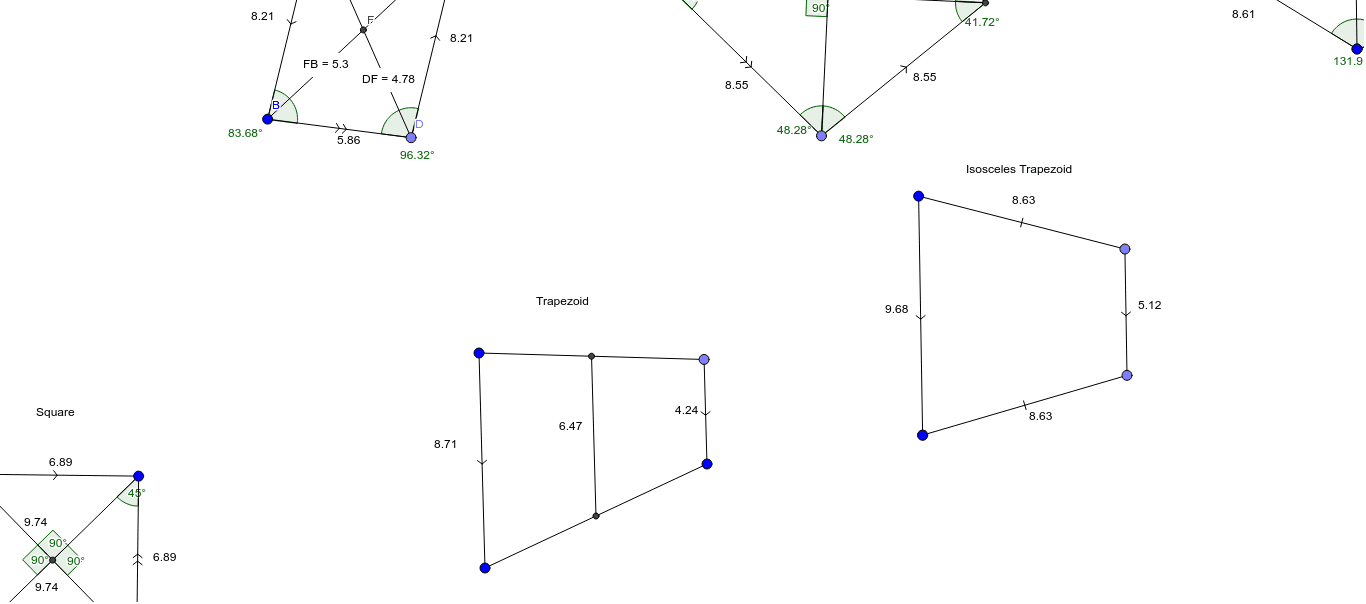
This example demonstrates precise geometric constructions and calculations using GeoGebra, involving core math concepts like geometric construction, perimeter calculation, matrix applications, Poisson distribution, sphere geometry, and diagram plotting. Key GeoGebra commands and objects used in the construction include Segment, Line, Point, Intersect, Angle, Distance, Circle, OrthogonalLine, Midpoint, and Mirror, as listed in the construction summary. It is suitable for high school and above learners to understand geometric construction techniques and the application of matrices in geometric problems.
GeoGebra Commands & Parameters
Segment(A, B) → aLine(C, a) → bPoint(b) → DSegment(B, D) → cLine(A, c) → dIntersect(b, d) → ESegment(D, E) → eSegment(A, E) → fAngle(B, A, E) → αAngle(A, E, D) → βAngle(E, D, B) → γAngle(D, B, A) → δSegment(E, B) → hSegment(A, D) → gIntersect(h, g) → FDistance(A, F) → distanceAFDistance(F, E) → distanceFEDistance(D, F) → distanceDFDistance(F, B) → distanceFBSegment(G, H) → iCircle(G, H) → kPoint(k) → JSegment(G, J) → jCircle(G, H) → qLine(J, i) → lLine(H, j) → mIntersect(l, m) → KSegment(J, K) → nSegment(K, H) → pSegment(H, J) → rSegment(G, K) → sIntersect(r, s) → LAngle(G, L, J) → εAngle(K, J, L) → ζAngle(L, J, G) → ηAngle(J, G, L) → θAngle(L, G, H) → ιAngle(G, H, L) → κAngle(L, H, K) → λAngle(H, K, L) → μAngle(L, K, J) → νSegment(M, N) → tLine(O, t) → a_1OrthogonalLine(N, t) → b_1OrthogonalLine(M, t) → c_1Intersect(a_1, c_1) → PIntersect(a_1, b_1) → QSegment(N, Q) → d_1Segment(Q, P) → e_1Segment(P, M) → f_1Angle(M, N, Q) → ξAngle(N, Q, P) → οAngle(Q, P, M) → ρAngle(P, M, N) → σSegment(N, P) → g_1Segment(Q, M) → h_1Segment(R, S) → i_1Circle(R, S) → k_1OrthogonalLine(R, i_1) → j_1Circle(R, S) → p_1Intersect(p_1, j_1, 1) → TLine(T, i_1) → l_1OrthogonalLine(S, i_1) → m_1Intersect(l_1, m_1) → UIntersect(j_1, l_1) → VSegment(V, R) → n_1Segment(U, S) → q_1Segment(V, U) → r_1Segment(R, U) → s_1Segment(S, V) → t_1Intersect(s_1, t_1) → WAngle(U, W, S) → τAngle(S, W, R) → υAngle(R, W, V) → ϕSegment(Z, A_1) → a_2Line(B_1, a_2) → b_2Point(b_2) → C_1Segment(Z, C_1) → c_2Segment(A_1, B_1) → d_2Segment(C_1, B_1) → e_2Midpoint(c_2) → D_1Midpoint(d_2) → E_1Segment(D_1, E_1) → f_2Segment(F_1, G_1) → g_2Line(H_1, g_2) → h_2Point(h_2) → I_1Segment(F_1, I_1) → i_2Midpoint(g_2) → J_1OrthogonalLine(J_1, g_2) → j_2Mirror(F_1, j_2) → K_1Mirror(I_1, j_2) → L_1Segment(K_1, L_1) → k_2Segment(I_1, L_1) → l_2Segment(P_1, Q_1) → p_2Midpoint(p_2) → R_1OrthogonalLine(R_1, p_2) → q_2Point(q_2) → O_1Segment(P_1, O_1) → n_2Mirror(P_1, q_2) → S_1Mirror(O_1, q_2) → T_1Segment(S_1, T_1) → r_2Point(q_2) → U_1Segment(Q_1, U_1) → s_2Mirror(Q_1, q_2) → V_1Mirror(U_1, q_2) → W_1Segment(V_1, W_1) → t_2Segment(O_1, U_1) → a_3Intersect(p_2, a_3) → Z_1Angle(Q_1, Z_1, O_1) → ψAngle(U_1, P_1, O_1) → χAngle(O_1, Q_1, U_1) → α_1Angle(V, R, S) → ωAngle(S, U, V) → β_1Angle(W, V, R) → γ_1Angle(W, S, U) → δ_1
AI Drawing Prompt Reference
Draw a geometric figure with segments, lines, and points. Start by creating segment AB and line AC, then find their intersection point D. Next, draw segments BD and AD, and determine their intersection point F. Then, draw a circle with center G and radius H, locate point J on the circle, and sketch the relevant segments and angles. Finally, take MN as a reference line, draw perpendicular segments, and find intersection points P and Q to complete the figure.
The prompt above was compiled from the original drawing commands and is for reference only.