
3D Perception GeoGebra Example: 3D Geometry and Vector Applications
Loading the math board and drawing, please wait…
In collections
Realidades de GeoGebra
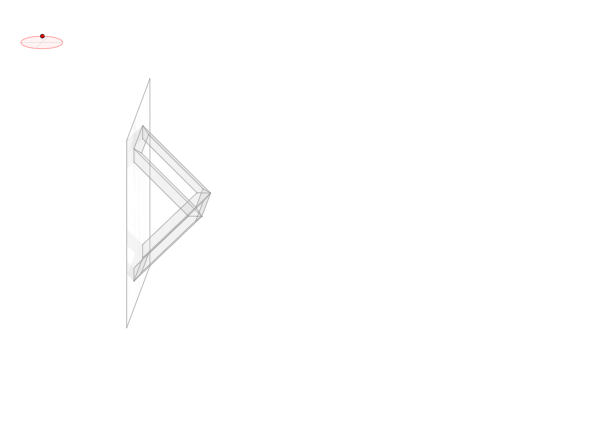
This example demonstrates the construction of an ellipse in 3D space and vector rotations, highlighting key concepts in solid geometry. GeoGebra commands used include Ellipse, Point, Angle, Line, Vector, Intersect, etc., for building 3D figures. Suitable for high school students or college undergraduates learning 3D geometry and vector operations.
GeoGebra Commands & Parameters
Ellipse((-3.62, 5 + nada), (-2.38, 5 + nada), 0.65) → zElipse1Point(zElipse1) → XYAngle((-2, 5), (-3, 5), XY) → zAngRotEllipse((-3, 4.38), (-3, 5.62), 0.65) → zElipse2Point(zElipse2) → ZAngle((-3, 6), (-3, 5), Z) → zAngIncLine(O, zX) → zEjeXLine(O, zY) → zEjeYLine(O, zZ) → zEjeZVector(O, zX) → zVectorXVector(O, zY) → zVectorYVector(O, zZ) → zVectorZIntersect(zElipse2, zElipse1, 1) → zPunto1Intersect(zElipse2, zElipse1, 4) → zPunto2Segment((-3, 4.35) + O, (-3, 5.65) + O) → zSeg1Segment(zPunto1, zPunto2) → zSeg2Segment((-3.65, 5) + O, (-2.35, 5) + O) → zSeg3Punto3D(XY, Z, E1) → E1'Punto3D(XY, Z, E2) → E2'Punto3D(XY, Z, E3) → E3'Punto3D(XY, Z, E4) → E4'Punto3D(XY, Z, F1) → F1'Punto3D(XY, Z, F2) → F2'Punto3D(XY, Z, F3) → F3'Punto3D(XY, Z, F4) → F4'Punto3D(XY, Z, V1) → V1'Punto3D(XY, Z, V2) → V2'Punto3D(XY, Z, V3) → V3'Punto3D(XY, Z, V4) → V4'Punto3D(XY, Z, V5) → V5'Punto3D(XY, Z, V6) → V6'Punto3D(XY, Z, V7) → V7'Punto3D(XY, Z, V8) → V8'Angle(E1', E2', E4') → angPolygon(V7', V1', V15', V73') → poly13, v7', v1'_3, v15'_1, v73'Polygon(V7', V5', V51', V73') → poly14, v7'_1, v5'_3, v51'_1, v73'_1Polygon(V1', V18', V72', V7') → poly15, v1'_4, v18', v72', v7'_2Polygon(V1', V18', V27', V2') → poly16, v1'_5, v18'_1, v27', v2'_3Polygon(V2', V27', V81', V8') → poly17, v2'_4, v27'_1, v81', v8'Polygon(V8', V81', V72', V7') → poly18, v8'_1, v81'_1, v72'_1, v7'_3Polygon(V2', V26', V84', V8') → poly19, v2'_5, v26'_1, v84', v8'_2Polygon(V8', V84', V62', V6') → poly20, v8'_3, v84'_1, v62'_1, v6'_3Polygon(V7', V76', V85', V8') → poly21, v7'_4, v76', v85', v8'_4Polygon(V7', V76', V58', V5') → poly22, v7'_5, v76'_1, v58', v5'_4Polygon(V5', V58', V67', V6') → poly23, v5'_5, v58'_1, v67', v6'_4Polygon(V8', V85', V67', V6') → poly24, v8'_5, v85'_1, v67'_1, v6'_5Polygon(E1', F1', F4', E4') → tapa_i, e1'_1, f1', f4', e4'_1Polygon(E2', F2', F3', E3') → tapa_d, e2'_1, f2', f3', e3'_1Polygon(V1', V15', V37', V3') → poly1, v1', v15', v37', v3'Polygon(V3', V37', V51', V5') → poly2, v3'_1, v37'_1, v51', v5'Polygon(V1', V14', V32', V3') → poly3, v1'_1, v14', v32', v3'_2Polygon(V3', V4', V41', V32') → poly4, v3'_3, v4', v41', v32'_1Polygon(V3', V36', V54', V5') → poly5, v3'_4, v36', v54', v5'_1Polygon(V3', V36', V45', V4') → poly6, v3'_5, v36'_1, v45', v4'_1Polygon(V5', V54', V63', V6') → poly7, v5'_2, v54'_1, v63', v6'Polygon(V6', V4', V45', V63') → poly8, v6'_1, v4'_2, v45'_1, v63'_1Polygon(V1', V2', V23', V14') → poly9, v1'_2, v2', v23', v14'_1Polygon(V2', V4', V41', V23') → poly10, v2'_1, v4'_3, v41'_1, v23'_1Polygon(V2', V26', V48', V4') → poly11, v2'_2, v26', v48', v4'_4Polygon(V4', V6', V62', V48') → poly12, v4'_5, v6'_2, v62', v48'_1Polygon(E1', E2', E3', E4') → espejo, e1', e2', e3', e4'Punto3D(XY, Z, R1) → R1'Punto3D(XY, Z, R2) → R2'Punto3D(XY, Z, R4) → R4'
AI Drawing Prompt Reference
Create a 3D geometric construction in space. Start by drawing two perpendicular ellipses, one in the XY plane and another in the YZ plane. Select one point on each ellipse and use these points to define rotation angles. Draw the three coordinate axes from the origin along with their corresponding direction vectors. Find the intersection points between the two ellipses and connect these points to relevant points on the axes using line segments. Then use these 3D points as vertices to construct multiple quadrilateral faces, forming a polyhedral solid that demonstrates ellipse and vector rotation relationships in three-dimensional space.
The prompt above was compiled from the original drawing commands and is for reference only.