
3D Implicit Surface Grapher: Three Cylinders
Loading the math board and drawing, please wait…
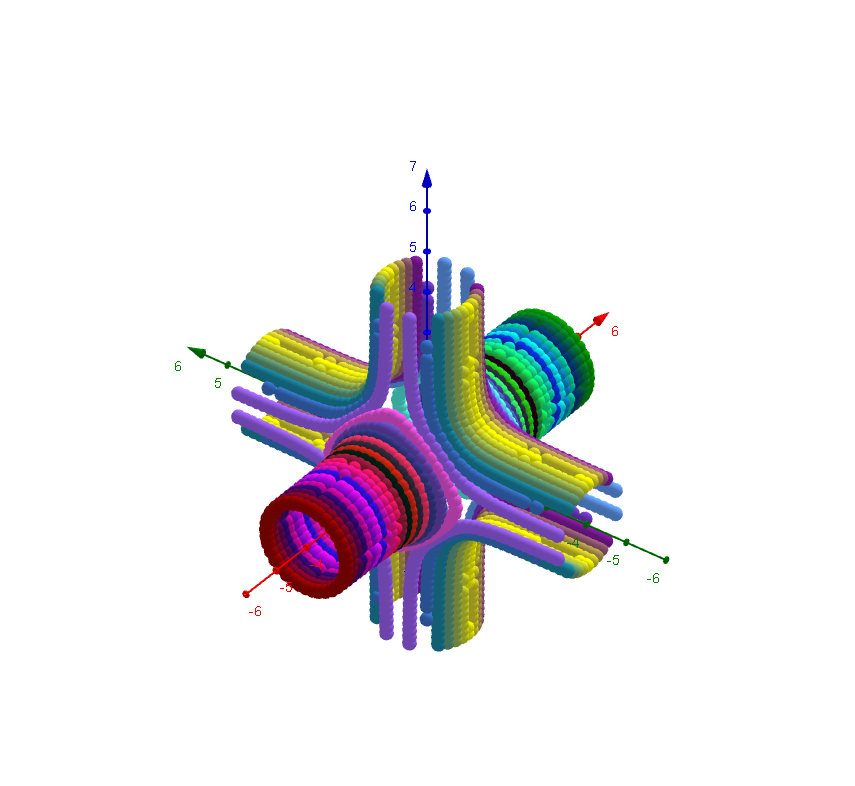
This example demonstrates how to plot three-dimensional implicit surfaces using GeoGebra. The key mathematical concepts include implicit functions, cylinder equations, and parameterized surfaces. Construction involves using predefined implicit function commands, setting coordinate ranges, adjusting parameters like radius and height, and observing changes through slider animations. Suitable for high school students or college undergraduates learning solid geometry and graphing functions.
GeoGebra Commands & Parameters
Textfield(x_{min}) → Textfeld1Textfield(y_{min}) → Textfeld2Textfield(z_{min}) → Textfeld3Textfield(x_{max}) → Textfeld4Textfield(y_{max}) → Textfeld5Textfield(z_{max}) → Textfeld6Textfield(Nn) → Textfeld10Textfield(g) → Textfeld13Textfield(b) → inputBox1
AI Drawing Prompt Reference
Draw a 3D implicit surface composed of three cylinders. The cylinders should be perpendicular to each other and share a common center point. Adjust the radius and height of the cylinders to observe how the surface changes. Ensure the graph is clearly visible in three-dimensional space, suitable for learning solid geometry and function plotting.
The prompt above was compiled from the original drawing commands and is for reference only.