
2D to 3D Conversion: Geometry and Probability
Loading the math board and drawing, please wait…
In collections
Cross Section to Surface of Revolution (Intro)
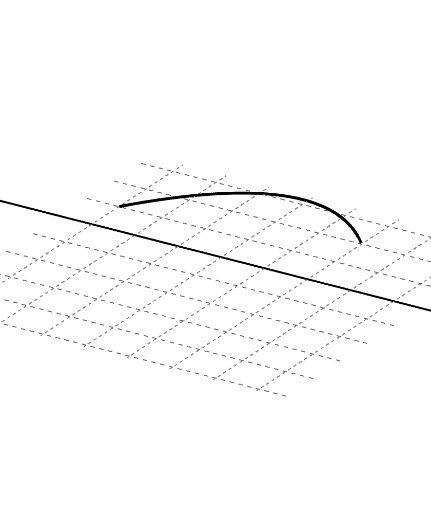
This example demonstrates the conversion from 2D to 3D graphics, involving geometric construction and probability concepts. It uses GeoGebra commands like Min, Max, FitPoly to create coordinate systems, fit polygons, and rotate objects. Suitable for high school students or college freshmen learning geometric transformations and probability distributions.
GeoGebra Commands & Parameters
Min({x(A), x(B), x(C)}) → aMax({x(A), x(B), x(C)}) → bFitPoly({A, B, C}) → fRotate(g, n, xAxis) → g_1Surface(g, n, xAxis) → cPoint(xAxis) → DPoint(xAxis) → ELine(D, E) → h
AI Drawing Prompt Reference
Create a 2D to 3D conversion example by first finding the minimum and maximum x-coordinates of three points, fitting a polynomial through these points, rotating the fitted curve around the x-axis to generate a surface, marking two points on the x-axis, and connecting them with a line to show the relationship between the rotated surface and the line.
The prompt above was compiled from the original drawing commands and is for reference only.