
2 Jug Puzzle (Difficulty Selectable)
Loading the math board and drawing, please wait…
In collections
Permutation, Combination and Probability
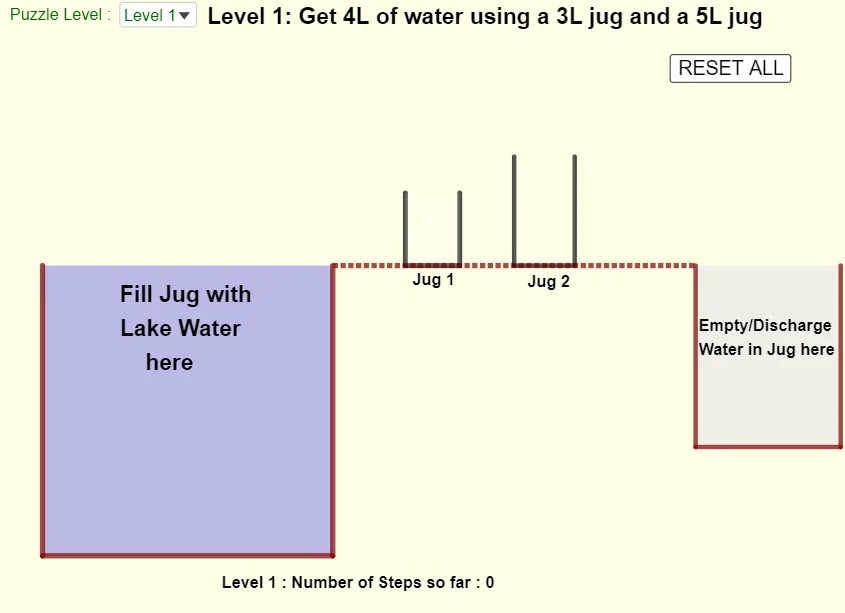
This interactive 2 jug puzzle allows users to choose from different difficulty levels. Using GeoGebra commands like Polygon, Point, PathParameter, etc., it visually demonstrates how to solve the puzzle by pouring water. Suitable for middle school and above students to learn combinatorial mathematics strategies and algorithms.
GeoGebra Commands & Parameters
Polygon((10, -5), (14, -5), (14, 0), (10, 0)) → qdump, m, n, p, qPolygon(A_1, B_1, C_1, D_1) → q1, a, b, c, dPoint(b, f1) → F_1PathParameter(F_1) → ePoint(d, 1 - f1) → E_1Polygon(A_1, B_1, F_1, E_1) → j1, a_1, b_1, f, e_1Polygon(A_2, B_2, C_2, D_2) → q2, a_2, b_2, c_2, d_2Point(b_2, f2) → F_2Point(d_2, 1 - f2) → E_2Polygon(A_2, B_2, F_2, E_2) → j2, g, h, f_2, e_2Polygon(A, B, C, D) → q3, a_3, b_3, c_1, d_1Polygon(Corner[1, 1], Corner[1, 2], Corner[1, 3], Corner[1, 4]) → qall, i, j, k, lIf(v1 ≟ Element[listVolumeToObtain, SelectedIndex[listLevels]] ∨ v2 ≟ Element[listVolumeToObtain, SelectedIndex[listLevels]], true, false) → successPoint(n, (fout * 0.2)) → F_dPoint(q, 1 - (fout * 0.2)) → E_dPolygon((10, -5), (14, -5), F_d, E_d) → qdwater, r, s, f_d, e_dSegment((0, 0), (10, 0)) → t
AI Drawing Prompt Reference
Draw two side-by-side rectangular jug frames on a plane, each as a closed polygon outline. On the vertical sides of each frame, mark two points that represent the endpoints of a variable water surface height. Connect these points with the corresponding jug corners to form the filled cross-sectional polygon for each jug. Add an additional filled polygon section that reflects a second water level configuration by using a related pair of height-dependent points on the same sides, illustrating pouring positions. Finally, include a horizontal reference segment from the origin to the right.
The prompt above was compiled from the original drawing commands and is for reference only.