
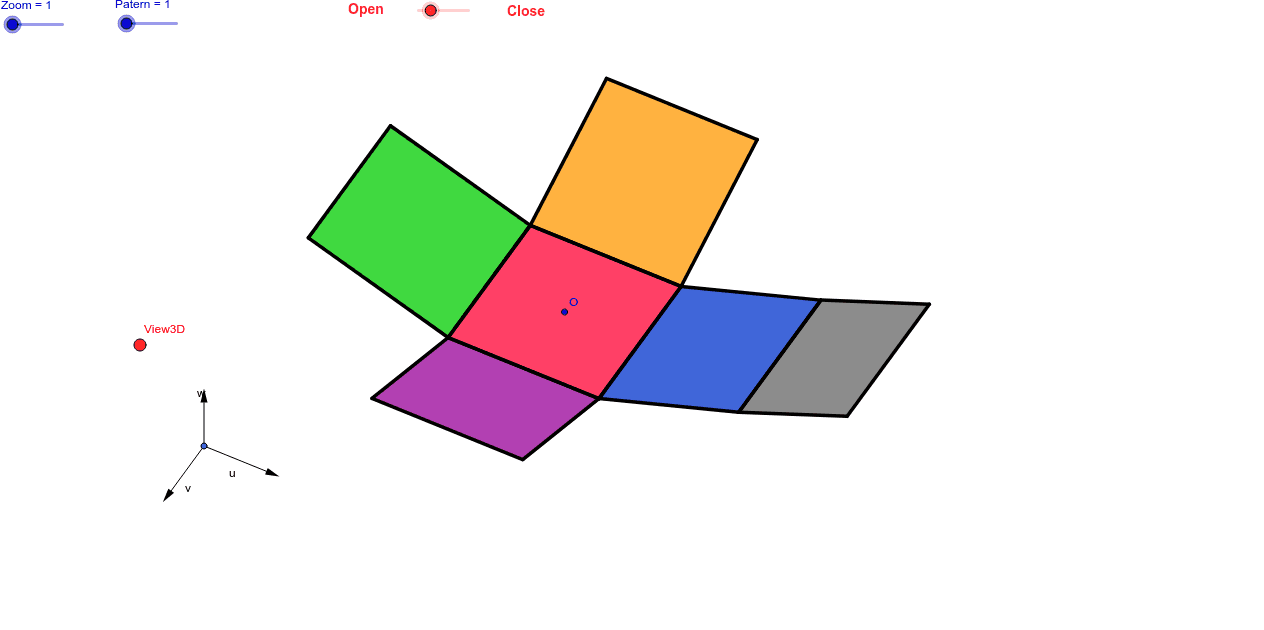
11 Patterns of the Cube (Net of a Cube)
Loading the math board and drawing, please wait…
This example demonstrates the 11 different nets of a cube, allowing users to observe through sliders and 3D viewpoint. Key math concepts include solid geometry, spatial visualization, and geometric transformations. It is constructed using commands like Vector, OrthogonalLine, Polygon, Midpoint, Translate, Segment, and Mirror in GeoGebra. Suitable for high school students or math enthusiasts exploring spatial geometry.
GeoGebra Commands & Parameters
Vector(B_1, X) → uVector(B_1, Z) → wOrthogonalLine(View3D, yAxis) → a_1OrthogonalLine(View3D, xAxis) → b_1Vector(B_1, Y) → vPolygon(L, K, N, M) → poly1, l, k_1, n, mPolygon(K, P, Q, N) → poly2, k_2, p, q, n_1Polygon(L, M, S, R) → poly3, l_1, m_1, s, rPolygon(N, V, W, M) → poly4, n_2, v_1, w_1, m_2Polygon(K, T, U, L) → poly5, k_3, t, u_1, l_2Polygon(B, Q, P, A) → poly6, b_2, q_1, p_1, a_2Midpoint(R, M) → DTranslate(S, Vector[-(2.0 * v)]) → S'Segment(S, C) → eTranslate(M, Vector[-(2.0) * v]) → M'Segment(M, E) → fSegment(E, C) → hTranslate(N, Vector[-(2.0) * v]) → N'Translate(Q, Vector[-(2.0) * v]) → Q'_1Segment(Q, F) → iSegment(N, G) → jSegment(G, F) → d_1Translate(Q, Vector[-(2.0) * v]) → Q'_2Translate(B, Vector[-(2.0) * v]) → B'_1Segment(B, I) → e_1Segment(I, H) → f_1Segment(H, Q) → g_1Translate(K, Vector[2.0 * v]) → K'Translate(P, Vector[2.0 * v]) → P'_1Segment(P, J) → h_1Segment(J, A_1) → i_1Segment(A_1, K) → j_1Segment(B, H_1) → s_1Segment(H_1, C_1) → cSegment(C_1, A) → r_1Midpoint(N, P) → D_1Midpoint(k_1) → F_1Translate(A, Vector[2.0 * v]) → A'Translate(P, Vector[2.0 * v]) → P'Segment(A, G_1) → t_1Segment(G_1, I_1) → c_2Segment(I_1, P) → d_2Segment(J, K_1) → f_2Segment(P, L_1) → e_2Segment(L_1, K_1) → g_2Segment(M, W) → h_2Mirror(L_1, F_1) → O_1Mirror(K_1, F_1) → P_1Segment(M, M_1) → i_2Segment(N_1, J_1) → j_2Segment(J_1, M_1) → p_2Polygon(M, E, C, S) → poly7, q_2, r_2, s_2, t_2Polygon(Q, N, G, F) → poly8, q_3, n_3, g_3, f_3Polygon(B, Q, H, I) → poly9, b_3, q_4, h_3, i_3Polygon(J, A_1, K, P) → poly10, j_3, a_3, k_4, p_3Polygon(C_1, A, B, H_1) → poly11, c_3, a_4, b_4, h_4Polygon(G_1, I_1, P, A) → poly12, g_4, i_4, p_4, a_5Polygon(K_1, J, P, L_1) → poly13, k_5, j_4, p_5, l_3Polygon(M, M_1, J_1, N_1) → poly14, m_3, m_4, j_5, n_4
AI Drawing Prompt Reference
Draw 11 different nets of a cube, allowing observation through sliders and 3D viewpoints. Display multiple squares connected by edges to form faces, with some faces obtained via mirror and translation transformations, resulting in several distinct nets that illustrate spatial geometry and geometric transformations.
The prompt above was compiled from the original drawing commands and is for reference only.