
11 Nets of the Cube
Loading the math board and drawing, please wait…
In collections
Area, Surface Area, Volume, Cross Section, 3D
3D Geometry & Cross Sections
Surface Area and Volume
Surface Area & Volume
Surface Area & Volume
Surface Area and Volume
Nets of 3D Figures 立體圖形的摺紙圖樣
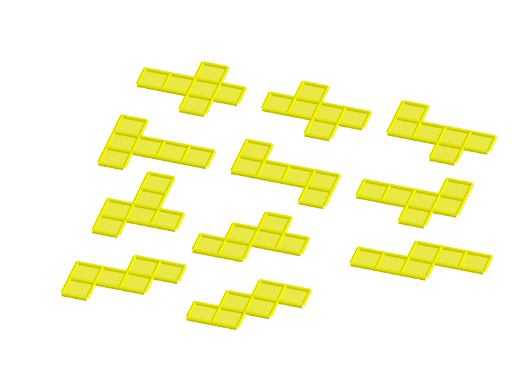
This example demonstrates the 11 different nets of a cube, covering core math concepts in solid geometry, polygons, and spatial visualization. It utilizes GeoGebra commands like Cube, Rotate, Midpoint, OrthogonalLine, Segment, and Translate, along with objects such as A, B, and faceABCD. Suitable for middle school students and above to learn solid geometry and develop spatial reasoning skills, or for educational demonstrations.
GeoGebra Commands & Parameters
Cube(A, B, xOyPlane) → a, C, faceBCGF, faceCDHG, faceEFGH, edgeAD, edgeAB, edgeBC, edgeCD, edgeAE, edgeDH, edgeEH, D, edgeEF, edgeBF, edgeFG, edgeCG, edgeGH, E, F, G, H, faceABCD, faceADHE, faceABFERotate(faceABFE, (90° * t), edgeAB) → faceABFE'Midpoint(A, C) → IOrthogonalLine(I, xOyPlane) → bRotate(faceABFE', 90°, b) → faceABFE''Rotate(faceABFE', 180°, b) → faceABFE''_1Rotate(faceABFE', 270°, b) → faceABFE''_2Rotate(E, (90° * t), edgeAB) → E'Rotate(F, (90° * t), edgeAB) → F'Segment(E', F') → cRotate(Rotate[faceEFGH, (90° * t), edgeAB], (90° * t), Segment[E', F']) → poly1Translate(J, Vector[A, B]) → KTranslate(faceABFE''_1, Vector[A, J]) → poly2Translate(faceABCD, Vector[A, J]) → faceABCD'Translate(faceABFE', Vector[A, J]) → faceABFE''_3Translate(poly1, Vector[A, J]) → poly1'Translate(Rotate[Rotate[faceADHE, (90° * t), edgeAB], ((-(90°)) * t), Segment[Rotate[E, (90° * t), edgeAB], Rotate[A, (90° * t), edgeAB]]], Vector[A, J]) → poly4Translate(faceABFE'', Vector[A, J]) → faceABFE'''Translate(faceABCD, Vector[A, L]) → faceABCD'_1Translate(faceABFE''_1, Vector[A, L]) → poly3Translate(faceABFE', Vector[A, L]) → faceABFE''_4Translate(poly1, Vector[A, L]) → poly1'_1Translate(faceABFE'', Vector[A, L]) → faceABFE'''_1Midpoint(B, E') → MOrthogonalLine(M, faceABFE') → dTranslate(Rotate[faceABFE'', 180°, d], Vector[A, L]) → poly5Translate(faceABCD, Vector[A, O]) → faceABCD'_2Translate(faceABFE''_1, Vector[A, O]) → poly6Translate(faceABFE', Vector[A, O]) → faceABFE''_5Translate(poly1, Vector[A, O]) → poly1'_2Translate(faceABFE'', Vector[A, O]) → faceABFE'''_2Translate(Rotate[Rotate[faceADHE, (90° * t), edgeCD], (90° * t), Segment[Rotate[H, (90° * t), edgeCD], Rotate[D, (90° * t), edgeCD]]], Vector[A, O]) → poly8Translate(faceABCD, Vector[A, N]) → faceABCD'_3Translate(faceABFE''_1, Vector[A, N]) → poly7Translate(faceABFE', Vector[A, N]) → faceABFE''_6Translate(poly1, Vector[A, N]) → poly1'_3Translate(Rotate[faceABFE'', 180°, d], Vector[A, N]) → poly9Rotate(Rotate[H, (90° * t), edgeAB], (90° * t), Segment[E', F']) → PMidpoint(P, F') → QOrthogonalLine(Q, poly1) → eTranslate(Rotate[Rotate[faceABFE'', 180°, d], 180°, e], Vector[A, N]) → poly10Translate(faceABCD, Vector[A, R]) → faceABCD'_4Translate(faceABFE''_1, Vector[A, R]) → poly11Translate(faceABFE', Vector[A, R]) → faceABFE''_7Translate(poly1, Vector[A, R]) → poly1'_4Translate(Rotate[faceABFE'', 180°, d], Vector[A, R]) → poly12Rotate(F', 180°, b) → F''Midpoint(C, F'') → SOrthogonalLine(S, faceABFE''_1) → gTranslate(Rotate[Rotate[Rotate[faceADHE, (90° * t), edgeCD], (90° * t), Segment[Rotate[H, (90° * t), edgeCD], Rotate[D, (90° * t), edgeCD]]], 180°, g], Vector[A, R]) → poly15Translate(faceABCD, Vector[A, T]) → faceABCD'_5Translate(faceABFE''_1, Vector[A, T]) → poly13Translate(faceABFE', Vector[A, T]) → faceABFE''_8Translate(Rotate[faceABFE', 270°, b], Vector[A, T]) → poly14Translate(Rotate[poly1, (-(90°)), b], Vector[A, T]) → poly16Translate(Rotate[Rotate[Rotate[faceADHE, (90° * t), edgeAB], ((-(90°)) * t), Segment[Rotate[E, (90° * t), edgeAB], Rotate[A, (90° * t), edgeAB]]], 180°, d], Vector[A, T]) → poly17Translate(faceABCD, Vector[A, U]) → faceABCD'_6Translate(faceABFE''_1, Vector[A, U]) → poly18Translate(faceABFE', Vector[A, U]) → faceABFE''_9Translate(Rotate[faceABFE', 270°, b], Vector[A, U]) → poly19Translate(Rotate[Rotate[Rotate[faceADHE, (90° * t), edgeAB], ((-(90°)) * t), Segment[Rotate[E, (90° * t), edgeAB], Rotate[A, (90° * t), edgeAB]]], 180°, d], Vector[A, U]) → poly20Translate(Rotate[faceABFE'', 270°, d], Vector[A, U]) → poly22Translate(faceABCD, Vector[A, V]) → faceABCD'_7Translate(faceABFE''_1, Vector[A, V]) → poly21Translate(Rotate[faceABFE, (90° * t), edgeAB], Vector[A, V]) → poly23Translate(Rotate[Rotate[faceADHE, (90° * t), edgeCD], (90° * t), Segment[Rotate[H, (90° * t), edgeCD], Rotate[D, (90° * t), edgeCD]]], Vector[A, V]) → poly24Rotate(Rotate[faceADHE, (90° * t), edgeCD], (90° * t), Segment[Rotate[H, (90° * t), edgeCD], Rotate[D, (90° * t), edgeCD]]) → poly25Rotate(Rotate[E, (90° * t), edgeCD], (90° * t), Segment[Rotate[H, (90° * t), edgeCD], Rotate[D, (90° * t), edgeCD]]) → WMidpoint(D, W) → ZOrthogonalLine(Z, poly25) → hRotate(faceABFE''_1, 90°, h) → poly26Translate(Rotate[faceABFE''_1, 90°, h], Vector[A, V]) → poly27Rotate(C, 90°, h) → C'Midpoint(W, C') → A_1OrthogonalLine(A_1, poly26) → iRotate(poly25, 180°, i) → poly25'Translate(Rotate[poly25, 180°, i], Vector[A, V]) → poly28Translate(faceABCD, Vector[A, B_1]) → faceABCD'_8Translate(faceABFE''_1, Vector[A, B_1]) → poly29Translate(faceABFE', Vector[A, B_1]) → faceABFE''_{10}Translate(Rotate[Rotate[Rotate[faceADHE, (90° * t), edgeAB], ((-(90°)) * t), Segment[Rotate[E, (90° * t), edgeAB], Rotate[A, (90° * t), edgeAB]]], 180°, d], Vector[A, B_1]) → poly30Translate(Rotate[Rotate[faceADHE, (90° * t), edgeCD], (90° * t), Segment[Rotate[H, (90° * t), edgeCD], Rotate[D, (90° * t), edgeCD]]], Vector[A, B_1]) → poly31Translate(Rotate[faceABFE''_1, 90°, h], Vector[A, B_1]) → poly32Translate(faceABCD, Vector[A, C_1]) → faceABCD'_9Translate(faceABFE''_1, Vector[A, C_1]) → poly33Translate(Rotate[Rotate[faceADHE, (90° * t), edgeCD], (90° * t), Segment[Rotate[H, (90° * t), edgeCD], Rotate[D, (90° * t), edgeCD]]], Vector[A, C_1]) → poly34Translate(Rotate[faceABFE''_1, 90°, h], Vector[A, C_1]) → poly35Translate(faceABFE'', Vector[A, C_1]) → faceABFE'''_3Rotate(G, 90°, b) → G'Rotate(F', 90°, b) → F''_1Midpoint(B, F''_1) → D_1OrthogonalLine(D_1, faceABFE'') → jRotate(faceABCD, 90°, j) → faceABCD'_{10}Translate(Rotate[faceABCD, 90°, j], Vector[A, C_1]) → poly36
AI Drawing Prompt Reference
Draw the 11 different nets of a cube, showcasing various arrangements of its faces. Start by creating a cube and then rotate some of its faces around the edges to form different nets. Use midpoints and perpendicular lines to rotate and move these faces, combining them into various configurations. Finally, display 11 distinct nets, each consisting of several square faces connected along shared edges.
The prompt above was compiled from the original drawing commands and is for reference only.