
单位圆与余弦函数图 by Anthony OR 柯志明
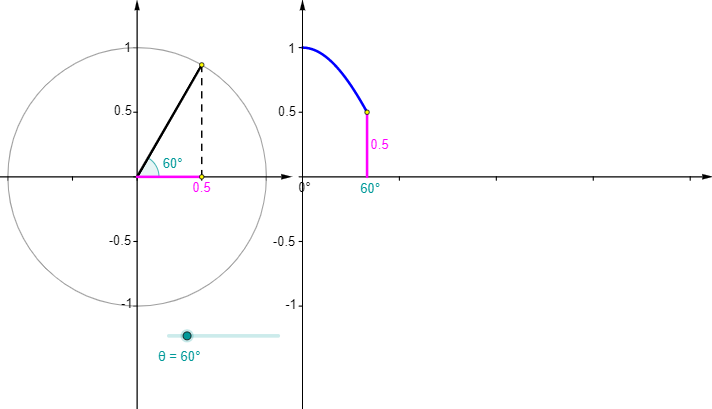
几何画板及绘图内容加载中,请稍等……
所属专题
Trigonometric Graphs and the Unit Circle
Trigonometric Graphs and the Unit Circle wellington point
The Unit Circle Begins
Trigonometric Graphs and the Unit Circle
Trigonometric Graphs
本示例通过单位圆生成余弦函数图。演示了单位圆上点的运动如何对应余弦值的变化。核心数学概念包括三角函数和解析几何。使用了GeoGebra中的Point, Rotate, Angle, Segment, Circle, Vector, Sequence等命令。适合高中数学教学和学习。
GeoGebra 命令及参数
Point(Ray[(0, 0), (-1, 0)]) → BRotate(A, θ, B) → PRotate(A, θ, B) → A'Angle(A, B, A') → αRotate(A, θ, B) → A'_1Angle(A, B, A'_1) → βSegment(Q, (x(Q), 0)) → eSegment((0, 0), (x(Q), 0)) → gCircle(B, A) → cSegment(B, P) → aVector((x(B), y(Corner[1])), (x(B), y(Corner[4]))) → uVector((0, y(Corner[1])), (0, y(Corner[4]))) → wVector((0, 0), (x(Corner[2]), 0)) → zSequence(Segment[((0.75 * i), 0), ((0.75 * i), -0.025)], i, 1, 4) → list1Segment(B, (x(P), 0)) → bSegment(P, (x(P), 0)) → hVector(B - (1.2, 0), B + (1.2, 0)) → vSequence(Segment[(0, (0.5 * i) - 1), (-0.025, (0.5 * i) - 1)], i, 0, 4) → list2Sequence(Segment[(x(B), (0.5 * i) - 1), (x(B) - 0.025, (0.5 * i) - 1)], i, 0, 4) → list3Sequence(Segment[B + ((0.5 * i) - 1, 0), B + ((0.5 * i) - 1, -0.025)], i, 0, 4) → list4Segment(Q, (0, y(Q))) → dPoint(Ray[(0, 0), (-1, 0)]) → B_1Rotate(A_1, θ, B_1) → P_1Rotate(A_1, θ, B_1) → A'_2Rotate(A_1, θ, B_1) → A'_3Circle(B_1, A_1) → c_1Segment(B_1, P_1) → a_1
AI 绘图提示语参考
画一个单位圆,并在圆上移动一个点,展示该点与余弦函数图像的对应关系。首先绘制坐标轴和原点,然后画出单位圆,接着在圆上标记一个点并随角度变化旋转,连接该点与圆心,并显示其对应的余弦值变化。最后,将圆上的点投影到x轴和y轴上,形成余弦函数图像,清晰展示单位圆与余弦函数的关联性。
以上提示语为根据原始绘图命令整理而来,仅供参考。