
特殊椭球体轨迹演示
几何画板及绘图内容加载中,请稍等……
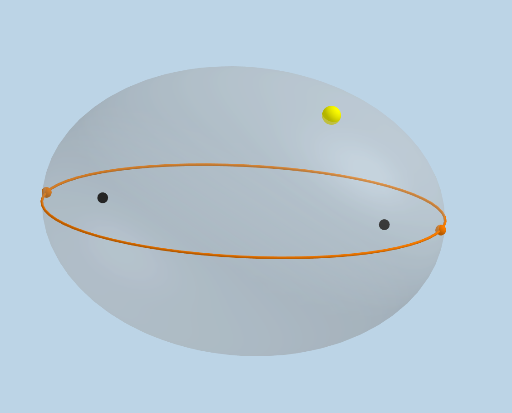
该范例演示了特殊椭球体的轨迹。核心数学概念包括椭球体的旋转、轨迹和立体几何。通过使用GeoGebra命令如PointIn、IntersectPath、Rotate等,动态展示了轨迹的形成过程。适合高中数学教学和学习。
GeoGebra 命令及参数
PointIn(d) → AIntersectPath(z = 0, d) → eMax({MajorAxis, MinorAxis, c}) → maxFocus(e) → B, CVertex(e) → D, E, F, GDilate(B, If[0 < Animate ≤ 1, 1 - Animate, 0], A) → B'Segment(B, B') → iDilate(C, If[0 < Animate ≤ 1, 1 - Animate, 0], A) → C'Segment(C, C') → jVertex(f) → H, I, J, KVertex(g) → L, M, N, ODilate(B, If[1.5 < Animate ≤ 2.5, 2.5 - Animate, 0], D) → B'_1Vector(B, B'_1) → uTranslate(B, u) → B'_2Translate(B', u) → B''Segment(B'_2, B'') → i'OrthogonalLine(B'', k) → lPoint(e) → RSphere(D, B'') → mIntersectPath(z = 0, m) → pIntersect(p, e) → P, Q, ,Angle(P, D, B'') → αRotate(B'_2, If[2.5 < Animate ≤ 3.5, ((-(Animate - 2.5)) * α), (-α)], D) → SPlane(B'', D, P) → nRotate(B'_2, If[2.5 < Animate ≤ 3.5, ((-(Animate - 2.5)) * α), (-α)], D, n) → TRotate(B'', If[2.5 < Animate ≤ 3.5, ((-(Animate - 2.5)) * α), (-α)], D, n) → B'''Segment(T, B''') → i''Angle(B''', D, B) → βRotate(T, If[3.5 < Animate ≤ 4.5, ((Animate - 3.5) * β), β], D) → T'Rotate(B''', If[3.5 < Animate ≤ 4.5, ((Animate - 3.5) * β), β], D) → USegment(T', U) → i'''Dilate(C, If[4.5 < Animate ≤ 5.5, 5.5 - Animate, 0], E) → C'_1Vector(C, C'_1) → vTranslate(C, v) → C'_2Translate(C', v) → C''Segment(C'_2, C'') → j'Sphere(E, C'') → oIntersectPath(z = 0, o) → qIntersect(q, e) → V, W, ,Angle(W, E, C'') → γPlane(E, C'', W) → rRotate(C'_2, If[5.5 < Animate ≤ 6.5, ((Animate - 5.5) * γ), γ], E, r) → ZRotate(C'', If[5.5 < Animate ≤ 6.5, ((Animate - 5.5) * γ), γ], E, r) → C'''Segment(Z, C''') → j''Angle(W, E, D) → δRotate(Z, If[6.5 < Animate ≤ 7.5, ((Animate - 6.5) * δ), δ], E) → Z'Rotate(C''', If[6.5 < Animate ≤ 7.5, ((Animate - 6.5) * δ), δ], E) → A_1Segment(Z', A_1) → j'''Distance(B, A) → sCircle(D, s, xOyPlane) → tSegment(D, E) → f_1Intersect(f_1, xAxis) → B_1Intersect(f_1, t) → C_1, E_1Segment(D, C_1) → g_1Segment(C_1, E) → h_1Dilate(D, If[0 < Animate ≤ 1, 1 - Animate, 0], C_1) → D'Segment(D, D') → i_1Dilate(C_1, If[1 < Animate ≤ 2, 2 - Animate, 0], E) → D_1Segment(C_1, D_1) → j_1Rotate(B''', If[3.5 < Animate ≤ 4.5, ((-(Animate - 3.5)) * β), (-β)], D) → F_1Segment(D, F_1) → k_1
AI 绘图提示语参考
绘制一个特殊椭球体的轨迹,首先在平面上创建一个点A,然后在椭球体上创建点B和C,通过旋转和缩放操作,动态生成轨迹点P和Q,接着创建轨迹线i和j,最后通过旋转和平移操作,生成轨迹线i'、i''和i''',以及轨迹线j'、j''和j''',形成一个动态的椭球体轨迹。
以上提示语为根据原始绘图命令整理而来,仅供参考。