
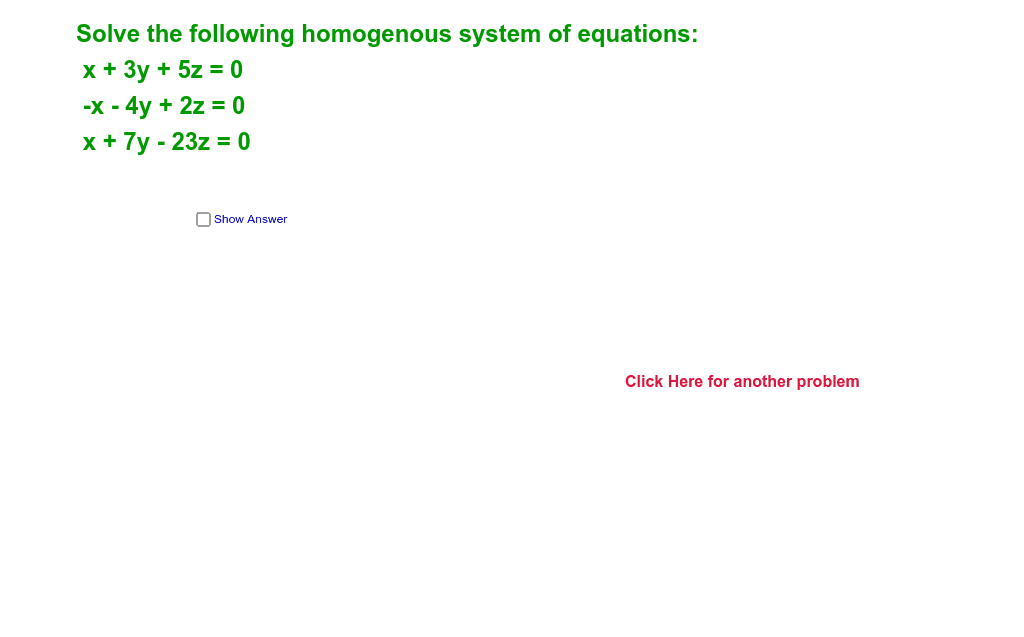
解齐次方程组
几何画板及绘图内容加载中,请稍等……
所属专题
Linear Algebra
本范例演示了解齐次方程组的过程。核心数学概念包括齐次方程组的解法。通过使用GeoGebra命令如Random、Element、LaTeX等,可以构造出解齐次方程组的动态模型。适合高中数学教学和学习。
GeoGebra 命令及参数
Random(-7, 7) → c12Random(-7, 7) → c13Random(-7, 7) → c23Random(-7, 7) → cRandom(-3, 3) → qRandom(-3, 3) → sRandom(-4, 4) → rElement({"Reduced Row Echelon Form Of", "transpose of", "scalar multiple of"}, pick) → opElement({ReducedRowEchelonForm[A3], Transpose[A3], (c * A3)}, pick) → CElement(C, 1, 4) → x1Element(C, 2, 4) → y1Element(C, 3, 4) → z1Element(C1, 2, 4) → y21Element(C1, 2, 3) → y22Element(C1, 1, 4) → x21Element(C1, 1, 3) → x22LaTeX(C1) → text7If(Element[C1, 3, 3] ≟ Element[C1, 3, 4], "Infinite Number of Solutions", "Only Trivial Solution") → text3
AI 绘图提示语参考
绘制一个动态模型,展示如何解齐次线性方程组,包含随机生成的系数矩阵和其行最简形,通过 LaTeX 显示方程组和解的类型(无穷多解或只有零解),并标注关键步骤。
以上提示语为根据原始绘图命令整理而来,仅供参考。