
黎曼和 - 矩形近似(左端点、右端点、中点)
几何画板及绘图内容加载中,请稍等……
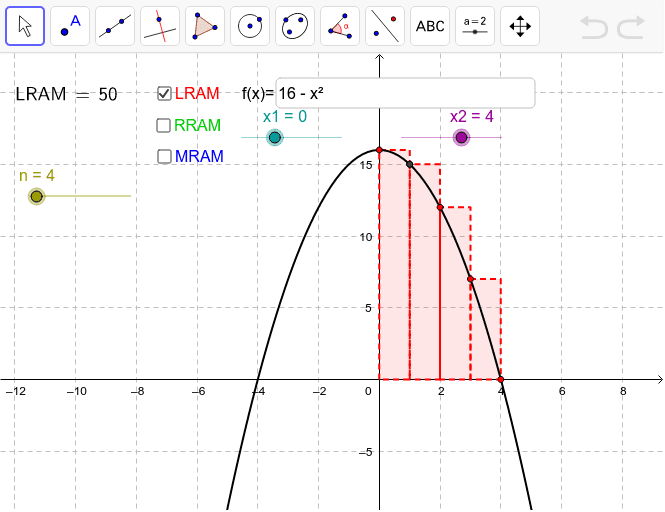
本范例演示了如何使用左端点、右端点和中点三种方法来近似计算函数的定积分。核心数学概念包括定积分、黎曼和。通过调整矩形的数量和上下界,可以直观地理解积分的几何意义。使用了Sequence、Sum、LaTeX、Textfield、Element等GeoGebra命令,适合高中数学教学和学习。
GeoGebra 命令及参数
Sequence(f(i) * h, i, x1 + h / 2, x2 - h / 2, h) → M2Sequence(f(i) * h, i, x1 + h, x2, h) → R2Sequence(f(i) * h, i, x1, x2 - h, h) → L2Sequence((i, f(i)), i, x1, x2, h) → L1Sequence(Polygon[(x(Element[L1, i]), 0), Element[L1, i], (x(Element[L1, i + 1]), y(Element[L1, i])), (x(Element[L1, i + 1]), 0)], i, 1, n) → LeftPSequence(Polygon[(x(Element[L1, i]), 0), (x(Element[L1, i]), y(Element[L1, i + 1])), Element[L1, i + 1], (x(Element[L1, i + 1]), 0)], i, 1, n) → RightPSequence((i + h / 2, f(i + h / 2)), i, x1, x2 - h, h) → LMSequence(Polygon[(x(Element[L1, i]), 0), (x(Element[L1, i]), y(Element[LM, i])), (x(Element[L1, i + 1]), y(Element[LM, i])), (x(Element[L1, i + 1]), 0)], i, 1, n) → MidPSum(L2) → LRAMSum(R2) → RRAMSum(M2) → MRAMLaTeX(LRAM, true, true) → text4LaTeX(RRAM, true, true) → text5LaTeX(MRAM, true, true) → text6Textfield(f) → inputBox1Element(L1, 2) → A
AI 绘图提示语参考
画一个函数图像,并展示其左黎曼和、右黎曼和与中点黎曼和的几何意义。首先绘制函数曲线,然后根据给定的区间和矩形数量,分别画出左黎曼和的矩形、右黎曼和的矩形以及中点黎曼和的矩形,每个矩形的高度对应函数值。最后,计算并显示每种黎曼和的数值,以便直观理解积分的概念。
以上提示语为根据原始绘图命令整理而来,仅供参考。