
平行界面三层介质中的折射现象
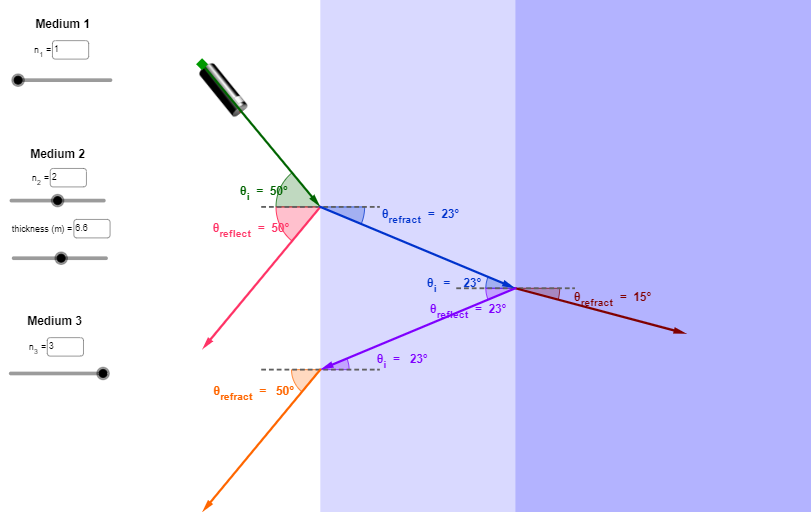
几何画板及绘图内容加载中,请稍等……
该范例演示光在三个平行介质界面间传播时的折射路径,通过几何作图直观展示斯涅尔定律在多层介质中的连续应用。核心数学概念包括折射定律、角度关系、平行线性质以及几何光学中的光路追踪。作图要点:使用GeoGebra的Segment、Point、Intersect、Line、OrthogonalLine、Angle、If、Rotate、Polygon、Vector、Circle、AngularBisector、Mirror、Textfield、Ray、Distance、Midpoint等命令,构建了多层介质界面、法线、入射光线、折射光线以及角度标注,并通过滑块或文本输入动态调整介质折射率与入射角。适合高中物理或大学光学课程中理解多层介质折射规律,也可用于数学几何与物理交叉教学。通过交互式调整参数,学生可观察折射角随介质变化而改变,加深对光路可逆性和界面平行条件下角度传递的理解。
GeoGebra 命令及参数
Segment(A, B) → fPoint(f) → CIntersect(xAxis, yAxis) → DPoint(yAxis) → EPoint(yAxis) → FLine(E, F) → gOrthogonalLine(D, g) → hIntersect(h, f) → GAngle(C, D, G) → αAngle(G, D, C) → βIf(α > 90°, β, α) → γPoint(h) → KRotate(K, (-a), D) → K'_1Line(D, K'_1) → h_1Angle(K'_1, D, K) → θPolygon(R, S, T, U) → poly2, r, s, t_1, u_1Intersect(h_1, t_1) → WRotate(K, a, D) → K'Line(D, K') → g_1Intersect(g_1, t_1) → VVector(C, D) → uCircle(D, 1.2) → cAngularBisector(C, D, G) → iIntersect(c, i, 2) → HMirror(C, h) → C'Vector(D, C') → vAngularBisector(C', D, G) → jIntersect(c, j, 2) → IAngle(C', D, G) → δAngle(G, D, C') → εIf(δ > 90°, ε, δ) → ζCircle(D, 1.8) → dIntersect(d, j, 2) → JAngle(K, D, K') → ηAngularBisector(K'_1, D, K) → kAngularBisector(K, D, K') → lIntersect(c, k, 2) → LIntersect(c, l, 2) → MVector(D, K'_1) → wVector(D, K') → bPolygon(N, O, P, Q) → poly1, n, o, p, qTextfield(n_1) → InputBox1Textfield(n_2) → InputBox2Line(C, D) → mOrthogonalLine(C, m) → f_1Circle(C, 0.6) → eIntersect(e, f_1, 2) → ZIntersect(e, f_1, 1) → A_1Vector(D, V) → v_1Vector(D, W) → w_1Rotate(B_1, (-e_2), W) → C_1Angle(C_1, W, B_1) → νPoint(h) → D_1Point(h) → E_1Segment(D_1, E_1) → i_1Vector(W, C_1) → a_1Rotate(G_1, γ, V) → F_1Angle(G_1, V, F_1) → ξVector(V, F_1) → b_1Ray(C, D) → j_1Segment(H_1, I_1) → k_1Segment(J_1, K_1) → l_1AngularBisector(F_1, V, G_1) → m_1AngularBisector(B_1, W, C_1) → p_1Circle(W, 1) → c_1Circle(V, 1) → d_1Intersect(d_1, m_1, 2) → L_1Intersect(c_1, p_1, 2) → M_1Angle(D, W, J_1) → οAngle(H_1, V, D) → ρAngularBisector(J_1, W, D) → q_1AngularBisector(D, V, H_1) → r_1Intersect(d_1, r_1, 2) → N_1Intersect(c_1, q_1, 2) → O_1Intersect(t_1, j_1) → P_1OrthogonalLine(P_1, j_1) → s_1Line(W, C_1) → e_1Intersect(s_1, e_1) → Q_1Distance(P_1, Q_1) → distanceP1Q1Textfield(t) → InputBox3Midpoint(P_1, Q_1) → R_1Vector(P_1, Q_1) → u_2Vector(Q_1, P_1) → v_2Line(F_1, V) → f_2Intersect(f_2, s_1) → S_1Midpoint(P_1, S_1) → T_1Vector(S_1, P_1) → w_2Vector(P_1, S_1) → a_2Distance(P_1, S_1) → o_1Distance(P_1, S_1) → b_2Point(r) → U_1Point(t_1) → V_1Vector(U_1, V_1) → c_2Vector(V_1, U_1) → d_2Polygon(W_1, Z_1, A_2, B_2) → poly3, w_3, z_1, a_3, b_3Line(J_1, K_1) → g_2Mirror(D, g_2) → D'Vector(W, D') → h_2Segment(C_2, D_2) → i_2Rotate(C_2, ζ, D') → F_2Angle(C_2, D', F_2) → σRay(D', F_2) → k_2Point(k_2) → G_2Vector(H_2, I_2) → l_2AngularBisector(C_2, D', F_2) → m_2Circle(D', 2) → p_2Intersect(p_2, m_2, 2) → J_2Angle(J_1, W, D') → τAngularBisector(J_1, W, D') → q_2Intersect(c_1, q_2, 2) → K_2Textfield(n_3) → InputBox4Angle(D_2, D', W) → ϕAngularBisector(W, D', D_2) → r_2Intersect(p_2, r_2, 2) → L_2Line(B, A) → s_2Intersect(s_2, k_2) → N_2Vector(D', N_2) → j_2