
乘法练习:所有模式
几何画板及绘图内容加载中,请稍等……
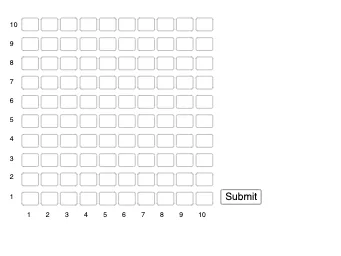
该范例是一个交互式乘法练习工具,通过随机生成乘法算式并让用户输入答案来巩固乘法运算能力。它演示了如何利用GeoGebra的文本输入框和序列功能构建一个可重复练习的数学测验界面。核心数学概念是整数乘法及其运算规律,涉及从简单到复杂的各种乘法模式。作图要点包括使用Textfield命令创建输入框,使用Sequence命令生成多个算式和对应的答案输入框,并通过Submit按钮提交答案进行即时反馈。该范例适合小学中高年级学生进行乘法口算训练,也可用于教师课堂演示或学生自主练习,帮助提升计算速度与准确性。
GeoGebra 命令及参数
Textfield(answer_00) → InputBox1Textfield(answer_01) → InputBox2Textfield(answer_02) → InputBox3Textfield(answer_03) → InputBox4Textfield(answer_04) → InputBox5Textfield(answer_05) → InputBox6Textfield(answer_06) → InputBox7Textfield(answer_07) → InputBox8Textfield(answer_08) → InputBox9Textfield(answer_09) → InputBox10Textfield(answer_10) → InputBox11Textfield(answer_11) → InputBox12Textfield(answer_12) → InputBox13Textfield(answer_13) → InputBox14Textfield(answer_14) → InputBox15Textfield(answer_15) → InputBox16Textfield(answer_16) → InputBox17Textfield(answer_17) → InputBox18Textfield(answer_18) → InputBox19Textfield(answer_19) → InputBox20Textfield(answer_20) → InputBox21Textfield(answer_21) → InputBox22Textfield(answer_22) → InputBox23Textfield(answer_23) → InputBox24Textfield(answer_24) → InputBox25Textfield(answer_25) → InputBox26Textfield(answer_26) → InputBox27Textfield(answer_27) → InputBox28Textfield(answer_28) → InputBox29Textfield(answer_29) → InputBox30Textfield(answer_30) → InputBox31Textfield(answer_31) → InputBox32Textfield(answer_32) → InputBox33Textfield(answer_33) → InputBox34Textfield(answer_34) → InputBox35Textfield(answer_35) → InputBox36Textfield(answer_36) → InputBox37Textfield(answer_37) → InputBox38Textfield(answer_38) → InputBox39Textfield(answer_39) → InputBox40Textfield(answer_40) → InputBox41Textfield(answer_41) → InputBox42Textfield(answer_42) → InputBox43Textfield(answer_43) → InputBox44Textfield(answer_44) → InputBox45Textfield(answer_45) → InputBox46Textfield(answer_46) → InputBox47Textfield(answer_47) → InputBox48Textfield(answer_48) → InputBox49Textfield(answer_49) → InputBox50Textfield(answer_50) → InputBox51Textfield(answer_51) → InputBox52Textfield(answer_52) → InputBox53Textfield(answer_53) → InputBox54Textfield(answer_54) → InputBox55Textfield(answer_55) → InputBox56Textfield(answer_56) → InputBox57Textfield(answer_57) → InputBox58Textfield(answer_58) → InputBox59Textfield(answer_59) → InputBox60Textfield(answer_60) → InputBox61Textfield(answer_61) → InputBox62Textfield(answer_62) → InputBox63Textfield(answer_63) → InputBox64Textfield(answer_64) → InputBox65Textfield(answer_65) → InputBox66Textfield(answer_66) → InputBox67Textfield(answer_67) → InputBox68Textfield(answer_68) → InputBox69Textfield(answer_69) → InputBox70Textfield(answer_70) → InputBox71Textfield(answer_71) → InputBox72Textfield(answer_72) → InputBox73Textfield(answer_73) → InputBox74Textfield(answer_74) → InputBox75Textfield(answer_75) → InputBox76Textfield(answer_76) → InputBox77Textfield(answer_77) → InputBox78Textfield(answer_78) → InputBox79Textfield(answer_79) → InputBox80Textfield(answer_80) → InputBox81Textfield(answer_81) → InputBox82Textfield(answer_82) → InputBox83Textfield(answer_83) → InputBox84Textfield(answer_84) → InputBox85Textfield(answer_85) → InputBox86Textfield(answer_86) → InputBox87Textfield(answer_87) → InputBox88Textfield(answer_88) → InputBox89Textfield(answer_89) → InputBox90Textfield(answer_90) → InputBox91Textfield(answer_91) → InputBox92Textfield(answer_92) → InputBox93Textfield(answer_93) → InputBox94Textfield(answer_94) → InputBox95Textfield(answer_95) → InputBox96Textfield(answer_96) → InputBox97Textfield(answer_97) → InputBox98Textfield(answer_98) → InputBox99Textfield(answer_99) → InputBox100Sequence(Text[m, (((m - 1) * 10.25) + 1.2, 30)], m, 1, 10) → l1Sequence(Text[m, (-8, (m * 10.25) + 30)], m, 1, 10) → l2
AI 绘图提示语参考
创建一个交互式数学练习工具,包含多个文本输入框用于输入答案,展示一系列随机的乘法问题,通过序列生成多个问题-答案对,并设置一个提交按钮用于检查答案,适合小学生练习整数乘法,界面应包含多个输入框和一个提交按钮。
以上提示语为根据原始绘图命令整理而来,仅供参考。