
整数数轴
几何画板及绘图内容加载中,请稍等……
所属专题
Mathematics Form 1
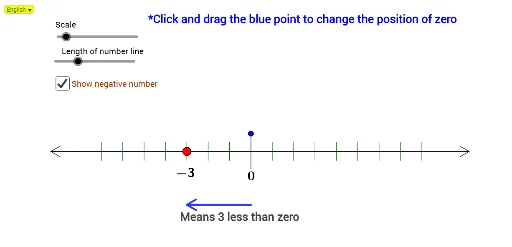
①本范例演示整数数轴的构建与可视化;②涉及核心数学概念包括整数、数轴、加法、减法运算;③作图要点:使用Line、Circle、Intersect、Segment、OrthogonalLine、Point、Sequence、Distance、IndexOf、If、DynamicCoordinates、Element、Zip、Rotate、Ray、Midpoint等GeoGebra命令和对象;④适合初中数学教学,用于理解数轴运算与几何关系。
GeoGebra 命令及参数
Line(A, xAxis) → aCircle(A, 0.5) → fCircle(A, Pj) → cIntersect(c, a, 2) → BSegment(A, B) → bOrthogonalLine(A, b) → dIntersect(f, d, 2) → EOrthogonalLine(B, b) → eCircle(B, 0.5) → gIntersect(g, e, 2) → FSegment(E, F) → hOrthogonalLine(B_1, b) → c_1Intersect(c_1, h) → OOrthogonalLine(A_1, b) → b_1Intersect(b_1, h) → MSegment(M, O) → d_1Point(d_1) → GOrthogonalLine(G, b) → iIntersect(i, b) → HSequence((p, y(H) + 0.25), p, x(H) - Dsz, x(A), (-Dsz)) → LlTopDistance(H, B) → LrSequence((p, y(H) + 0.25), p, x(H) + Dsz, x(H) + Lr, Dsz) → LrTopSequence((p, y(A)), p, x(Element[Last[LlTop], 1]), x(Element[Last[LrTop], 1]), Dsz) → ListMoveIndexOf(H, ListMove) → ZPosPoint(b) → NDistance(N, Element[ListMove, 1]) → KedNDistance(Element[ListMove, TitikP], N) → KiriNDistance(N, Element[ListMove, TitikP + 1]) → KananNIf(KiriN < KananN, Element[ListMove, TitikP], Element[ListMove, TitikP + 1]) → TitikGerakDynamicCoordinates(N, x(TitikGerak), y(TitikGerak)) → MPointIndexOf(MPoint, ListMove) → KedMSequence((p, y(H) - 0.25), p, x(H) - Dsz, x(A), (-Dsz)) → LlBottomSequence((p, y(H) - 0.25), p, x(H) + Dsz, x(H) + Lr, Dsz) → LrBottomDistance(H, A) → LlCircle(H, G) → kIntersect(k, i, 2) → CSegment(G, C) → jElement(Last[ListMove], 1) → LastMIndexOf(LastM, ListMove) → TolEZip(Segment[p, q], p, LrTop, q, LrBottom) → SkalaRZip(Segment[p, q], p, LlTop, q, LlBottom) → SkalaLCircle(H, 1.5) → pIntersect(p, i, 1) → DOrthogonalLine(MPoint, b) → lCircle(MPoint, 1.5) → qIntersect(q, l, 1) → ISegment(D, I) → mCircle(I, 0.3) → rRotate(D, 30°, I) → D'Rotate(D, (-(30°)), I) → D'_1Ray(D', I) → nRay(D'_1, I) → sIntersect(r, n, 1) → JIntersect(r, s, 1) → KMidpoint(D, I) → LIntersect(r, n, 2) → PIntersect(r, s, 2) → QSegment(P, I) → tSegment(Q, I) → a_1Circle(B, 0.75) → e_1Intersect(e_1, a, 2) → RCircle(R, 0.3) → f_1Intersect(f_1, a, 1) → SRotate(S, 30°, R) → S'Rotate(S, (-(30°)), R) → S'_1Segment(R, S'_1) → g_1Segment(R, S') → h_1Segment(R, B) → i_1Circle(A, 1) → k_1Intersect(k_1, a, 1) → TCircle(T, 0.3) → p_1Intersect(p_1, a, 2) → URotate(U, 30°, T) → U'Rotate(U, (-(30°)), T) → U'_1Segment(T, U') → j_1Segment(T, U'_1) → l_1Segment(T, A) → m_1SelectedIndex(Bahasa) → nnIf(nn ≟ 1, "Means " + PosV2 + " less than zero", "Bermaksud " + PosV2 + " kurang daripada sifar") → text4If(nn ≟ 1, "Means " + (LaTeX[PosV]) + " more than zero", "Bermaksud " + (LaTeX[PosV]) + " lebih daripada sifar") → text3If(nn ≟ 1, "*Click and drag the blue point to change the position of zero", "*Klik dan seret titik biru untuk mengubah kedudukan sifar") → text6