
求极坐标曲线所包围的面积
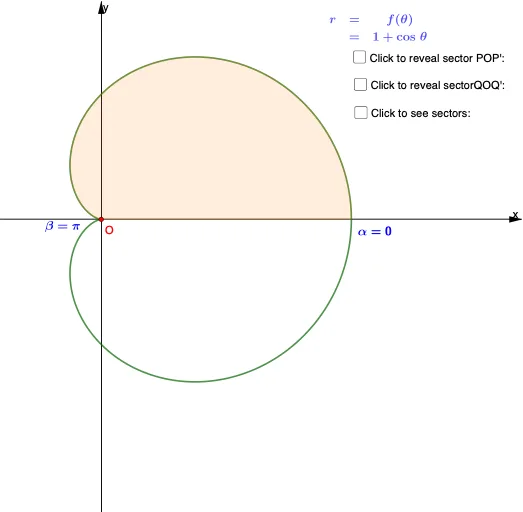
几何画板及绘图内容加载中,请稍等……
本例演示如何利用极坐标曲线求解曲线所围面积。涉及极坐标参数化、极坐标积分计算、圆扇形面积公式以及几何作图技巧。使用GeoGebra的CurveCartesian命令绘制极坐标曲线,CircleSector和Segment命令构建扇形区域,Integral命令进行积分计算,Midpoint和Rotate用于几何构造。适合高中数学或大学微积分入门阶段,帮助学生理解极坐标下面积的计算方法和几何构造原理。
GeoGebra 命令及参数
CurveCartesian(((1 + cos(t)) * cos(t)), ((1 + cos(t)) * sin(t)), t, (-π), π) → aCurveCartesian(((1 + cos(t)) * cos(t)), ((1 + cos(t)) * sin(t)), t, 0, π) → cFractionText(d) → text1Rotate(Q, α, O) → Q'Angle(Q, O, Q') → βCircleSector(O, Q, Q') → δAFractionText(deltatheta) → text3Segment(O, Q') → fIntersect(f, a) → B, P, F, GRotate(P, (-β), O) → P'Angle(P', O, P) → γCircleSector(O, P', P) → eMidpoint(O, Q) → AMidpoint(O, P) → CMidpoint(P', Q) → DAngle(E, O, Q) → δMidpoint(A, C) → HCircleSector(O, P', P) → gIntegral((1 + cos(x))^(2), theta, theta + deltatheta) → AreaSequence((1 + cos(θ); θ), θ, 0, π, π / n) → l1Ray(O, l1(1)) → mRay(O, l1(2)) → pRay(O, l1(3)) → qRay(O, l1(4)) → rRay(O, l1(5)) → sRay(O, l1(6)) → tRay(O, l1(7)) → f_1Ray(O, l1(8)) → g_1Ray(O, l1(9)) → h_1Ray(O, l1(10)) → i_1Ray(O, l1(11)) → j_1Ray(O, l1(12)) → k_1Ray(O, l1(13)) → l_1Ray(O, l1(14)) → m_1Ray(O, l1(15)) → n_1Ray(O, l1(16)) → p_1Ray(O, l1(17)) → q_1Ray(O, l1(18)) → r_1Ray(O, l1(19)) → s_1Ray(O, l1(20)) → t_1Sequence((1 + cos(θ); θ + π / n), θ, 0, π, π / n) → l2CircleSector(O, l1(1), l2(1)) → Out_1CircleSector(O, l1(2), l2(2)) → Out_2CircleSector(O, l1(3), l2(3)) → Out_3CircleSector(O, l1(4), l2(4)) → Out_4CircleSector(O, l1(5), l2(5)) → Out_5CircleSector(O, l1(6), l2(6)) → Out_6CircleSector(O, l1(7), l2(7)) → Out_7CircleSector(O, l1(8), l2(8)) → Out_8CircleSector(O, l1(9), l2(9)) → Out_9CircleSector(O, l1(10), l2(10)) → Out_{10}CircleSector(O, l1(11), l2(11)) → Out_{11}CircleSector(O, l1(12), l2(12)) → Out_{12}CircleSector(O, l1(13), l2(13)) → Out_{13}CircleSector(O, l1(14), l2(14)) → Out_{14}CircleSector(O, l1(15), l2(15)) → Out_{15}CircleSector(O, l1(16), l2(16)) → Out_{16}CircleSector(O, l1(17), l2(17)) → Out_{17}CircleSector(O, l1(18), l2(18)) → Out_{18}CircleSector(O, l1(19), l2(19)) → Out_{19}CircleSector(O, l1(20), l2(20)) → Out_{20}Sequence((1 + cos(θ + π / n); θ), θ, 0, π, π / n) → l3CircleSector(O, l3(1), l2(1)) → In_1CircleSector(O, l3(2), l2(2)) → In_{2}CircleSector(O, l3(3), l2(3)) → In_4CircleSector(O, l3(4), l2(4)) → In_{3}CircleSector(O, l3(5), l2(5)) → In_5CircleSector(O, l3(6), l2(6)) → In_{6}CircleSector(O, l3(7), l2(7)) → In_7CircleSector(O, l3(8), l2(8)) → In_8CircleSector(O, l3(9), l2(9)) → In_9CircleSector(O, l3(10), l2(10)) → In_{10}CircleSector(O, l3(11), l2(11)) → In_{11}CircleSector(O, l3(12), l2(12)) → In_{12}CircleSector(O, l3(13), l2(13)) → In_{13}CircleSector(O, l3(14), l2(14)) → In_{14}CircleSector(O, l3(15), l2(15)) → In_{15}CircleSector(O, l3(16), l2(16)) → In_{16}CircleSector(O, l3(17), l2(17)) → In_{17}CircleSector(O, l3(18), l2(18)) → In_{18}CircleSector(O, l3(19), l2(19)) → In_{19}CircleSector(O, l3(20), l2(20)) → In_{20}CircleSector(O, l3(1), l2(1)) → Outl_1CircleSector(O, l3(2), l2(2)) → Outl_2CircleSector(O, l3(3), l2(3)) → Outl_1_3CircleSector(O, l3(4), l2(4)) → Outl_4CircleSector(O, l3(5), l2(5)) → Outl_5CircleSector(O, l3(6), l2(6)) → Outl_6CircleSector(O, l3(7), l2(7)) → Outl_7CircleSector(O, l3(8), l2(8)) → Outl_3CircleSector(O, l3(8), l2(8)) → Outl_8CircleSector(O, l3(9), l2(9)) → Outl_9CircleSector(O, l3(10), l2(10)) → Outl_{10}CircleSector(O, l3(11), l2(11)) → Outl_{11}CircleSector(O, l3(12), l2(12)) → Outl_{12}CircleSector(O, l3(13), l2(13)) → Outl_{13}CircleSector(O, l3(14), l2(14)) → Outl_{14}CircleSector(O, l3(15), l2(15)) → Outl_{15}CircleSector(O, l3(16), l2(16)) → Outl_{16}CircleSector(O, l3(17), l2(17)) → Outl_{17}CircleSector(O, l3(18), l2(18)) → Outl_{18}CircleSector(O, l3(19), l2(19)) → Outl_{19}
AI 绘图提示语参考
在坐标平面中画出极坐标曲线,生成两条参数曲线:一条对应角参数从 −π 到 π,另一条对应从 0 到 π,并把它们标作用于后续求交的曲线。取曲线相关点以作为扇形端点,通过以圆心为基点的旋转构造出一个扇形扇面。用扇形端点作圆弧与分段连线,在两条曲线之间求交得到若干交点,并再以圆心与其中某点的角度进行定向旋转得到另一端点。随后围绕圆心与端点各作扇形,画出圆扇及其分割线;最后标注并保留面积计算所需的参数增量视作等间隔划分的参考角。
以上提示语为根据原始绘图命令整理而来,仅供参考。