
探究垂直线
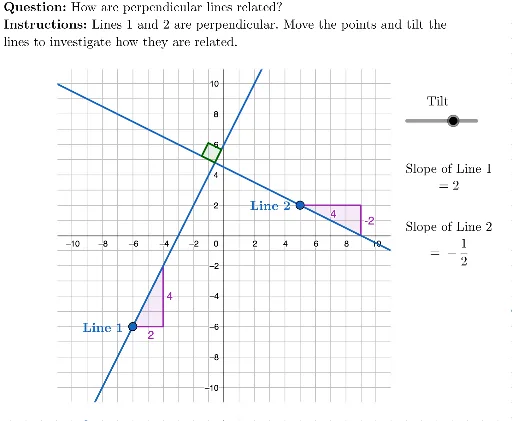
几何画板及绘图内容加载中,请稍等……
①本范例演示如何通过 GeoGebra 探究两条直线垂直的条件与性质;②涉及的核心数学概念包括直线方程、斜率、勾股定理、角度计算;③作图要点提炼自构造摘要,使用了 Element, Polygon, PointIn, Line, OrthogonalLine, Slope, LaTeX, Text, Angle 等命令与对象;④适合高中数学学生或教师用于理解垂直线判定与相关几何性质。
GeoGebra 命令及参数
Element({-5, -4, -3, -2, -1, 1, 2, 3, 4, 5}, m) → actualMPolygon({(-11, -11), (-11, 11), (11, 11), (11, -11)}) → viewBoxPointIn(viewBox) → APointIn(viewBox) → BLine(A, baseLine) → line1OrthogonalLine(B, baseLine) → line2Slope(line1) → slope1LaTeX("\text{Tilt}") → tiltLaTeX("\textbf{Instructions: }Lines 1 and 2 are perpendicular. Move the points and tilt the\\lines to investigate how they are related.") → INSTRUCTIONSLaTeX("\textbf{Question: }How are perpendicular lines related?") → QUESTIONSlope(line2) → slope2Text("\textbf{Line \(1\)}", A + (-3.5, 0.5), true, true) → line1LabelText("\textbf{Line \(2\)}", B + (-3.5, 0.5), true, true) → line2LabelSlope(line2) → slope2multiplier2Slope(line2) → slope2multiplier3Slope(line2) → slope2multiplier4Slope(line2) → slope2multiplier5Angle(line1, line2) → α