
数轴上的不等式
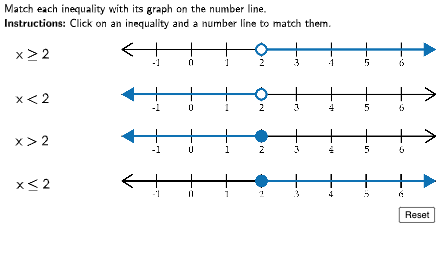
几何画板及绘图内容加载中,请稍等……
这个范例演示了数轴上的不等式。核心数学概念包括不等式及其在数轴上的表示。通过使用GeoGebra命令如Segment、Inequality等,可以构造不等式的图形。适合初中及以上学生学习不等式的概念和作图方法。
GeoGebra 命令及参数
LaTeX(((((" \text{" * QUESTION) * "\\") * INSTRUCTION) * "}")) → TEXTSegment(IneqPts(1), GraphPts(1)) → Line11Segment(IneqPts(1), GraphPts(2)) → Line12Segment(IneqPts(1), GraphPts(3)) → Line13Segment(IneqPts(1), GraphPts(4)) → Line14Segment(IneqPts(2), GraphPts(1)) → Line21Segment(IneqPts(2), GraphPts(2)) → Line22Segment(IneqPts(2), GraphPts(3)) → Line23Segment(IneqPts(2), GraphPts(4)) → Line24Segment(IneqPts(3), GraphPts(1)) → Line31Segment(IneqPts(3), GraphPts(2)) → Line32Segment(IneqPts(3), GraphPts(3)) → Line33Segment(IneqPts(3), GraphPts(4)) → Line34Segment(IneqPts(4), GraphPts(1)) → Line41Segment(IneqPts(4), GraphPts(2)) → Line42Segment(IneqPts(4), GraphPts(3)) → Line43Segment(IneqPts(4), GraphPts(4)) → Line44
AI 绘图提示语参考
在数轴上绘制不等式图形。首先确定四个不等式关键点,再确定四个对应的图形点,然后依次用线段连接每个关键点与每个图形点,共形成十六条线段,构成一个网格状结构。这些线段用于表示不等式在数轴上的区间关系,整体图形应清晰展示各点之间的连接模式,帮助理解不等式的表示方法。
以上提示语为根据原始绘图命令整理而来,仅供参考。