
列表项轻松着色
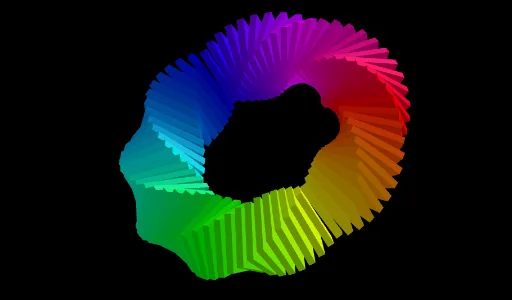
几何画板及绘图内容加载中,请稍等……
所属专题
Color 3D surfaces
①本范例演示如何在 GeoGebra 中对列表中的图形项进行着色;②涉及核心数学概念包括多边形、立体几何、解析几何;③作图要点:使用了 Polygon(多边形)、Prism(棱柱)、Midpoint(中点)、Circle(圆)、Line(直线)、Sequence(数列)、Rotate(旋转)等命令和对象;④适合高中及以上学生学习和探索几何图形的属性与变换。
GeoGebra 命令及参数
Polygon(A, B, 4, xOyPlane) → poly1, f, g, h, i, C, DPrism(poly1, 0.2) → a, E, edge1, edge2, edge3, edge4, edge5, edge6, edge7, edge8, F, G, H, face1, face2, face3, face4, face5Midpoint(D, B) → LCircle(yAxis, L) → cMidpoint(E, G) → JLine(L, J) → jSequence(Rotate[j, (w * π / 36), yAxis], w, 1, 72) → L_2Rotate(A, b, L) → AARotate(B, b, L) → BBPolygon(AA, BB, 4, xOyPlane) → poly2, k, l, m, n_1, I, KPrism(poly2, 0.2) → d, M, arêteAAM, arêteBBN, arêteIO, arêteKP, arêteMN, arêteNO, arêteOP, arêteMP, N, O, P, faceAABBNM, faceBBION, faceIKPO, faceAAKPM, faceMNOPRotate(Rotate[d, (A1 * π / (n / 2)), yAxis], (A1 * π / (n / 4)), Element[L_2, A1]) → B1Rotate(Rotate[d, (A2 * π / (n / 2)), yAxis], (A2 * π / (n / 4)), Element[L_2, A2]) → B2Rotate(Rotate[d, (A3 * π / (n / 2)), yAxis], (A3 * π / (n / 4)), Element[L_2, A3]) → B3Rotate(Rotate[d, (A4 * π / (n / 2)), yAxis], (A4 * π / (n / 4)), Element[L_2, A4]) → B4Rotate(Rotate[d, (A5 * π / (n / 2)), yAxis], (A5 * π / (n / 4)), Element[L_2, A5]) → B5Rotate(Rotate[d, (A6 * π / (n / 2)), yAxis], (A6 * π / (n / 4)), Element[L_2, A6]) → B6Rotate(Rotate[d, (A7 * π / (n / 2)), yAxis], (A7 * π / (n / 4)), Element[L_2, A7]) → B7Rotate(Rotate[d, (A8 * π / (n / 2)), yAxis], (A8 * π / (n / 4)), Element[L_2, A8]) → B8Rotate(Rotate[d, (A9 * π / (n / 2)), yAxis], (A9 * π / (n / 4)), Element[L_2, A9]) → B9Rotate(Rotate[d, (A10 * π / (n / 2)), yAxis], (A10 * π / (n / 4)), Element[L_2, A10]) → B10Rotate(Rotate[d, (A11 * π / (n / 2)), yAxis], (A11 * π / (n / 4)), Element[L_2, A11]) → B11Rotate(Rotate[d, (A12 * π / (n / 2)), yAxis], (A12 * π / (n / 4)), Element[L_2, A12]) → B12Rotate(Rotate[d, (A13 * π / (n / 2)), yAxis], (A13 * π / (n / 4)), Element[L_2, A13]) → B13Rotate(Rotate[d, (A14 * π / (n / 2)), yAxis], (A14 * π / (n / 4)), Element[L_2, A14]) → B14Rotate(Rotate[d, (A15 * π / (n / 2)), yAxis], (A15 * π / (n / 4)), Element[L_2, A15]) → B15Rotate(Rotate[d, (A16 * π / (n / 2)), yAxis], (A16 * π / (n / 4)), Element[L_2, A16]) → B16Rotate(Rotate[d, (A17 * π / (n / 2)), yAxis], (A17 * π / (n / 4)), Element[L_2, A17]) → B17Rotate(Rotate[d, (A18 * π / (n / 2)), yAxis], (A18 * π / (n / 4)), Element[L_2, A18]) → B18Rotate(Rotate[d, (A19 * π / (n / 2)), yAxis], (A19 * π / (n / 4)), Element[L_2, A19]) → B19Rotate(Rotate[d, (A20 * π / (n / 2)), yAxis], (A20 * π / (n / 4)), Element[L_2, A20]) → B20Rotate(Rotate[d, (A21 * π / (n / 2)), yAxis], (A21 * π / (n / 4)), Element[L_2, A21]) → B21Rotate(Rotate[d, (A22 * π / (n / 2)), yAxis], (A22 * π / (n / 4)), Element[L_2, A22]) → B22Rotate(Rotate[d, (A23 * π / (n / 2)), yAxis], (A23 * π / (n / 4)), Element[L_2, A23]) → B23Rotate(Rotate[d, (A24 * π / (n / 2)), yAxis], (A24 * π / (n / 4)), Element[L_2, A24]) → B24Rotate(Rotate[d, (A25 * π / (n / 2)), yAxis], (A25 * π / (n / 4)), Element[L_2, A25]) → B25Rotate(Rotate[d, (A26 * π / (n / 2)), yAxis], (A26 * π / (n / 4)), Element[L_2, A26]) → B26Rotate(Rotate[d, (A27 * π / (n / 2)), yAxis], (A27 * π / (n / 4)), Element[L_2, A27]) → B27Rotate(Rotate[d, (A28 * π / (n / 2)), yAxis], (A28 * π / (n / 4)), Element[L_2, A28]) → B28Rotate(Rotate[d, (A29 * π / (n / 2)), yAxis], (A29 * π / (n / 4)), Element[L_2, A29]) → B29Rotate(Rotate[d, (A30 * π / (n / 2)), yAxis], (A30 * π / (n / 4)), Element[L_2, A30]) → B30Rotate(Rotate[d, (A31 * π / (n / 2)), yAxis], (A31 * π / (n / 4)), Element[L_2, A31]) → B31Rotate(Rotate[d, (A32 * π / (n / 2)), yAxis], (A32 * π / (n / 4)), Element[L_2, A32]) → B32Rotate(Rotate[d, (A33 * π / (n / 2)), yAxis], (A33 * π / (n / 4)), Element[L_2, A33]) → B33Rotate(Rotate[d, (A34 * π / (n / 2)), yAxis], (A34 * π / (n / 4)), Element[L_2, A34]) → B34Rotate(Rotate[d, (A35 * π / (n / 2)), yAxis], (A35 * π / (n / 4)), Element[L_2, A35]) → B35Rotate(Rotate[d, (A36 * π / (n / 2)), yAxis], (A36 * π / (n / 4)), Element[L_2, A36]) → B36Rotate(Rotate[d, (A37 * π / (n / 2)), yAxis], (A37 * π / (n / 4)), Element[L_2, A37]) → B37Rotate(Rotate[d, (A38 * π / (n / 2)), yAxis], (A38 * π / (n / 4)), Element[L_2, A38]) → B38Rotate(Rotate[d, (A39 * π / (n / 2)), yAxis], (A39 * π / (n / 4)), Element[L_2, A39]) → B39Rotate(Rotate[d, (A40 * π / (n / 2)), yAxis], (A40 * π / (n / 4)), Element[L_2, A40]) → B40Rotate(Rotate[d, (A41 * π / (n / 2)), yAxis], (A41 * π / (n / 4)), Element[L_2, A41]) → B41Rotate(Rotate[d, (A42 * π / (n / 2)), yAxis], (A42 * π / (n / 4)), Element[L_2, A42]) → B42Rotate(Rotate[d, (A43 * π / (n / 2)), yAxis], (A43 * π / (n / 4)), Element[L_2, A43]) → B43Rotate(Rotate[d, (A44 * π / (n / 2)), yAxis], (A44 * π / (n / 4)), Element[L_2, A44]) → B44Rotate(Rotate[d, (A45 * π / (n / 2)), yAxis], (A45 * π / (n / 4)), Element[L_2, A45]) → B45Rotate(Rotate[d, (A46 * π / (n / 2)), yAxis], (A46 * π / (n / 4)), Element[L_2, A46]) → B46Rotate(Rotate[d, (A47 * π / (n / 2)), yAxis], (A47 * π / (n / 4)), Element[L_2, A47]) → B47Rotate(Rotate[d, (A48 * π / (n / 2)), yAxis], (A48 * π / (n / 4)), Element[L_2, A48]) → B48Rotate(Rotate[d, (A49 * π / (n / 2)), yAxis], (A49 * π / (n / 4)), Element[L_2, A49]) → B49Rotate(Rotate[d, (A50 * π / (n / 2)), yAxis], (A50 * π / (n / 4)), Element[L_2, A50]) → B50Rotate(Rotate[d, (A51 * π / (n / 2)), yAxis], (A51 * π / (n / 4)), Element[L_2, A51]) → B51Rotate(Rotate[d, (A52 * π / (n / 2)), yAxis], (A52 * π / (n / 4)), Element[L_2, A52]) → B52Rotate(Rotate[d, (A53 * π / (n / 2)), yAxis], (A53 * π / (n / 4)), Element[L_2, A53]) → B53Rotate(Rotate[d, (A54 * π / (n / 2)), yAxis], (A54 * π / (n / 4)), Element[L_2, A54]) → B54Rotate(Rotate[d, (A55 * π / (n / 2)), yAxis], (A55 * π / (n / 4)), Element[L_2, A55]) → B55Rotate(Rotate[d, (A56 * π / (n / 2)), yAxis], (A56 * π / (n / 4)), Element[L_2, A56]) → B56Rotate(Rotate[d, (A57 * π / (n / 2)), yAxis], (A57 * π / (n / 4)), Element[L_2, A57]) → B57Rotate(Rotate[d, (A58 * π / (n / 2)), yAxis], (A58 * π / (n / 4)), Element[L_2, A58]) → B58Rotate(Rotate[d, (A59 * π / (n / 2)), yAxis], (A59 * π / (n / 4)), Element[L_2, A59]) → B59Rotate(Rotate[d, (A60 * π / (n / 2)), yAxis], (A60 * π / (n / 4)), Element[L_2, A60]) → B60Rotate(Rotate[d, (A61 * π / (n / 2)), yAxis], (A61 * π / (n / 4)), Element[L_2, A61]) → B61Rotate(Rotate[d, (A62 * π / (n / 2)), yAxis], (A62 * π / (n / 4)), Element[L_2, A62]) → B62Rotate(Rotate[d, (A63 * π / (n / 2)), yAxis], (A63 * π / (n / 4)), Element[L_2, A63]) → B63Rotate(Rotate[d, (A64 * π / (n / 2)), yAxis], (A64 * π / (n / 4)), Element[L_2, A64]) → B64Rotate(Rotate[d, (A65 * π / (n / 2)), yAxis], (A65 * π / (n / 4)), Element[L_2, A65]) → B65Rotate(Rotate[d, (A66 * π / (n / 2)), yAxis], (A66 * π / (n / 4)), Element[L_2, A66]) → B66Rotate(Rotate[d, (A67 * π / (n / 2)), yAxis], (A67 * π / (n / 4)), Element[L_2, A67]) → B67Rotate(Rotate[d, (A68 * π / (n / 2)), yAxis], (A68 * π / (n / 4)), Element[L_2, A68]) → B68Rotate(Rotate[d, (A69 * π / (n / 2)), yAxis], (A69 * π / (n / 4)), Element[L_2, A69]) → B69Rotate(Rotate[d, (A70 * π / (n / 2)), yAxis], (A70 * π / (n / 4)), Element[L_2, A70]) → B70Rotate(Rotate[d, (A71 * π / (n / 2)), yAxis], (A71 * π / (n / 4)), Element[L_2, A71]) → B71Rotate(Rotate[d, (A72 * π / (n / 2)), yAxis], (A72 * π / (n / 4)), Element[L_2, A72]) → B72
AI 绘图提示语参考
画一个四边形,然后以该四边形为基础构造一个棱柱。接着找到棱柱的一个顶点和四边形的一个顶点的中点,并以此中点为圆心画一个圆。再找到棱柱的另外两个顶点的中点,并连接这两个中点形成一条直线。最后,将这条直线绕Y轴旋转72次,每次旋转角度为π/36,得到一系列旋转后的直线。
以上提示语为根据原始绘图命令整理而来,仅供参考。