
双数轴模型——百分比变化
几何画板及绘图内容加载中,请稍等……
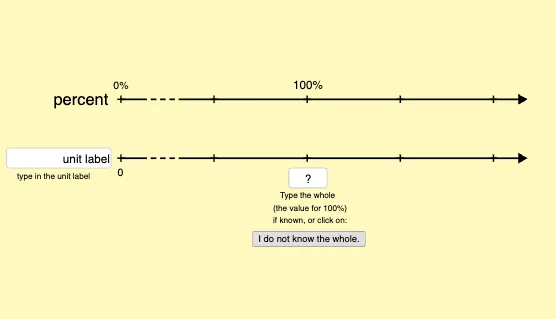
该范例使用双数轴模型来演示百分比变化的情境。核心数学概念包括百分比、比例和数值调整。通过使用GeoGebra命令如If, Point, Segment, Textfield等,可以动态展示数值变化。适合初中及以上学生学习比例和百分比计算。
GeoGebra 命令及参数
If(q1changeValue ≥ 0 ∧ q1changeValue ≤ 0.1, 0.1, If[q1changeValue < 25, round((100 * q1changeValue)) / 100, If[q1changeValue < 75, round((10 * q1changeValue)) / 10, If[q1changeValue > 100, 100, round(q1changeValue)]]]) → q1changeValueRndIf(q1 ≥ 0 ∧ q1 ≤ 0.1, 0.1, If[q1 < 25, round((100 * q1)) / 100, If[q1 < 75, round((10 * q1)) / 10, If[q1 > 100, 100, round(q1)]]]) → q1rndIf(q2 < 500, 100, If[q2 < 1000, 10, 1]) → roundingFactorDNL2valuesIf(q2 ≥ 0 ∧ q2 ≤ 0.1, 0.1, round((roundingFactorDNL2values * q2)) / roundingFactorDNL2values) → q2rndPoint(Segment[(0, 0.85), (4.3, 0.85)]) → SlidePtIf(q1 < 500, 100, If[q1 < 1000, 10, 1]) → roundingFactorDNL1valuesSegment(A, DNL2ArrowPt) → lineDNL1Segment(B, DNL1ArrowPt) → lineDNL2Textfield(q1labelForLengthAlwaysShow) → q1blabelInputTextfield(q2labelForLengthAlwaysShow) → q2blabelInputTextfield(q1) → q1avalueInputText("0%", (x(B) - 0.08, y(B) + yOffSet)) → zeroDNL1Text("0", (x(A) - 0.035, y(A) - (1.7 * yOffSet))) → zeroDNL2Segment((3, h), (3, h + 1)) → startSegPercentValueIncrSegment((2.5, h + 1), (2.5, h + 1.2)) → startSegPercentIncrSequence(Segment[(k, -0.02), (k, h + 0.02)], k, 0.3, 0.6, 0.1) → startSelectDNLGapDashedSegment((1.5, -1.6), (1.5, h + 1.6)) → startSegPercentDecrVector(((2 * length) - 0.25, (0.3 * h)), ((2 * length) - 0.9, (0.3 * h))) → startVectorDecrButtonVector(((2 * length) + 0.25, (0.3 * h)), ((2 * length) + 0.9, (0.3 * h))) → startVectorIncrButtonIf(q2changeValue ≥ 0 ∧ q2changeValue ≤ 0.1, 0.1, If[q2changeValue < 25, round((100 * q2changeValue)) / 100, If[q2changeValue < 75, round((10 * q2changeValue)) / 10, round(q2changeValue)]]) → q2changeValueRndSegment(SlidePt + (0, h + 0.9), SlidePt - (0, h + 0.9)) → slideSegTextfield(locationXq1InputTextToParse) → locationXq1InputTextfield(locationXq2InputTextToParse) → locationXq2InputTextfield(q2inputTextToParse) → q2avalueInputTextfield(q2inputTextToParse) → q2valueInputStartTextfield(q2changeValueTextToParse) → startDecrAmtInputTextfield(q2decrIntervalTextToParse) → startDecrAmtIntervalInputTextfield(q1changeValueTextToParse) → startDecrPercentInputTextfield(q1decrIntervalTextToParse) → startDecrPercentIntervalInputTextfield(q2changeValueTextToParse) → startIncrAmtInputTextfield(q2incrIntervalTextToParse) → startIncrAmtIntervalInputTextfield(q1changeValueTextToParse) → startIncrPercentInputTextfield(q1incrIntervalTextToParse) → startIncrPercentIntervalInputSequence((k, h), k, 0, 4.3, ((2 * length)) / hatchMinor) → hashMinorDNL1Sequence((k, 0), k, 0, 4.3, ((2 * length)) / hatchMinor) → hashMinorDNL2Vector(((If[decrCk, 1.5, 2.5] * length), If[amtCk, -1.9, h + 1.88]), ((If[decrCk, 1, 3] * length), If[amtCk, -1.9, h + 1.88])) → startDecrIncrVector1Vector(((If[decrCk, 1, 1.5] * If[amtCk, (1.5 * length), (1.8 * length)]), If[amtCk, -1.9, h + 1.88]), ((2 * length), If[amtCk, -1.9, h + 1.88])) → startDecrIncrVector2Vector(((2 * length), h + 1.085), ((q1changeValue / ((50 * zoom)) * length), h + 1.085)) → dnlIntervalVector2Segment(((2 * length), If[dnlCk ∧ showAmtIntervalCk ∧ (¬showPercentIntervalCk), -1, If[amtCk ∧ (¬dnlCk), -2, If[showAmtCk ∧ (¬showPercentIntervalCk), -0.93, If[dnlCk, h + 1.2, h + 2]]]]), ((2 * length), If[dnlCk ∧ showAmtCk ∧ showPercentCk, -1.3, If[showAmtIntervalCk ∧ showPercentIntervalCk, -1, If[(¬dnlCk) ∧ showPercentIntervalCk, h + 1.2, If[(¬dnlCk) ∧ (¬showPercentCk) ∧ (¬showPercentIntervalCk) ∧ (¬amtCk) ∧ (¬startCk2), 0, If[(¬dnlCk) ∧ amtCk, h, (0.5 * h)]]]]])) → segAt100percentSequence(((length * k), h), k, 0, 4, 1) → hashMajorDNL1Sequence(((length * k), 0), k, 0, 4, 1) → hashMajorDNL2Sequence(Text[((0.5 * p) * q2), ((length * p) + xOffSet, y(A) - (1.7 * yOffSet))], p, If[addHashMarksCk ∧ (hatchMinor ≟ 7 ∨ hatchMinor ≟ 9), 6 / hatchMinor, If[addHashMarksCk ∧ hatchMinor ≤ 5, 2 / hatchMinor, 4 / If[addHashMarksCk, hatchMinor, 4]]], 4, If[addHashMarksCk ∧ (hatchMinor ≟ 7 ∨ hatchMinor ≟ 9), 6 / hatchMinor, If[addHashMarksCk ∧ hatchMinor ≤ 5, 2 / hatchMinor, 4 / If[addHashMarksCk, hatchMinor, 4]]]) → hashMarkValuesTextDNL2Sequence(Text[(50 * q) + "%", ((length * q) + topxOffSet, y(B) + yOffSet)], q, If[addHashMarksCk ∧ (hatchMinor ≟ 7 ∨ hatchMinor ≟ 9), 6 / hatchMinor, If[addHashMarksCk ∧ hatchMinor ≤ 5, 2 / hatchMinor, 4 / If[addHashMarksCk, hatchMinor, 4]]], If[addHashMarksCk ∧ (hatchMinor ≟ 3 ∨ hatchMinor ≟ 6 ∨ hatchMinor ≟ 9), 3.5, 4], If[addHashMarksCk ∧ (hatchMinor ≟ 7 ∨ hatchMinor ≟ 9), 6 / hatchMinor, If[addHashMarksCk ∧ hatchMinor ≤ 5, 2 / hatchMinor, 4 / If[addHashMarksCk, hatchMinor, 4]]]) → hashMarkValuesTextDNL1If(dnlCk, Segment[((q1changeValue / ((50 * zoom)) * length), If[showAmtCk, -1.3, If[showAmtIntervalCk ∧ (¬showPercentIntervalCk) ∧ (¬showPercentCk), h + 0.2, h + 1.2]]), ((q1changeValue / ((50 * zoom)) * length), If[showAmtCk ∧ (showPercentCk ∨ showPercentIntervalCk), 3, If[showAmtCk, h + 0.2, If[showAmtIntervalCk, -1, -0.15]]])], Segment[((If[decrCk, 1, 3] * length), If[(¬dnlCk) ∧ showPercentIntervalCk, h + 1.2, If[(¬dnlCk) ∧ showPercentCk, h + 0.6, (0.5 * h)]]), ((If[decrCk, 1, 3] * length), If[amtCk, -2, h + 2])]) → segIncrDecrVector(((2 * length), If[showAmtIntervalCk, -0.85, h + 1.085]), (If[¬dnlCk, If[decrCk, length, (3 * length)], (q1changeValue / ((50 * zoom)) * length)], If[showAmtIntervalCk, -0.85, h + 1.085])) → dnlIntervalVector
AI 绘图提示语参考
画两条平行的数轴,表示百分比变化。第一条数轴标注0%到100%,第二条数轴标注0到1000。在第一条数轴上,根据输入值动态显示百分比变化,并在第二条数轴上显示相应的数值变化。使用虚线和小刻度标记数值间隔,并在数轴旁标注数值。添加按钮和滑块,用于调整数值和百分比变化,并实时更新两条数轴的显示。
以上提示语为根据原始绘图命令整理而来,仅供参考。