
分数减法估算练习:判断差值与基准数的大小
几何画板及绘图内容加载中,请稍等……
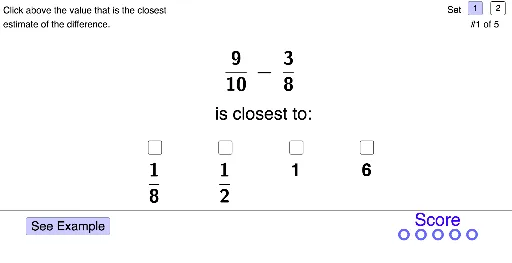
① 本范例是一个交互式数学练习,演示如何估算两个分数相减的结果与给定基准数(如1/2)的大小关系,并通过图形化反馈帮助学习者掌握估算策略。② 核心数学概念包括分数减法、有理数比较、估算与近似、数感培养,涉及分数、减法、不等式等基础算术运算。③ 作图要点:从构造摘要可见,使用了GeoGebra的If、Polygon、FractionText、Ellipse、Vector、Segment、Sequence等命令,创建了多个对象如AnsNotePolyPt、set、problem、sumBenchmarkSet1/2、sumBenchmarkValue、SR1-SR4、SRSkip、ansCorrect、ansSkip、sr1-sr4、SkipCorrectPt、AnsSelectedPt、SRSelect、example、directions、probTextClosestTo、probNumberTotal、ExPt、NextPt、nextPoly系列、buttonNext、term1num、term2num、term1denom等,用于生成题目、显示分数文本、绘制选择按钮和反馈图形。④ 适合小学高年级至初中阶段的学生,用于课堂练习或家庭作业,也可作为教师演示估算策略的教学工具,帮助学生直观理解分数减法估算。
GeoGebra 命令及参数
If(set ≟ 1, Element[sumBenchmarkSet1, problem], Element[sumBenchmarkSet2, problem]) → sumBenchmarkValueIf(set ≟ 1, {0, 0, 0, 0, 0, 0, 0, 0, 0, 0}, {0, 1, 0, 0, 1, 0, 0, 0, 0, 0}) → SR1If(set ≟ 1, {0, 0, 0, 0, 0, 0, 0, 0, 0, 0}, {1, 0, 0, 0, 0, 0, 0, 0, 0, 0}) → SR2If(set ≟ 1, {1, 0, 0, 0, 0, 0, 0, 0, 0, 0}, {1, 1, 0, 1, 0, 0, 0, 0, 0, 0}) → SR3If(set ≟ 1, {1, 0, 0, 0, 0, 0, 0, 0, 0, 0}, {0, 0, 0, 1, 1, 0, 0, 0, 0, 0}) → SR4If(set ≟ 1, {2, 1, 4, 2, 3, 1, 1, 1, 1, 1}, {2, 1, 2, 4, 3, 1, 1, 1, 1, 1}) → ansCorrectIf(Element[ansCorrect, problem] ≟ 1, (2, 1.8), If[Element[ansCorrect, problem] ≟ 2, (8, 1.8), If[Element[ansCorrect, problem] ≟ 3, (14, 1.8), (20.1, 1.8)]]) → SkipCorrectPtIf(ansSkip ≟ 1, SkipCorrectPt, If[sr1, (5.9, 1.9), If[sr2, (9.3, 1.9), If[sr3, (12.65, 1.9), If[sr4, (16, 1.9)]]]]) → AnsSelectedPtIf(sr1, SR1, If[sr2, SR2, If[sr3, SR3, SR4]]) → SRSelectPolygon(NextPt + (0, 0.2), NextPt + (0.2, 0), NextPt + (2, 0), NextPt + (2, -0.5), NextPt + (4, 0.5), NextPt + (2, 1.5), NextPt + (2, 1), NextPt + (0.2, 1), NextPt + (0, 0.8)) → nextPoly, nextPoly_2, nextPoly_3, nextPoly_4, nextPoly_5, nextPoly_6, nextPoly_7, nextPoly_8, nextPoly_9, nextPoly_{10}If(set ≟ 1, {9, 5, 5, 5, 5, 1, 1, 1, 1, 1}, {1, 12, 11, 8, 14, 1, 1, 1, 1, 1}) → term1numIf(set ≟ 1, {3, 2, 3, 3, 2, 1, 1, 1, 1, 1}, {7, 9, 5, 9, 4, 1, 1, 1, 1, 1}) → term2numIf(set ≟ 1, {10, 8, 6, 9, 7, 1, 1, 1, 1, 1}, {10, 11, 12, 3, 5, 1, 1, 1, 1, 1}) → term1denomIf(set ≟ 1, {8, 7, 16, 11, 9, 1, 1, 1, 1, 1}, {9, 10, 8, 8, 7, 1, 1, 1, 1, 1}) → term2denomPolygon(ProbSetSelect1Pt, ProbSetSelect1Pt + (0.5, 0), ProbSetSelect1Pt + (0.5, 0.5), ProbSetSelect1Pt + (0, 0.5)) → probSetSelect1Poly, probSetSelect1polySeg, probSetSelect1polySeg_1, probSetSelect1polySeg_2, probSetSelect1polySeg_3Polygon(ProbSetSelect2Pt, ProbSetSelect2Pt + (0.5, 0), ProbSetSelect2Pt + (0.5, 0.5), ProbSetSelect2Pt + (0, 0.5)) → probSetSelect2Poly, probSetSelect2polySeg_1, probSetSelect2polySeg_2, probSetSelect2polySeg_3, probSetSelect2polySegIf(set ≟ 1, {0, 0, 0, 0, 0, 0, 0, 0, 0, 0}, {2, 0, 3, 0, 0, 0, 0, 0, 0, 0}) → term1mixedWholeIf(set ≟ 1, {0, 0, 0, 0, 0, 0, 0, 0, 0, 0}, {0, 0, 2, 0, 1, 0, 0, 0, 0, 0}) → term2mixedWholeIf(sr1, 1, If[sr2, 2, If[sr3, 3, If[sr4, 4, 0]]]) → srSelectIf(srSelect ≟ Element[ansCorrect, problem], 1, 0) → correctPolygon(AnsSelectedPt + If[Element[SRSelect, problem] ≟ 0, (0, 0), (0, 0.8)], AnsSelectedPt + (2, 0) + If[Element[SRSelect, problem] ≟ 0, (0, 0), (0, 0.8)], AnsSelectedPt + (2, 2.5), AnsSelectedPt + (0, 2.5)) → ansSelectedPoly, ansSelectedPolyBottom, ansSelectedPolyR, ansSelectedPolyTop, ansSelectedPolyLIf(sr1 ∨ sr2 ∨ sr3 ∨ sr4, true, false) → ansSelectedIf(set ≟ 1, {1, 0.5, 1, 0.5, 0.6666666666666666, 1, 1, 1, 1, 1}, {2, 1, 4, 3, 3, 1, 1, 1, 1, 1}) → term1BenchmarkIf(set ≟ 1, {0.5, 0.25, 0.25, 0.25, 0.3333333333333333, 1, 1, 1, 1, 1}, {1, 1, 2.5, 1, 1.5, 1, 1, 1, 1, 1}) → term2BenchmarkFractionText(If[set ≟ 1, Element[sumBenchmarkSet1, problem], Element[sumBenchmarkSet2, problem]]) → sumBenchmarkIf(Element[ansCorrect, problem] ≟ 1, (6.9, 3.8), If[Element[ansCorrect, problem] ≟ 2, (10.25, 3.8), If[Element[ansCorrect, problem] ≟ 3, (13.65, 3.8), (17, 3.8)]]) → CorrectEllipsePt2Ellipse(CorrectEllipsePt1, CorrectEllipsePt2, CorrectEllipsePt3) → correctEllipseVector((14.5, 0.5), (13.7, 1)) → exCorrectArrowSegment((17.3, 8), (19.7, 8)) → exSegBenchmarkSegment((12.8, 8), (16.4, 8)) → exSegOriginalVector(CorrectEllipsePt2 + (1.9, 0), CorrectEllipsePt2 + (0.9, 0)) → ansNoteIncCorrVectorPolygon(AnsNotePolyPt + (0, If[sumBenchmarkValue ≥ 1, 0.5, 0]), AnsNotePolyPt + (7, If[sumBenchmarkValue ≥ 1, 0.5, 0]), AnsNotePolyPt + (7, 5), AnsNotePolyPt + (0, 5)) → ansNotePoly, ansNotePolySegBottom, ansNotePolySegR, ansNotePolySegTop, ansNotePolySegLIf(set ≟ 1, {-1, -1, -1, -1, -1, -1, -1, -1, -1, -1}, {-1, 0, 1, -1, 0, -1, -1, -1, -1, -1}) → SR1wholeIf(set ≟ 1, {-1, -1, -1, -1, -1, -1, -1, -1, -1, -1}, {1, -1, 1, -1, -1, -1, -1, -1, -1, -1}) → SR2wholeIf(set ≟ 1, {1, -1, -1, -1, -1, -1, -1, -1, -1, -1}, {2, 1, 2, 1, 1, -1, -1, -1, -1, -1}) → SR3wholeIf(set ≟ 1, {6, -1, -1, -1, -1, -1, -1, -1, -1, -1}, {-1, -1, 2, 2, 13, -1, -1, -1, -1, -1}) → SR4wholeIf(set ≟ 1, {2, 2, 10, 4, 4, 1, 1, 1, 1, 1}, {0, 2, 2, 8, 2, 1, 1, 1, 1, 1, 1}) → SR2denomIf(set ≟ 1, {1, 1, 2, 1, 1, 1, 1, 1, 1, 1}, {-1, 1, 1, 3, 1, 1, 1, 1, 1, 1}) → SR2numIf(set ≟ 1, {8, 4, 16, 9, 8, 1, 1, 1, 1, 1}, {9, 0, 8, 5, 0, 1, 1, 1, 1, 1}) → SR1denomIf(set ≟ 1, {1, 1, 1, 1, 1, 1, 1, 1, 1, 1}, {6, -1, 1, 1, -1, 1, 1, 1, 1, 1}) → SR1numIf(set ≟ 1, {-1, 3, 1, 3, 1, 1, 1, 1, 1, 1}, {-1, -1, 1, -1, 1, 1, 1, 1, 1, 1}) → SR3numIf(set ≟ 1, {-1, 4, 2, 4, 3, 1, 1, 1, 1, 1}, {-1, -1, 2, -1, 2, 1, 1, 1, 1, 1}) → SR3denomIf(set ≟ 1, {-1, 3, 3, 2, 3, 1, 1, 1, 1, 1}, {14, 7, 3, -1, -1, 1, 1, 1, 1, 1}) → SR4numIf(set ≟ 1, {-1, 1, 4, 2, 4, 1, 1, 1, 1, 1}, {1, 5, 4, -1, -1, 1, 1, 1, 1, 1}) → SR4denomSequence((17.8 + i, 0.6), i, 1, 4.5, 0.81) → scorePtsEmptySequence((17.8 + i, 0.6), i, 1, scoreTotal, 0.81) → scorePts
AI 绘图提示语参考
画一个分数减法估算练习的交互式图形,包含两个分数的分子和分母,以及一个基准数1/2。用户输入两个分数,计算它们的差,并判断这个差是否小于或大于1/2。图形中包含箭头、椭圆、多边形和段落,用于显示计算结果和反馈。分数以文本形式显示,箭头和椭圆用于指示正确答案的方向。
以上提示语为根据原始绘图命令整理而来,仅供参考。