
平行四边形面积公式探索
几何画板及绘图内容加载中,请稍等……
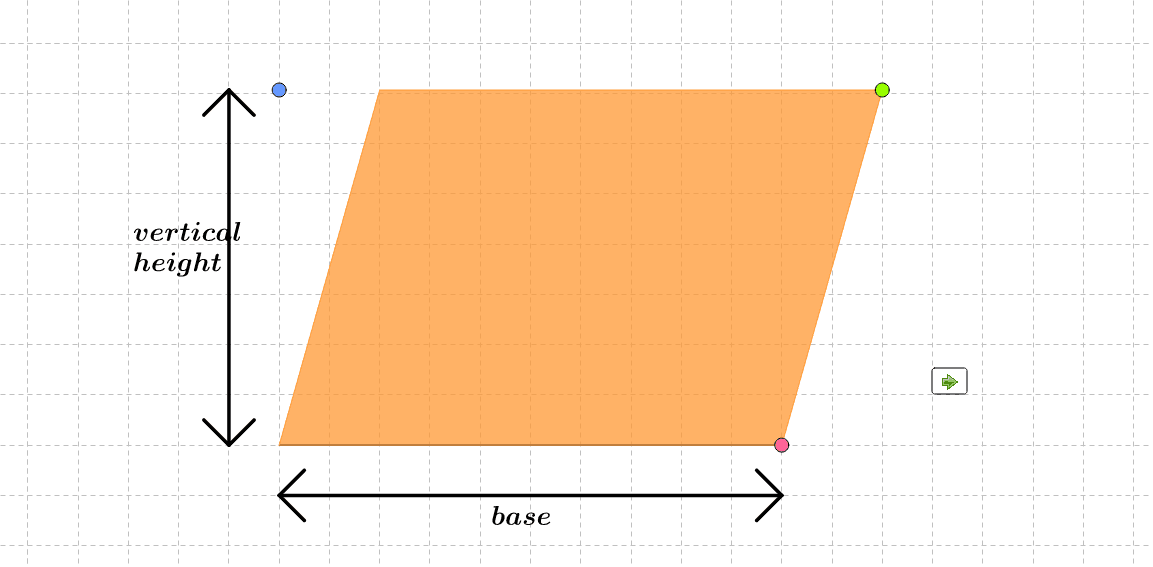
①本范例通过交互式演示,帮助学习者直观理解平行四边形面积公式的推导过程;②涉及的核心数学概念包括平行四边形、底边、高、向量、几何变换;③作图要点提炼自 GeoGebra 命令:Intersect, Polygon, Point, Segment, Line, Midpoint, Min, OrthogonalLine, Vector, Translate,对象包括 A, minB, maxB, constrainB, a, b, B, c, maxheight, minheight, constrainheight, d, e, height, f, constrainC, g, h, C, i, j, D, poly1, a_1, b_1, c_1, d_1, base_1, base_2, m_1, m_2, m_3, m_4, m_5, base_3, text1, text2, vheight_1, vheight_2, vheight_3;④适合初中及以上学生,用于几何教学和公式理解。
GeoGebra 命令及参数
Intersect(xAxis, yAxis) → APolygon(A + (minB, 0), A + (maxB, 0)) → constrainB, a, bPoint(constrainB) → BSegment(A, B) → cPolygon(A + (0, minheight), A + (0, maxheight)) → constrainheight, d, ePoint(constrainheight) → heightLine(height, c) → fPolygon((x(B) + (0.5 * x(B - A)), y(height)), (x(B) - (0.5 * x(B - A)), y(height))) → constrainC, g, hPoint(constrainC) → CLine(C, B) → iLine(A, i) → jIntersect(f, j) → DPolygon(A, B, C, D) → poly1, a_1, b_1, c_1, d_1Segment(base_1, base_2) → m_1Segment(base_1, base_1 + (0.5, 0.5)) → m_2Segment(base_1, base_1 + (0.5, (-0.5))) → m_3Segment(base_2, base_2 + ((-0.5), 0.5)) → m_4Segment(base_2, base_2 + ((-0.5), (-0.5))) → m_5Midpoint(base_1, base_2) → base_3Midpoint(vheight_1, vheight_2) → vheight_3Segment(vheight_1, vheight_2) → n_1Segment(vheight_2, vheight_2 + ((-0.5), (-0.5))) → n_2Segment(vheight_2, vheight_2 + (0.5, (-0.5))) → n_3Segment(vheight_1, vheight_1 + ((-0.5), 0.5)) → n_4Segment(vheight_1, vheight_1 + (0.5, 0.5)) → n_5Midpoint(vheight_4, vheight_5) → vheight_6Segment(vheight_4, vheight_5) → p_1Segment(vheight_5, vheight_5 + (0.5, (-0.5))) → p_2Segment(vheight_5, vheight_5 + ((-0.5), (-0.5))) → p_3Segment(vheight_4, vheight_4 + (0.5, 0.5)) → p_4Segment(vheight_4, vheight_4 + ((-0.5), 0.5)) → p_5Min(x(A), x(D)) → ADminOrthogonalLine(B, f) → kIntersect(f, k) → EPolygon(E, C, B) → poly2, b_2, e_1, c_2Vector(B, A) → t_1Translate(E, Vector[(rot * t_1)]) → E'Translate(C, Vector[(rot * t_1)]) → C'Translate(B, Vector[(rot * t_1)]) → B'Polygon(E', C', B') → poly2', b', e', c'Polygon(D, A, B, E) → poly3, d_2, a_2, b_3, e_2OrthogonalLine(A, f) → lIntersect(l, f) → FPolygon(F, A, B, C) → poly4, m, n, p, qPolygon(D, F, A) → poly5, r, s, tVector(A, B) → t_2Translate(D, Vector[(rot * t_2)]) → D'Translate(D, Vector[(rot * t_2)]) → D'_1Translate(F, Vector[(rot * t_2)]) → F'Translate(A, Vector[(rot * t_2)]) → A'Polygon(D'_1, F', A') → poly5', a', d'_1, f'
AI 绘图提示语参考
画一个平行四边形,展示其面积公式。首先绘制坐标轴并标记交点,然后创建平行四边形的底边和高度,用向量表示。接着,通过几何变换展示平行四边形与长方形的等积性,包括旋转和平移操作。最后,用不同颜色和线条强调关键部分,如底边、高度和变换后的图形,并标注相关面积公式。
以上提示语为根据原始绘图命令整理而来,仅供参考。