
达兰贝尔椭圆演示
几何画板及绘图内容加载中,请稍等……
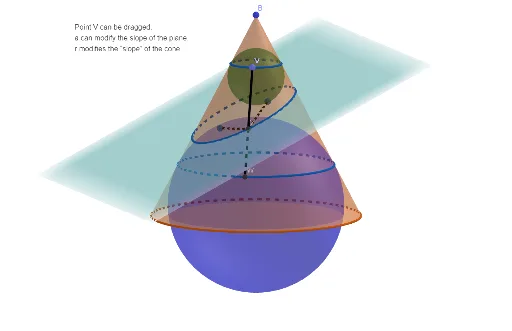
①本范例演示了达兰贝尔椭圆的构造及其与圆锥曲线的关系;②涉及核心概念包括圆锥曲线、椭圆、几何作图、平面与线的交点;③构造要点:使用 GeoGebra 命令如 Cone(圆锥)、Line(直线)、Intersect(交点)、Segment(线段)、Point(点)、Plane(平面)等;④适合高中及以上学生及数学爱好者学习圆锥曲线性质及几何作图技巧。
GeoGebra 命令及参数
Cone(A, B, r) → b, c, dLine(D, yAxis) → fIntersect(xAxis, c, 1) → ESegment(B, E) → gPoint(g) → FPlane(F, f) → pIntersect(xAxis, c, 2) → ILine(B, I) → nLine(F, D) → iIntersect(i, n) → CAngularBisector(B, C, F) → hIntersect(h, zAxis) → GOrthogonalLine(G, n, space) → jIntersect(j, n) → HSphere(G, H) → eAngularBisector(E, F, C) → kIntersect(k, zAxis) → JOrthogonalLine(J, i, space) → lIntersect(l, i) → KSphere(J, K) → mIntersectPath(p, b) → qCorner(q) → L, M, T, UIntersectPath(p, m) → sIntersectPath(p, e) → tOrthogonalLine(J, n, space) → f_1Intersect(f_1, d) → N, OIntersect(n, l) → PIntersect(l, f_1) → QPoint(yAxis) → RPlane(I, A, R) → p_1Plane(N, p_1) → q_1IntersectPath(q_1, m) → c_1OrthogonalLine(G, g, space) → g_1Intersect(g_1, g) → SPlane(S, p_1) → r_1IntersectPath(r_1, e) → d_1Point(d_1) → VLine(B, V) → h_1Intersect(h_1, c_1) → W,Segment(V, W) → i_1Intersect(i_1, q) → Z,Point(s) → F_1Segment(F_1, Z) → j_1Point(t) → F_2Segment(F_2, Z) → k_1
AI 绘图提示语参考
绘制一个Dandelin椭圆,通过构造圆锥、平面和直线的交点来定义椭圆。首先创建圆锥,然后通过平面与圆锥的交线构造椭圆的两个焦点F和F1,接着通过焦点和椭圆上的点构造辅助线和辅助平面,最终确定椭圆的具体形状。
以上提示语为根据原始绘图命令整理而来,仅供参考。