
转滑变换(Turn-Slide)的几何构造与验证
几何画板及绘图内容加载中,请稍等……
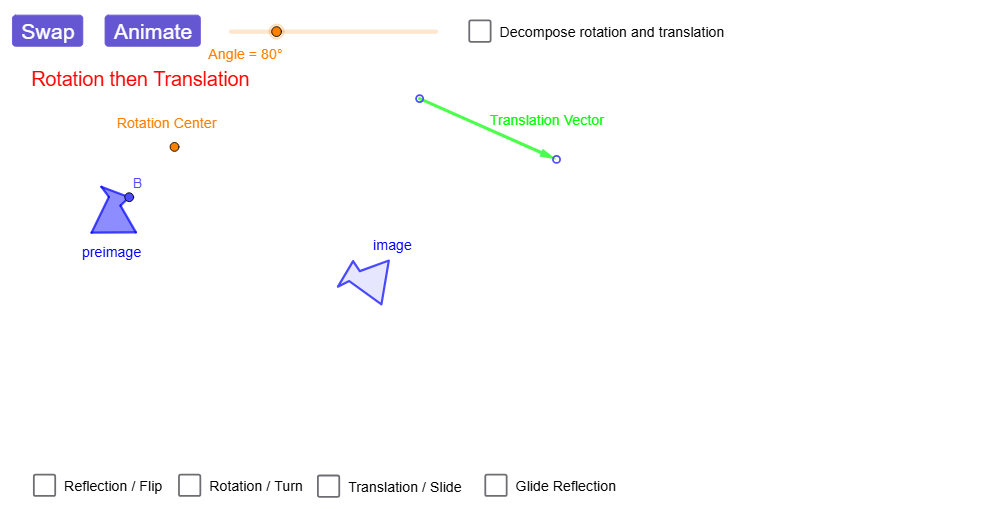
该范例通过把一个多边形先做旋转再做平移(或等效地先做平移再做旋转),演示“转滑(Turn-Slide)”对应图形在平面中的位置变化与对应关系。核心数学概念包括刚体变换、复合变换(旋转+平移/滑移)、反射与直线(可作为对照)、对应点位置的一致性,以及由构造得到的角度与线段对应。作图要点:从“构造摘要”可见使用了 GeoGebra 命令 Point、Polygon、Vector、Line、Translate、Mirror、Rotate、Segment、Angle、OrthogonalLine、Circle、Intersect;对象上构造并追踪多个关键点(如 A、B、C、D、E、F 及其变换后的对应点 A'、B' 等)、以及向量与辅助直线(lineOfReflection 等),随后用 Translate、Rotate 实现转滑复合变换,并通过 Angle、Segment、Intersect 等检验几何关系。适合中学阶段的几何变换教学(七/八年级到高中几何复习),也适用于课堂演示与学生探究活动,用于理解等距变换与复合变换的图形保持性质。
GeoGebra 命令及参数
Point(Circle[A, 1.2851459061133876]) → BPolygon(A, B, C, D, E, F) → preimage, a_{1}, b_1, c_1, d_1, e, fVector(G, H) → VectorLine(I, J) → lineOfReflectionTranslate(A, Vector) → A'_{5}Translate(B, Vector) → B'_{5}Translate(C, Vector) → C'_{5}Translate(D, Vector) → D'_{5}Translate(E, Vector) → E'_{5}Translate(F, Vector) → F'_{5}Polygon(A'_{5}, B'_{5}, C'_{5}, D'_{5}, E'_{5}, F'_{5}) → translated, a', b', c', d', e', f'Mirror(A, lineOfReflection) → A'_{1}Mirror(B, lineOfReflection) → B'_{1}Mirror(C, lineOfReflection) → C'_{1}Mirror(D, lineOfReflection) → D'_{1}Mirror(E, lineOfReflection) → E'_{1}Mirror(F, lineOfReflection) → F'_{1}Rotate(A, dummyRotationAngle, Center) → A'_{2}Rotate(B, dummyRotationAngle, Center) → B'_{2}Rotate(C, dummyRotationAngle, Center) → C'_{2}Rotate(D, dummyRotationAngle, Center) → D'_{2}Rotate(E, dummyRotationAngle, Center) → E'_{2}Rotate(F, dummyRotationAngle, Center) → F'_{2}Polygon(A'_{2}, B'_{2}, C'_{2}, D'_{2}, E'_{2}, F'_{2}) → rotated, a'_{2}, b'_{2}, c'_{2}, d'_{2}, e'_{2}, f'_{2}Line(K, lineOfReflection) → hPoint(h) → LVector(K, L) → Vector2Mirror(A, lineOfReflection) → A'_{3}Mirror(B, lineOfReflection) → B'_{3}Mirror(C, lineOfReflection) → C'_{3}Mirror(D, lineOfReflection) → D'_{3}Mirror(E, lineOfReflection) → E'_{3}Mirror(F, lineOfReflection) → F'_{3}Polygon(A'_{3}, B'_{3}, C'_{3}, D'_{3}, E'_{3}, F'_{3}) → intermediary, a'_{3}, b'_{3}, c'_{3}, d'_{3}, e'_{3}, f'_{3}Translate(A'_{3}, Vector2) → MTranslate(B'_{3}, Vector2) → NTranslate(C'_{3}, Vector2) → OTranslate(D'_{3}, Vector2) → PTranslate(E'_{3}, Vector2) → QTranslate(F'_{3}, Vector2) → RPolygon(M, N, O, P, Q, R) → image_{1}, m, n, o, p, q, rRotate(preimageList, angleAnimator, rotationCenter) → RTanimRotListRotate(A, rotationAngle) → A'_{4}Rotate(C, rotationAngle) → C'_{4}Rotate(D, rotationAngle) → D'_{4}Rotate(E, rotationAngle) → E'_{4}Rotate(F, rotationAngle) → F'_{4}Rotate(A, rotationAngle, rotationCenter) → A'_{6}Rotate(C, rotationAngle, rotationCenter) → C'_{6}Rotate(D, rotationAngle, rotationCenter) → D'_{6}Rotate(E, rotationAngle, rotationCenter) → E'_{6}Rotate(F, rotationAngle, rotationCenter) → F'_{6}Rotate(preimageList, rotationAngle, rotationCenter) → RTintermListPolygon(RTanimRotList) → RTanimRotPolygon(RTintermList) → RTintermSegment(rotationCenter, RTanimRotList(2)) → RFrotSegmentLine(rotationCenter, V) → aRotate(V, rotationAngle / 2, rotationCenter) → V'Angle(V, rotationCenter, V') → linesAngleLine(rotationCenter, V') → bVector(S, T) → translVectorOrthogonalLine(W, translVector, xOyPlane) → cCircle(W, abs(translVector) / 2) → kOrthogonalLine(W, c, xOyPlane) → iCircle(W, abs(translVector) / 2) → sIntersect(i, s, 2) → ZLine(Z, c) → dTranslate(RTinterm, translVector) → imageMirror(A, lineOfReflection) → A'Mirror(B, lineOfReflection) → B'Mirror(C, lineOfReflection) → C'Mirror(D, lineOfReflection) → D'Mirror(E, lineOfReflection) → E'Mirror(F, lineOfReflection) → F'Polygon(A', B', C', D', E', F') → preimage', l, t, a_{2}, f_1, g_1, h_1Polygon(RTanimTranslList) → RTanimTranslPolygon(TRanimTranslList) → TRanimTranslPolygon(TRintermList) → TRintermRotate(TRintermList, angleAnimator, rotationCenter) → TRanimRotListPolygon(TRanimRotList) → TRanimRotSegment(rotationCenter, TRanimRotList(1)) → rotSegmentRotate(TRinterm, rotationAngle, rotationCenter) → TRinterm'Translate(A, translVector) → A'_{7}Translate(C, translVector) → C'_{7}Translate(D, translVector) → D'_{7}Translate(E, translVector) → E'_{7}Translate(F, translVector) → F'_{7}Mirror(A, c) → A'_{8}Mirror(B, c) → B'_{4}Mirror(C, c) → C'_{8}Mirror(D, c) → D'_{8}Mirror(E, c) → E'_{8}Mirror(F, c) → F'_{8}Polygon(A'_{8}, B'_{4}, C'_{8}, D'_{8}, E'_{8}, F'_{8}) → preimage'_{1}, a'_{8}, b'_{4}, c'_{8}, d'_{8}, e'_{8}, f'_{8}Mirror(preimage'_{1}, d) → poly1Mirror(poly1, a) → poly1'Mirror(poly1', b) → poly1''Mirror(A, a) → A'_{9}Mirror(B, a) → B'_{6}Mirror(C, a) → C'_{9}Mirror(D, a) → D'_{9}Mirror(E, a) → E'_{9}Mirror(F, a) → F'_{9}Polygon(A'_{9}, B'_{6}, C'_{9}, D'_{9}, E'_{9}, F'_{9}) → preimage'_{2}, a'_{9}, b'_{6}, c'_{9}, d'_{9}, e'_{9}, f'_{9}Mirror(A'_{9}, b) → B_1Mirror(B'_{6}, b) → C_1Mirror(C'_{9}, b) → D_1Mirror(D'_{9}, b) → E_1Mirror(E'_{9}, b) → F_1Mirror(F'_{9}, b) → G_1Polygon(B_1, C_1, D_1, E_1, F_1, G_1) → poly2, g, j, d_{2}, e_1, i_1, j_1Mirror(B_1, c) → H_1Mirror(C_1, c) → I_1Mirror(D_1, c) → J_1Mirror(E_1, c) → K_1Mirror(F_1, c) → L_1Mirror(G_1, c) → M_1Polygon(H_1, I_1, J_1, K_1, L_1, M_1) → poly2', k_1, l_1, m_1, n_1, p_1, q_1Mirror(poly2', d) → poly2''
AI 绘图提示语参考
绘制一个多边形作为原始图形,再画一条直线作为反射轴,并画一个向量表示平移方向。先沿该向量平移多边形得到平移后的图形,再关于反射轴作镜像得到镜像图形。接着以某点为旋转中心,将原始多边形旋转一个角度得到旋转图形。然后先关于反射轴镜像原始多边形,再沿另一个向量平移镜像结果,得到最终的复合变换图形。最后用虚线或不同颜色标出对应点、对应边和对应角,以展示旋转加平移的复合刚体运动效果。
以上提示语为根据原始绘图命令整理而来,仅供参考。