
翻滑变换的几何演示:含垂直向量与轨迹构造
几何画板及绘图内容加载中,请稍等……
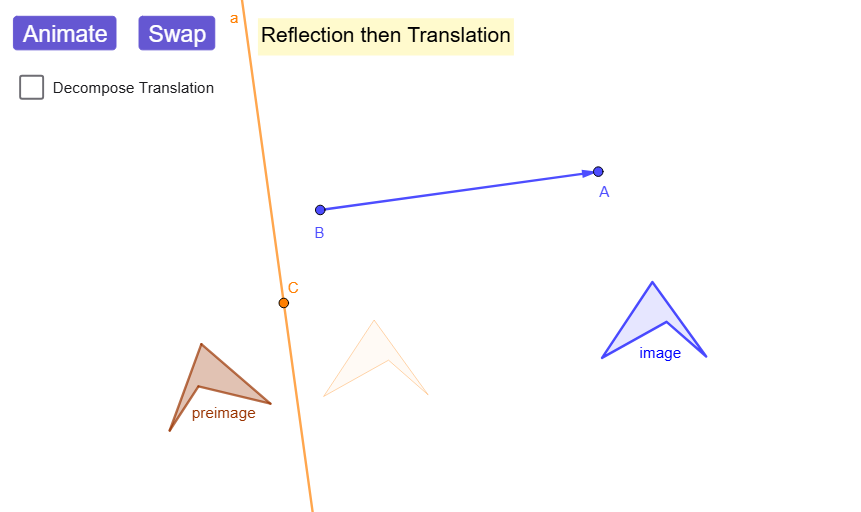
该范例通过“翻转(关于直线的镜像)+滑移(平移)”的组合,展示翻滑(Flip-Slide)如何将点/图形映到新位置,并可用动画观察其过渡。核心数学概念包括:向量表示与垂直关系(用垂直线刻画“翻转轴”的方向)、关于直线的镜像(Mirror)以及平移(Translate)作为刚体变换的组合;同时结合曲线/区域构造(Polygon、Circle 等)与交点/条件分支(Intersect、If)来生成可验证的对应图形。作图要点:使用 Line、Vector、OrthogonalLine 确定镜像相关的直线与垂直向量;用 Polygon、Circle 构造原始图形对象;通过 Mirror 完成反射,并用 Translate 进行平移;再用 Intersect 得到关键位置点;利用 If、animator/animatorR/animatorT 以及 showTranslationDeco 展示在不同参数下的翻滑结果(如 reflectedList、ReflTranslList、RTreflectedShape、RTtranslated 及其中间过渡列表)。适合中学高年级到大学初级的几何变换教学与可视化探究,也适合作为函数图像/坐标变换单元的扩展活动。
GeoGebra 命令及参数
Line(A, B) → fVector(B, A) → uOrthogonalLine(C, u) → aPolygon(F, G, H, I) → preimage, f_1, g_1, h_1, i_1Mirror(F, a) → F'Mirror(G, a) → G'Mirror(H, a) → H'Mirror(I, a) → I'Mirror(preimageList, a) → reflectedListTranslate(reflectedList, u) → ReflTranslListPolygon(reflectedList) → RTreflectedShapePolygon(ReflTranslList) → RTtranslatedOrthogonalLine(D, f) → bIntersect(f, b) → ECircle(E, abs(u) / 2) → c_{1}Intersect(c_{1}, f, 1) → JOrthogonalLine(J, f) → cIf(animator < 1, animator, 0) → animatorRIf(animator > 1, animator - 1, 0) → animatorTPolygon(AnimRTtranslList) → AnimRTTranslPolygon(AnimRTreflectedList) → AnimRTreflMirror(RTreflectedShape, b) → RTintermediaryTranslTranslate(preimageList, u) → TRtranslatedListMirror(TRtranslatedList, a) → TRreflectedListPolygon(TRtranslatedList) → TRtranslatedShapePolygon(TRreflectedList) → TRreflectedShapePolygon(AnimTRtranslList) → AnimTRtranslShapePolygon(AnimTRreflList) → AnimTRreflectedShapeMirror(F, b) → F'_{1}Mirror(G, b) → G'_{1}Mirror(H, b) → H'_{1}Mirror(I, b) → I'_{1}Polygon(F'_{1}, G'_{1}, H'_{1}, I'_{1}) → TRIntermediarTransl, f'_{1}, g'_{1}, h'_{1}, i'_{1}
AI 绘图提示语参考
在平面中先给定一条参考线作为翻折轴,并取一个与该轴垂直方向的向量来表示平移方向。用该垂直方向建立一条与翻折轴正交的辅助直线,再选取与轴线相关的关键交点,用它确定一个圆以产生控制点。构造一个由四个顶点围成的多边形作为原图形;分别关于翻折轴把四个顶点镜像得到反射后的对应点与复合形。接着把反射后的点按向量平移,得到先反射后平移的新位置的多边形。最后再沿同一轴把中间状态的点镜像并与翻译后的点进行对照,形成翻折-滑移的动态图对比效果。
以上提示语为根据原始绘图命令整理而来,仅供参考。