
无枢轴的“转折翻转”几何变换:旋转与镜像合成
几何画板及绘图内容加载中,请稍等……
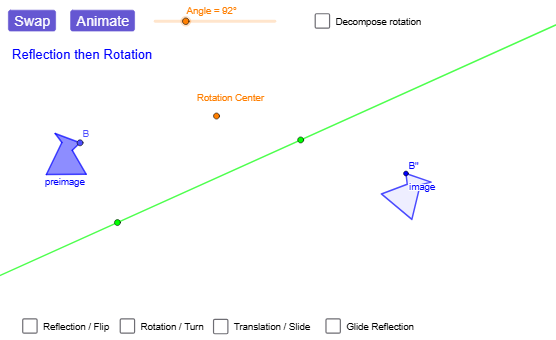
本范例展示把一个图形先做旋转,再做关于某条直线的反射时,合成效果可呈现“转—翻”式的几何规律。核心概念包括欧几里得平面刚体变换、反射(Mirror)与旋转(Rotate)的复合,以及由合成得到的像与对应关系(可理解为特定旋转与翻折的等效表示)。作图要点是:在 GeoGebra 中用 Point、Polygon、Segment、Line 等生成基准点、线段与多边形形状;再用 Rotate 与 Mirror 对原图像进行变换,必要时配合 Line 作为反射轴、Angle 用于标定旋转角;通过 Translate、Vector、glide/Translate 类操作(以及相关对象如向量与线)组织构造链,得到各点的像对象(例如 A'、B'、C' 等)并观察整体形态的翻转与旋转叠加。适合中学到大学初阶的几何变换教学、竞赛训练与交互式探究:用于理解“旋转+反射”的合成性质与像对应。
GeoGebra 命令及参数
Point(Circle[A, 1.2851459061133876]) → BPolygon(A, B, C, D, E, F) → preimage, a, b, c, d, e, fVector(G, H) → VectorLine(I, J) → lineOfReflectionTranslate(A, Vector) → A'_{5}Translate(B, Vector) → B'_{5}Translate(C, Vector) → C'_{5}Translate(D, Vector) → D'_{5}Translate(E, Vector) → E'_{5}Translate(F, Vector) → F'_{5}Polygon(A'_{5}, B'_{5}, C'_{5}, D'_{5}, E'_{5}, F'_{5}) → translated, a', b', c', d', e', f'Mirror(A, lineOfReflection) → A'_{1}Mirror(B, lineOfReflection) → B'_{1}Mirror(C, lineOfReflection) → C'_{1}Mirror(D, lineOfReflection) → D'_{1}Mirror(E, lineOfReflection) → E'_{1}Mirror(F, lineOfReflection) → F'_{1}Polygon(A'_{1}, B'_{1}, C'_{1}, D'_{1}, E'_{1}, F'_{1}) → reflected, a'_{1}, b'_{1}, c'_{1}, d'_{1}, e'_{1}, f'_{1}Rotate(A, α, Center) → A'_{2}Rotate(B, α, Center) → B'_{2}Rotate(C, α, Center) → C'_{2}Rotate(D, α, Center) → D'_{2}Rotate(E, α, Center) → E'_{2}Rotate(F, α, Center) → F'_{2}Polygon(A'_{2}, B'_{2}, C'_{2}, D'_{2}, E'_{2}, F'_{2}) → rotated, a'_{2}, b'_{2}, c'_{2}, d'_{2}, e'_{2}, f'_{2}Line(K, lineOfReflection) → hPoint(h) → LVector(K, L) → Vector2Mirror(A, lineOfReflection) → A'_{3}Mirror(B, lineOfReflection) → B'_{3}Mirror(C, lineOfReflection) → C'_{3}Mirror(D, lineOfReflection) → D'_{3}Mirror(E, lineOfReflection) → E'_{3}Mirror(F, lineOfReflection) → F'_{3}Polygon(A'_{3}, B'_{3}, C'_{3}, D'_{3}, E'_{3}, F'_{3}) → intermediary, a'_{3}, b'_{3}, c'_{3}, d'_{3}, e'_{3}, f'_{3}Translate(A'_{3}, Vector2) → MTranslate(B'_{3}, Vector2) → NTranslate(C'_{3}, Vector2) → OTranslate(D'_{3}, Vector2) → PTranslate(E'_{3}, Vector2) → QTranslate(F'_{3}, Vector2) → RPolygon(M, N, O, P, Q, R) → image_{1}, m, n, o, p, q, rLine(S, T) → gRotate(preimageList, angleAnimator, rotationCenter) → RFanimRotListRotate(A, rotationAngle) → A'_{4}Rotate(C, rotationAngle) → C'_{4}Rotate(D, rotationAngle) → D'_{4}Rotate(E, rotationAngle) → E'_{4}Rotate(F, rotationAngle) → F'_{4}Rotate(A, rotationAngle, rotationCenter) → A'_{6}Rotate(C, rotationAngle, rotationCenter) → C'_{6}Rotate(D, rotationAngle, rotationCenter) → D'_{6}Rotate(E, rotationAngle, rotationCenter) → E'_{6}Rotate(F, rotationAngle, rotationCenter) → F'_{6}Mirror(A'_{6}, g) → WMirror(C'_{6}, g) → F_1Mirror(D'_{6}, g) → G_1Mirror(E'_{6}, g) → H_1Mirror(F'_{6}, g) → I_1Rotate(preimageList, rotationAngle, rotationCenter) → RFintermListMirror(RFintermList, g) → RFfinalListMirror(preimageList, g) → FRintermListRotate(FRintermList, rotationAngle, rotationCenter) → FRfinalListRotate(FRintermList, angleAnimator, rotationCenter) → FRanimRotListPolygon(FRanimFlipList) → FRanimFlipPolygon(FRanimRotList) → FRanimRotPolygon(FRintermList) → FRintermPolygon(RFanimRotList) → RFanimRotPolygon(RFintermList) → RFintermPolygon(RFanimFlipList) → RFanimFlipPolygon(RFfinalList) → RFfinalPolygon(FRfinalList) → imageSegment(rotationCenter, FRanimRotList(2)) → FRrotationSegmentSegment(rotationCenter, RFanimRotList(2)) → RFrotSegmentLine(rotationCenter, V) → iRotate(V, rotationAngle / 2, rotationCenter) → V'Angle(V, rotationCenter, V') → βLine(rotationCenter, V') → line2
AI 绘图提示语参考
画出一个六边形以及它的多个变换图像,包括原始多边形、一条反射线、旋转中心和一个可调角度。先绘制一个六边形作为原始图形,画一条直线作为反射轴,再指定一个旋转中心和一个角度值。依次展示:平移后的多边形、反射后的多边形、旋转后的多边形,以及先反射再平移得到的最终图像。通过可调角度控制旋转大小,直观展示旋转与反射组合变换的效果和对应点的变化。
以上提示语为根据原始绘图命令整理而来,仅供参考。