
圆锥体45-22:旋转截面与几何构造
几何画板及绘图内容加载中,请稍等……
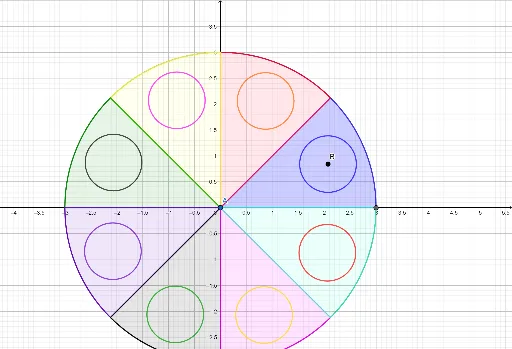
该范例演示了一个圆锥体(cone)的几何构造,通过旋转、相交等操作生成圆锥及其截面图形,并展示了相关点、线、圆弧等元素。核心数学概念包括圆锥的立体几何性质、旋转体、截面(如圆、扇形)、以及点线面的相交关系。作图要点:使用GeoGebra命令如Intersect(求交点)、Point(取点)、Circle(画圆)、Line(画线)、Rotate(旋转)、CircleSector(画扇形)等,构造了多个对象(如A、B、C、D、f、g、h等),涉及圆锥的母线、底面圆、旋转轴以及截面圆弧。适合高中或大学低年级学生学习立体几何、旋转体与几何作图,也可用于教师演示圆锥的生成过程及截面变化。
GeoGebra 命令及参数
Intersect(xAxis, yAxis) → APoint(xAxis) → B_1Circle(A, B_1) → cPoint(xAxis) → CPoint(xAxis) → DLine(C, D) → fPoint(yAxis) → EPoint(yAxis) → FLine(E, F) → gRotate(f, 45°, (0, 0)) → f'Rotate(g, 45°, (0, 0)) → g'Intersect(c, f, 2) → GIntersect(c, f', 2) → HCircleSector(A, G, H) → dIntersect(c, g, 2) → ICircleSector(A, (2.1213203435596424, 2.121320343559642), I) → eIntersect(c, g', 2) → JCircleSector(A, (0, 3), J) → hIntersect(c, f, 1) → KCircleSector(A, (-2.1213203435596424, 2.121320343559643), K) → kIntersect(c, f', 1) → LCircleSector(A, (-3, 0), L) → pIntersect(c, g, 1) → MCircleSector(A, L, M) → qIntersect(c, g', 1) → NCircleSector(A, M, N) → rCircleSector(A, (2.1213203435596424, -2.121320343559643), G) → sCircle(B, O) → tRotate(t, 45°, A) → t'Rotate(t, 90°, A) → t'_1Rotate(t, 135°, A) → t'_2Rotate(t, 180°, A) → t'_3Rotate(t, 225°, A) → t'_4Rotate(t, 270°, A) → t'_5Rotate(t, 315°, A) → t'_6