
环面一般交点处的切线构造
几何画板及绘图内容加载中,请稍等……
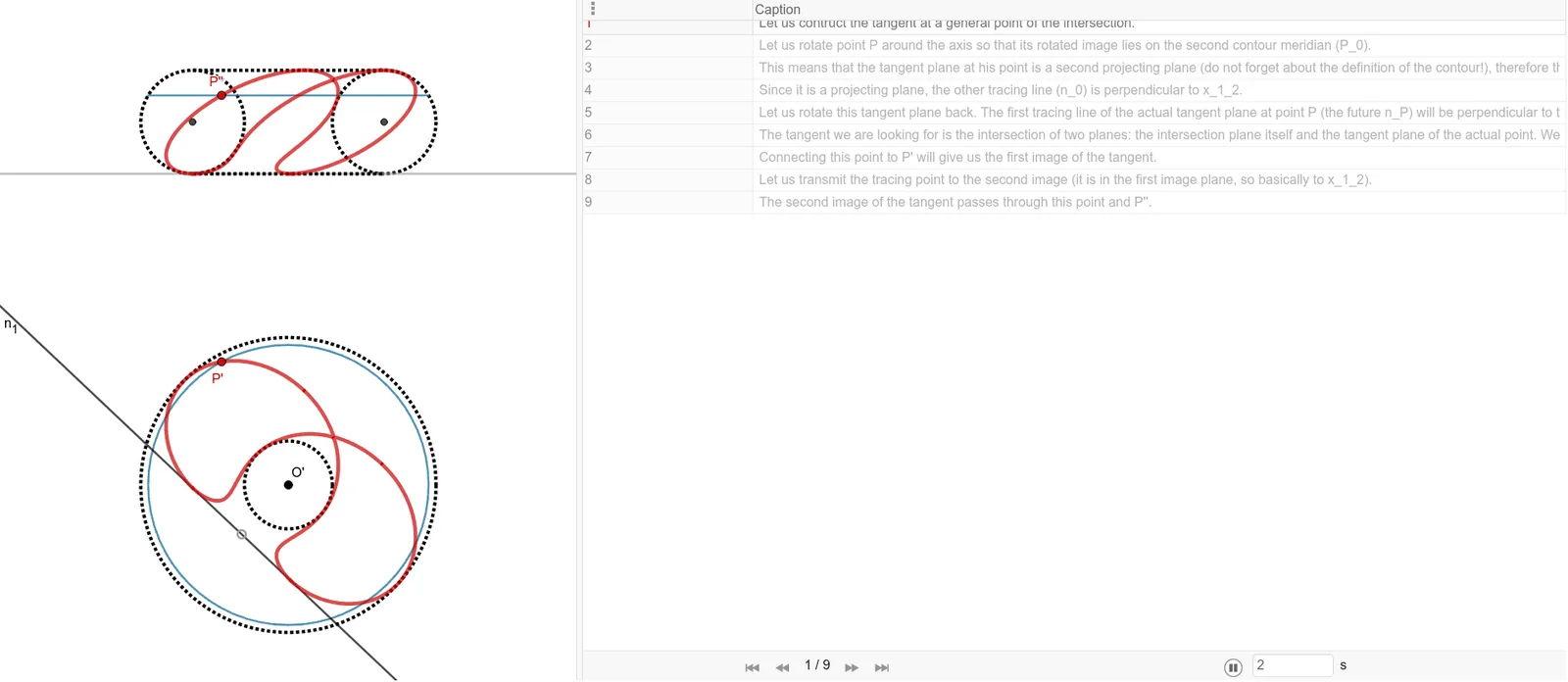
该范例演示了在环面(torus)与另一曲面或曲线的一般交点处构造切线的几何过程。核心数学概念涉及三维立体几何中的环面、切平面与切线,以及交点处的局部线性化。作图要点包括:使用GeoGebra的Line、Point、Circle、OrthogonalLine、Midpoint、Intersect、Mirror、Segment、Center、Locus、CircleArc、Angle等命令,构建了环面及其辅助对象(如O'、A、f、B、c等),通过求交、作垂线、取中点、镜像等操作,最终确定交点处的切线方向。该范例适合高中或大学阶段的立体几何与解析几何教学,帮助学生理解曲面交线处的切线构造方法,并熟悉GeoGebra中三维几何对象的交互式操作。
GeoGebra 命令及参数
Line(O', A) → fPoint(f) → BCircle(O', B) → cPoint(f) → CCircle(O', C) → dOrthogonalLine(O', f) → gMidpoint(B, C) → DOrthogonalLine(D, f) → hPoint(g) → EOrthogonalLine(E, g) → iIntersect(h, i) → FCircle(F, Segment[D, C]) → eMirror(e, g) → e'Mirror(h, g) → h'Intersect(e', h', 2) → GIntersect(e, h, 2) → HSegment(G, H) → jIntersect(e', h', 1) → IIntersect(e, h, 1) → JSegment(I, J) → kLine(O', K) → lOrthogonalLine(K, l) → n_1Line(I, J) → n_2Line(G, H) → pPoint(l) → LOrthogonalLine(L, l) → qOrthogonalLine(K, f) → rOrthogonalLine(L, f) → sIntersect(r, n_2) → MIntersect(s, p) → NSegment(M, N) → tPoint(t) → P_2OrthogonalLine(P_2, g) → aIntersect(e', a) → Q, P_0''pIntersect(e, a) → S, TIntersect(a, g) → UCircle(O', Segment[U, Q]) → c_1Circle(O', Segment[U, P_0''p]) → d_1OrthogonalLine(P_2, i) → bIntersect(l, b) → VOrthogonalLine(V, l) → f_1Center(e') → I_1Intersect(d_1, f_1) → P', ZIntersect(c_1, f_1) → A_1, B_1Locus(P', P_2) → ponthalmaz1Locus(A_1, P_2) → ponthalmaz2Locus(B_1, P_2) → ponthalmaz3Locus(Z, P_2) → ponthalmaz4OrthogonalLine(Z, f) → g_1OrthogonalLine(B_1, f) → h_1OrthogonalLine(A_1, f) → i_1OrthogonalLine(P', f) → j_1Intersect(g_1, a) → C_1Intersect(h_1, a) → D_1Segment(P_0''p, S) → k_2Intersect(i_1, a) → E_1Intersect(j_1, a) → P''Locus(P'', P_2) → ponthalmaz5Locus(E_1, P_2) → ponthalmaz6Locus(D_1, P_2) → ponthalmaz7Locus(C_1, P_2) → ponthalmaz8Intersect(d_1, f) → P_0', H_1Segment(O', P_0') → mSegment(P', O') → nSegment(P_0''p, P_0') → p_1Intersect(e', k_2, 1) → P_0''Segment(I_1, P_0''p) → k_1OrthogonalLine(P_0''p, k_1) → l_1Intersect(n_2, l_1) → J_1Segment(P_0''p, J_1) → m_1OrthogonalLine(J_1, f) → n_3Intersect(f, n_3) → K_1Segment(O', K_1) → l_2Segment(J_1, K_1) → n_0Line(O', P') → q_1Circle(O', K_1) → e_1Intersect(e_1, q_1) → L_1, M_1CircleArc(O', M_1, K_1) → r_1Segment(P', M_1) → t_1OrthogonalLine(M_1, q_1) → s_1Intersect(n_1, s_1) → N_1Angle(N_1, M_1, O') → αSegment(M_1, N_1) → n_PLine(N_1, P') → a_1Mirror(N_1, P') → O_1Segment(O_1, N_1) → t_P'OrthogonalLine(N_1, n_2) → f_2Intersect(n_2, f_2) → P_1Segment(N_1, P_1) → g_2Line(P_1, P'') → h_2Mirror(P_1, P'') → Q_1Segment(Q_1, P_1) → t_P''Segment(O', M_1) → j_2
AI 绘图提示语参考
绘制一个三维环面,在其上选取一条过环面中心轴的直线,并在该直线上取两个不同点,分别作以中心为圆心、过这两点的圆。过中心作该直线的垂线,取两圆上对应点并连接,构造出与环面相交的辅助圆。通过作垂线、取中点、镜像等操作,确定环面上一个交点处的切线方向。随后沿该方向构造一条线段,并让该线段在环面上滑动,生成多条轨迹曲线,展示切点随线段移动而变化的路径。
以上提示语为根据原始绘图命令整理而来,仅供参考。