
函数间区域
几何画板及绘图内容加载中,请稍等……
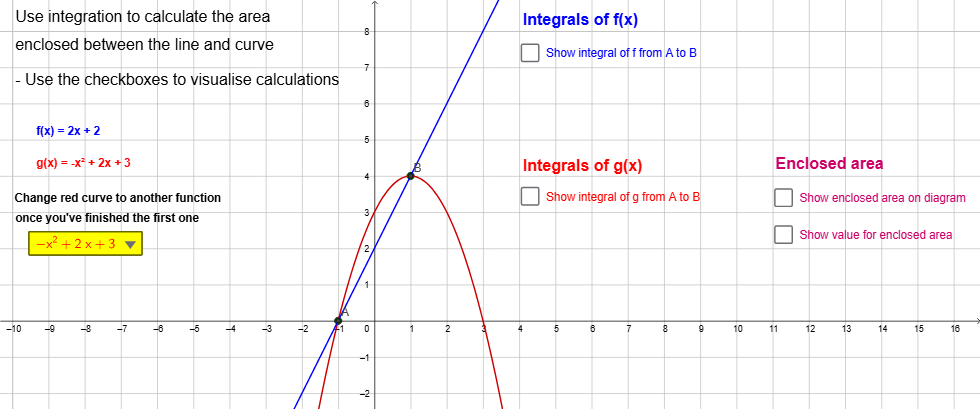
这个范例演示了如何使用GeoGebra计算两个函数之间的区域。核心数学概念包括函数、积分和面积。通过使用SelectedElement, Integral, IntegralBetween等命令,可以构造出函数间的区域。适合高中及以上学生学习微积分和函数相关知识。
GeoGebra 命令及参数
SelectedElement(DropDownList) → gIntegral(g, x(A), x(B)) → CurveABIntegral(f, x(A), x(B)) → LineABIntegralBetween(f, g, x(A), x(B)) → TotalAreaIntegral(abs(f(x) - g(x)), x(A), x(B)) → TotalSolutionIntegral(g, x(A), x(C)) → CurveACIntegral(g, x(C), x(B)) → CurveCBIntegral(f, x(A), x(C)) → LineACIntegral(f, x(C), x(B)) → LineCBText(("f(x) = " * f)) → text1Text(("g(x) = " * g)) → text2Text("Integrals of f(x)") → text4Text("Integrals of g(x)") → text5Text(LineAB) → text6Text(LineAC) → text7Text(LineCB) → text8Text(CurveAB) → text9Text(CurveAC) → text10Text(CurveCB) → text11Text("Enclosed area" = TotalSolution) → text12Text("Enclosed area") → text13Text("Use integration to calculate the area") → text14Text("enclosed between the line and curve") → text15Text("Change red curve to another function") → text3Text("once you've finished the first one") → text16Text("- Use the checkboxes to visualise calculations") → text20