
3D曲线追踪 by Lenore Horner
几何画板及绘图内容加载中,请稍等……
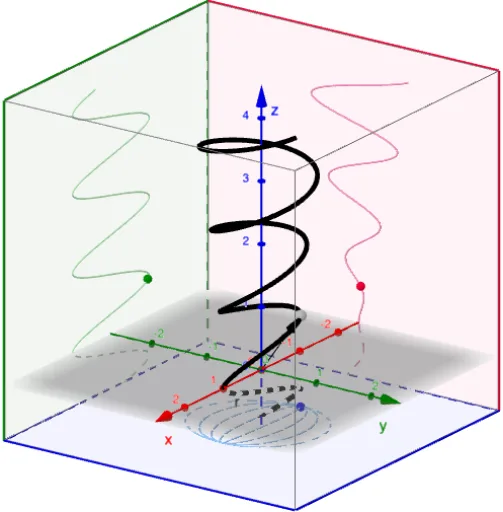
本范例演示了3D空间中的曲线追踪。涉及的核心数学概念包括参数方程和曲线绘制。使用了CurveCartesian、Vector、CornerThreeD等GeoGebra命令。适合高中及以上学生或教师用于教学和学习。
GeoGebra 命令及参数
CurveCartesian(f(u), g(u), h(u), u, t_{min}, t_{max}) → rTextfield(f) → InputBox1Textfield(g) → InputBox2Textfield(h) → InputBox3Textfield(t_{min}) → InputBox4Textfield(t_{max}) → InputBox5Vector((0, 0, 0), A) → rCurrentCornerThreeD(-1, 1) → C1CornerThreeD(-1, 2) → C2CornerThreeD(-1, 3) → C3CornerThreeD(-1, 4) → C4CornerThreeD(-1, 5) → C5CornerThreeD(-1, 6) → C6CornerThreeD(-1, 7) → C7CornerThreeD(-1, 8) → C8Polygon(C1, C4, C8, C5) → yzPlane, c1, c4, c8, c5Polygon(C2, C1, C5, C6) → xzPlane, c2, i, j, c6Polygon(C2, C3, C4, C1) → xyPlane, k, c3, l, mCurveCartesian(f(u), g(u), z(C1), u, t_{min}, t_{max}) → xyProjectionCurveCartesian(f(u), y(C1), h(u), u, t_{min}, t_{max}) → xzProjectionCurveCartesian(x(C1), g(u), h(u), u, t_{min}, t_{max}) → yzProjection
AI 绘图提示语参考
绘制三维曲线的轨迹,展示参数方程的应用。包含三个坐标平面的投影,分别用曲线表示。通过滑块调整参数范围,并标注关键点以辅助理解空间几何关系。先画出基础坐标平面,再绘制曲线及其投影,最后添加参数控制。
以上提示语为根据原始绘图命令整理而来,仅供参考。