
Writing Word Problems for One-Step Inequalities
Loading the math board and drawing, please wait…
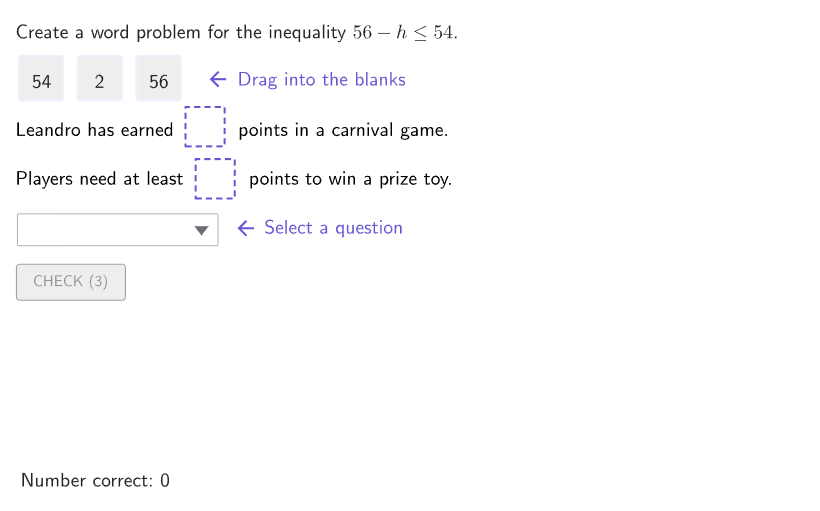
This example demonstrates how to write real-world word problems about a day at an amusement park using one-variable, one-step inequalities. It covers the math concepts of one-step inequalities and their application in practical scenarios. The construction utilizes GeoGebra commands such as Shuffle, Element, RemoveUndefined, Zip, Append, If, Polygon, Corner, centerBox, Text, Sequence, IndexOf, SelectedIndex, onboardingTextOffset, along with objects like randomNames, randomXVals, possibleOrdersA, randomCase, randomYVals, space2, space1, countQuestion, name, movingIndex, P3, P2, P1, movingPoints, PMove, valY, validX, valX, valDiff, homeIndices, textStrCurrent, boxText, currentLocations, questionA3, questionC3, questionD3, caseNum, expectedAns, order, studentAns, questionA1, questionA2, questionB2, questionB1, questionB3, questionC1, questionC2, questionD1, questionD2, currentQuestions. Suitable for students in grades 6-8 to learn how to apply mathematical concepts to real-world problems.
GeoGebra Commands & Parameters
Shuffle({"Anara", "Leandro", "Viktoria", "Mari", "Elias", "Domenic"}) → randomNames, {"Leandro", "Anara", "Domenic", "Elias", "Mari", "Viktoria"}Shuffle(Sequence[42, 55]) → randomXVals, {54, 42, 46, 49, 47, 51, 44, 50, 45, 48, 52, 55, 43, 53}Shuffle({{1, 2, 3}, {1, 3, 2}, {2, 1, 3}, {2, 3, 1}, {3, 1, 2}, {3, 2, 1}}) → possibleOrdersA, {{1, 3, 2}, {3, 1, 2}, {2, 1, 3}, {3, 2, 1}, {1, 2, 3}, {2, 3, 1}}Shuffle(Sequence[1, 4]) → randomCase, {3, 2, 1, 4}Shuffle({46, 48, 50, 52, 54, 56}) → randomYVals, {56, 50, 54, 48, 52, 46}Element(movingPoints, movingIndex) → PMoveElement(randomYVals, Mod[countQuestion, Length[randomYVals]] + 1) → valYRemoveUndefined(Zip[If[A < valY, A], A, randomXVals]) → validXElement(validX, Mod[countQuestion, Length[validX]] + 1) → valXElement(possibleOrdersA, Mod[countQuestion, Length[possibleOrdersA]] + 1) → homeIndicesZip(Element[{("" * valX), ("" * valY), ("" * valDiff)}, A], A, homeIndices) → textStrCurrentZip(Text[("" * A), B, true, true, 0, 0], A, textStrCurrent, B, movingPoints) → boxTextElement(randomCase, Mod[countQuestion, Length[randomCase]] + 1) → caseNumElement({{1, 2}, {2, 1}, {1, 2}, {2, 1}}, caseNum) → expectedAnsElement(possibleOrdersA, Mod[countQuestion, Length[possibleOrdersA]] + 1) → orderZip(homeIndices(IndexOf[A, currentLocations]), A, {1, 2}) → studentAnsElement({{questionA1, questionA2, questionA3}, {questionB1, questionB2, questionB3}, {questionC1, questionC2, questionC3}, {questionD1, questionD2, questionD3}}, caseNum) → currentQuestionsAppend("$\text\phantom{this is an empty line}$", Zip[(("$\text{" * currentQuestions(A)) * " }$"), A, order]) → selectQuestionIf(SelectedIndex[selectQuestion] ≠ 1, order(SelectedIndex[selectQuestion] - 1), NaN) → selectedQuestionElement(positions, caseNum) → boxAnchorsIf(caseNum < 5, "", "^2") → powerAppend(studentAns, selectedQuestion) → inputCurrentPolygon(Zip[PixelsToPoint[Corner[1], Corner[3], Corner[5], A], A, {(pixelsLeft, pixelsTop), (pixelsLeft, y(Corner[5]) - pixelsBottom), Corner[5] - (pixelsRight, pixelsBottom), (x(Corner[5]) - pixelsRight, pixelsTop)}]) → borderBoxCorner(5) → layoutAppSizecenterBox(innerSize, innerSize, P1) → box1centerBox(innerSize, innerSize, P2) → box2centerBox(innerSize, innerSize, P3) → box3centerBox(innerSize, innerSize, PMove) → highlightBoxZip(HOME, A, movingPoints) → allHomeText(("" * boxText(movingIndex)), If[Defined[PMove], PMove, (300, 300)], false, true, 0, 0) → textHighlightSequence((("SetFixed(box" * A) * ",false,enableInput)"), A, 1, Length[movingPoints]) → cmdFixBoxesSequence((((((((("SetValue(P" * A) * ",If(currentLocations(") * A) * ")==HOME,homeLocations(") * A) * "),boxAnchors(currentLocations(") * A) * "))))"), A, 1, Length[movingPoints]) → cmdOrganizecenterBox(boxWidth, boxHeight, boxAnchors(1)) → frame1centerBox(boxWidth, boxHeight, boxAnchors(2)) → frame2Sequence(HomeAnchor + (((A * 1.5) * boxWidth), 0), A, 0, Length[movingPoints] - 1) → homeLocationsIndexOf(true, Zip[IsInRegion[PMove, A], A, {frame1, frame2}]) → locationPMoveElement({{questionA1, questionA2, questionA3}, {questionB1, questionB2, questionB3}, {questionC1, questionC2, questionC3}, {questionD1, questionD2, questionD3}}, caseNum) → line3OptionsSelectedIndex(selectQuestion) → testcenterBox(boxWidth, boxWidth, boxAnchors(locationPMove)) → highlightFrameonboardingTextOffset(Corner[onboardingText, 1], Corner[onboardingText, 3], onboardingCase, Corner[1], Corner[3], Corner[5]) → OnboardingTextOffsetZip(expandQuad[Vertex[A, 1], Vertex[A, 2], Vertex[A, 3], Vertex[A, 4], (pulsing * 7), Corner[1], Corner[3], Corner[5]], A, {box1, box2, box3}) → pulsingObjects
AI Drawing Prompt Reference
Create an exercise-style diagram for practicing one-step inequalities: generate varying random names, coordinate-like numbers, and an option order so the displayed text changes. Draw two equal-sized rectangular panels centered on the page, add an outer border/frame around them, and place a highlighted border plus a smaller inner highlight box on the currently active panel. Inside the highlight area, show the corresponding option/answer text as a label, and at the top display the current question/option string with an intentional blank line before it. Also include a separate input text area below that combines the student answer prefix with the selected option string. Arrange everything so the highlighted panel and the displayed text remain linked by the chosen current case.
The prompt above was compiled from the original drawing commands and is for reference only.