
Writing Ratios for Apples and Oranges
Loading the math board and drawing, please wait…
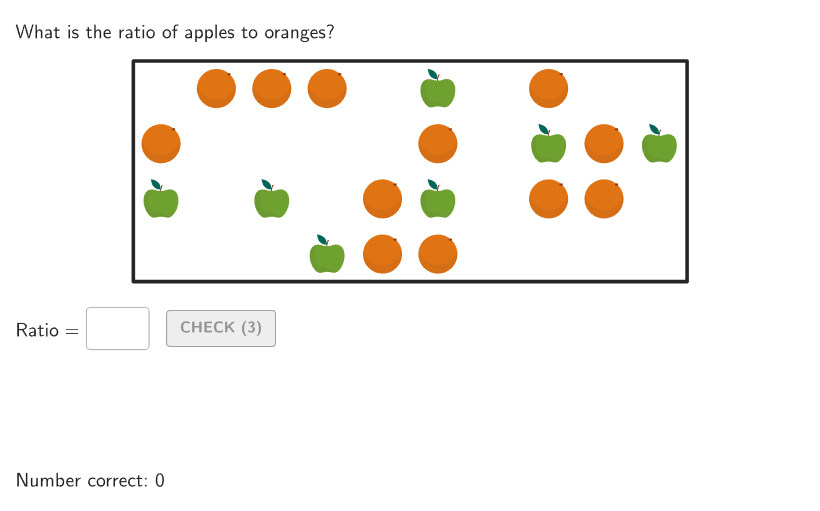
This GeoGebra activity randomly generates counts of apples and oranges, prompting students to write ratios comparing the two quantities. It focuses on the core mathematical concept of ratios and rates, emphasizing how to express the relationship between two numbers. The construction uses GeoGebra commands such as RandomUniform, Shuffle, and Sample to randomize problems, Textfield and InputBox for student responses, and Polygon with Translate to render fruit icons. Interactive buttons (btnValidate, btnNew) allow checking answers and generating new problems. Designed for grades 6-8, it serves as a classroom practice tool or self-study exercise, with Spanish translation available for broader accessibility.
GeoGebra Commands & Parameters
Shuffle(Sequence[20]) → applesNums_{1}, {7, 12, 19, 17, 14, 4, 3, 6, 1, 8, 13, 9, 15, 18, 16, 10, 2, 20, 11, 5}Element(applesNums_{1}, Mod[questionCount_{1}, Length[applesNums_{1}]] + 1) → applesNumShuffle(Sequence[25 - applesNum]) → orangesNums_{1}, {12, 5, 6, 18, 2, 15, 7, 17, 9, 11, 13, 3, 8, 16, 4, 14, 1, 10}Element(orangesNums_{1}, 1) → orangesNumRandomUniform(0, 0.99, 200) → allRandomSeeds, {0.07652076779085971, 0.8685243830501315, 0.2114043768171082, 0.5434539937186297, 0.14920321495389569, 0.8476057148638954, 0.8484448079238579, 0.5994263572985519, 0.4964999199596241, 0.4883514679897285, 0.08969196371331459, 0.505760783304117, 0.9217005589964525, 0.8407503623042758, 0.5618372078230758, 0.8725257723382244, 0.9382081282838892, 0.23799115944853944, 0.31115220773268126, 0.03929063634851419, 0.7995661868623837, 0.9174274609156943, 0.2678087413315922, 0.2952533127616925, 0.033410255606943225, 0.5590476636613372, 0.9614988426200354, 0.6053962786721527, 0.24997275740173613, 0.40927454175408723, 0.5903866249573237, 0.28513835566302803, 0.49224567340088937, 0.28275277466551607, 0.6179909911119712, 0.28062815588900275, 0.09106749139079248, 0.14680426867821594, 0.4898541204637641, 0.8286899121816631, 0.8442498100330541, 0.09244027331295253, 0.013794601880884631, 0.8494858310997808, 0.614397308916947, 0.12221541579357467, 0.7041744677700479, 0.5161982083953375, 0.07529800770218324, 0.8187931763229678, 0.001927832815168382, 0.9794636146725252, 0.3716740847045649, 0.5488635448720451, 0.7881047156378825, 0.039905272820462356, 0.3916824181499475, 0.14501240339834087, 0.1493771295614215, 0.649914076191424, 0.2758410631265058, 0.6132895100487722, 0.6593351830168974, 0.2958171792985301, 0.5200332167708512, 0.45655474076332625, 0.5794692619754532, 0.6737526055217733, 0.10390136031683604, 0.353204525623915, 0.9784906711638872, 0.3369318664200982, 0.9092946955763481, 0.22758945838562772, 0.02808561746737438, 0.2085267099522232, 0.4764695582490352, 0.4523299021425254, 0.8973293290572223, 0.673155661709837, 0.8684674187472822, 0.983821112565769, 0.15680456709316395, 0.35087335450761264, 0.8665071042890542, 0.9304902972213283, 0.8669750783157284, 0.8306822768265991, 0.5913272888973761, 0.7488275297281476, 0.6735579599675378, 0.37588762670943443, 0.27720280875444614, 0.9448584904066853, 0.6255194780150877, 0.13110732086517748, 0.47683253813216675, 0.5685612333286154, 0.7488874217050863, 0.16042665984359125, 0.5464589990913553, 0.18575058016503745, 0.5518290905086345, 0.008052075885485017, 0.3014293813849853, 0.4661627712594146, 0.6833867853792719, 0.7968716460719191, 0.6029445568159164, 0.6178694868968381, 0.9598943687910173, 0.4865698399184415, 0.05696763378129979, 0.03673422779453556, 0.00941614630438696, 0.6013718513189164, 0.9361755654815658, 0.6353957412120954, 0.09555548479309366, 0.5281083234116831, 0.5554367123418015, 0.32922178314043915, 0.3376738322496882, 0.7980936771763253, 0.17058474418629369, 0.6768236552647037, 0.7549418198736336, 0.3113014855012007, 0.16923359669032084, 0.9400551399424978, 0.7167121860749212, 0.758498630124476, 0.5310403875052669, 0.9829414654517175, 0.0514604852636798, 0.7963642591916511, 0.16317302893153196, 0.3506929084704175, 0.25098275166934486, 0.5421733096977173, 0.62477577245668, 0.14885372867662064, 0.4656698634977281, 0.12836369197686778, 0.631951401971262, 0.8587217477047703, 0.20049731338908072, 0.02323488496087922, 0.7421900853096297, 0.39844459736311566, 0.3698743868361836, 0.5421397960857421, 0.9842749926241755, 0.8896583614239719, 0.012690342994523495, 0.9638357388818488, 0.5864817919614975, 0.017180380811757646, 0.6767762560463374, 0.07914959800463188, 0.352363612601839, 0.2941021686420633, 0.794568957607119, 0.8237904180438413, 0.27957529078746723, 0.1566496566582943, 0.15902014589659635, 0.10400798388053117, 0.48304050337565557, 0.9223874893340074, 0.2807363041149145, 0.012848471393473483, 0.8893018233221838, 0.011739583436503146, 0.7439666818680385, 0.4559984395241955, 0.054119496375148145, 0.8563835442437262, 0.2303742153835675, 0.9796366326394385, 0.9702955628130038, 0.15884662637186456, 0.7755308450791448, 0.848327466019328, 0.29730043416580504, 0.7255907482839223, 0.9037713118648372, 0.548793804604617, 0.7085659961502656, 0.4310205170585822, 0.022421141560303733, 0.6453959393067363, 0.476283512639301, 0.19218163320328188, 0.08648213579662603, 0.925322130496706, 0.7572072315471127, 0.7334393419750727, 0.8596153019419764, 0.28586080381760653}Sample(Sequence[36], applesNum, false) → applesPos_{1}, {23, 20, 18, 26, 34, 21, 6}Sample(Sequence[36] \ applesPos_{1}, orangesNum, false) → orangesPos_{1}, {35, 16, 36, 4, 19, 3, 11, 25, 8, 28, 29, 2}Take(allRandomSeeds, randIndex, randIndex + numRandoms - 1) → currentRandomSeedsTextfield(input1) → InputBox1Textfield(input2) → InputBox2Corner(5) → layoutAppSizesectorPixels(A, B, C, haloPixels + 40, Corner[1], Corner[3], Corner[5]) → pulsingObjectsectorPixels(A, B, C, 40, Corner[1], Corner[3], Corner[5]) → displayAnglePointToPixels(Corner[onboardingDisplayText, 2], Corner[1], Corner[3], Corner[5]) → layoutOnboardingonboardingTextOffset(Corner[onboardingText, 1], Corner[onboardingText, 3], onboardingCase, Corner[1], Corner[3], Corner[5]) → OnboardingTextOffsetPolygon({(0, 0), (10, 0), (10, 4), (0, 4)}) → box_{1}Flatten(Sequence[Sequence[(0.5 + CLIPBOARDmagicSTRINGkk, 4 - (0.5 + CLIPBOARDmagicSTRINGjj)), CLIPBOARDmagicSTRINGkk, 0, 9], CLIPBOARDmagicSTRINGjj, 0, 4]) → positions_{1}Translate(vGL_{1}, Vector[(Vector[Corner[1], Corner[2]] / 800 * 16)]) → vGL'_{1}Translate(vGL_{1}, Vector[(Vector[Corner[1], Corner[2]] / 800 * 64)]) → vGL'_{2}Dilate(pic1_{1}, 0.11) → pic1'_{1}Zip(Translate[pic1'_{1}, Vector[positions_{1}(CLIPBOARDmagicSTRINGkk)]], CLIPBOARDmagicSTRINGkk, applesPos_{1}) → l1_{1}Dilate(pic2_{1}, 0.11) → pic2'_{1}Zip(Translate[pic2'_{1}, Vector[positions_{1}(CLIPBOARDmagicSTRINGkk)]], CLIPBOARDmagicSTRINGkk, orangesPos_{1}) → l2_{1}Zip(positions_{1}(kk), kk, Sort[Take[applesPos_{1}, 1, applesNum]]) → CentersApplesZip(Text[kk, PP, true, true, 0, 0], kk, Sequence[anim1], PP, CentersApples) → l1Zip(positions_{1}(kk), kk, Sort[Take[orangesPos_{1}, 1, orangesNum]]) → CentersOrangesZip(Text[kk, PP, true, true, 0, 0], kk, Sequence[anim2], PP, CentersOranges) → l2If(Mod[randomNum1, 2] ≟ 0, "oranges", "apples") → word1If(randomNum1 ≟ 1, "oranges", randomNum1 ≟ 2, "apples", "pieces of fruit") → word2Translate(hGL_{1}, Vector[(Vector[Corner[4], Corner[1]] / 500 * 16)]) → hGL'_{1}Text((InputBox1 * ""), false) → inputAsStringDefined(IndexOf[":", inputAsString]) → colon
AI Drawing Prompt Reference
Create an interactive math ratio practice scene: multiple apple icons arranged neatly on the left side of the画面 and multiple orange icons on the right side, with quantity numbers displayed below each fruit group. In the center or lower part of the画面, there are two input boxes for students to enter their ratio answers. The overall layout is clean and clear, with appropriately sized fruit icons arranged in an orderly manner, suitable for middle school students. The background should be simple white or light colored.
The prompt above was compiled from the original drawing commands and is for reference only.