
Writing Linear Equations (II) - B Not Obvious
Loading the math board and drawing, please wait…
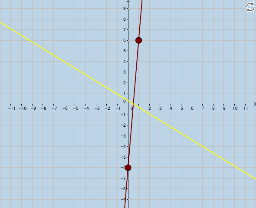
This example demonstrates how to write the slope-intercept form of a line equation passing through two points. It involves core math concepts like linear equations, slope, and y-intercept. Constructed using GeoGebra commands/objects such as Sequence, RandomElement, Union, Random, Line, Textfield, Intersect, Polygon, Segment, FractionText. Suitable for high school students learning coordinate geometry.
GeoGebra Commands & Parameters
Sequence(i, i, -10, 10, 1) → a_1RandomElement(a_1) → aSequence(i, i, -10, a - 1, 1) → aleftSequence(i, i, a + 1, 10, 1) → arightUnion(aleft, aright) → aleftplusrightRandom(-8, 8) → b_1Line(A, B) → bTextfield(mguess) → InputBox1Textfield(bguess) → InputBox2Intersect(e, f) → CPolygon(B, A, C) → poly1, c_1, b_2, a_2Segment(B, C) → gSegment(C, A) → hFractionText(mguess) → text3FractionText(bguess) → text4FractionText(b(0)) → text7Line(A, B) → j
AI Drawing Prompt Reference
Draw a line passing through two random points A and B. First, generate a sequence of integers from -10 to 10 and randomly select one as the slope m of the line. Then, create two sequences for the x-intercept b, one from -10 to m-1 and the other from m+1 to 10. Use points A and B to construct line b, and prompt the user to input the slope m and y-intercept b in the input boxes. Finally, construct a triangle with points A, B, and the intersection point C of line b with the x-axis, and display the fractional forms of the slope and y-intercept.
The prompt above was compiled from the original drawing commands and is for reference only.