
Writing Equivalent Expressions: Open Middle (Simplifying Expressions)
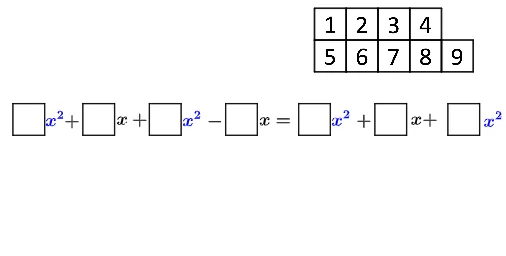
Loading the math board and drawing, please wait…
This example demonstrates an “open middle” learning flow where students write equivalent algebraic expressions while simplifying them, guided by a geometry-based model. It links symbolic reasoning to measured/geometric quantities so that multiple correct forms can be produced and checked via algebraic equivalence. The main concepts are equivalent expressions, expression simplification, and conditional reasoning controlled by GeoGebra’s If structure, together with the correspondence between points/segments in a constructed diagram and algebraic forms. Construction-wise, it uses Polygon to build the geometric framework (e.g., poly0, poly3, poly7) and If to switch or validate expression logic under different conditions. Numerous point objects (K_1, A2, A0, A1…A9, B, C, H, P, etc.) provide the geometric references, while function/expression objects (f, g, h, i, j, k, l, m, n) organize the algebraic expressions connected to the diagram. Suitable for middle/high school algebra, geometry–algebra integration tasks, and classroom inquiry activities focused on justification and simplification.
GeoGebra Commands & Parameters
Polygon(A0, B, 4) → poly0, f, g, h, i, A, CPolygon(A3, H, 4) → poly3, j, k, l, m, E, GPolygon(A7, P, 4) → poly7, n, p, q, r, I, KPolygon(A1, D, 4) → poly1, s, t, a, b, M, OPolygon(A6, N, 4) → poly6, c, d, e, f_1, Q, SPolygon(A2, K_1, 4) → poly2, k_1, l_1, m_1, n_1, W, ZPolygon(A8, A8 + (2, 0), 4) → poly8, g_1, h_1, i_1, j_1, U, VPolygon(A9, T, 4) → poly9, p_1, q_1, r_1, s_1, A_1, B_1Polygon(A4, J, 4) → poly4, t_1, a_1, b_1, c_1, C_1, D_1Polygon(A5, L, 4) → poly5, d_1, e_1, f_2, g_2, E_1, F_1Polygon(G_1, H_1, 4) → poly10, h_2, i_2, j_2, k_2, I_1, J_1Polygon(G_2, H_2, 4) → poly11, h_3, i_3, j_3, k_3, I_2, J_2Polygon(G_3, H_3, 4) → poly12, h_4, i_4, j_4, k_4, I_3, J_3Polygon(G_4, H_4, 4) → poly13, h_5, i_5, j_5, k_5, I_4, J_4Polygon(G_5, H_5, 4) → poly14, h_6, i_6, j_6, k_6, I_5, J_5Polygon(G_6, H_6, 4) → poly15, h_7, i_7, j_7, k_7, I_6, J_6Polygon(G_7, H_7, 4) → poly16, h_8, i_8, j_8, k_8, I_7, J_7Polygon(G_8, H_8, 4) → poly17, h_9, i_9, j_9, k_9, I_8, J_8Polygon(G_9, H_9, 4) → poly18, h_{10}, i_{10}, j_{10}, k_{10}, I_9, J_9Polygon(G_{10}, H_{10}, 4) → poly19, h_{11}, i_{11}, j_{11}, k_{11}, I_{10}, J_{10}If(o ∧ u_1, "Nice job!", "Not fully correct yet.") → text8
AI Drawing Prompt Reference
Draw a geometric figure composed of multiple polygons, including point objects and function expressions. The polygons form the framework, point objects provide geometric references, and function expressions correspond to points or line segments in the diagram. Students need to write equivalent algebraic expressions and simplify them, using the geometric model to verify algebraic equivalence. The construction order is to draw the polygons first, then add point objects, and finally use conditional logic structures to verify expression logic.
The prompt above was compiled from the original drawing commands and is for reference only.