
Working in Pairs: Interactive Exploration of Linear Equation Systems
Loading the math board and drawing, please wait…
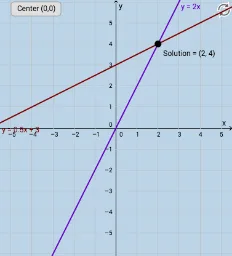
① This GeoGebra example demonstrates how to describe and solve systems of linear equations through a pair-based interactive interface, visually showing the relationship between the solution (intersection point) and the coefficients. ② Core math concepts include linear equations, solutions of systems, similarity transformations (observing graph changes when coefficients vary), and fraction representation (FractionText displays solutions as fractions). ③ Construction highlights: Intersect command finds the intersection of two lines, FractionText converts numeric results to fractions, Textfield and InputBox create input fields for coefficients, Point defines key points, button1 triggers calculations, and text objects display results, building an interactive algebra-geometry linked environment. ④ Suitable for middle and high school students learning linear equation systems, also useful for teacher demonstrations to help students understand the geometric meaning and algebraic solving methods, fostering visual-spatial thinking.
GeoGebra Commands & Parameters
Intersect(g, i) → SolutionFractionText(x(Solution)) → text1FractionText(y(Solution)) → text2Textfield(g) → InputBox1Textfield(i) → InputBox2Intersect(i, xAxis) → APoint(i) → BPoint(g) → CPoint(g) → D
AI Drawing Prompt Reference
Draw two intersecting lines in a coordinate system, with their intersection point highlighted. Create input fields to adjust the coefficients of the lines, which dynamically updates the lines. Display the equations of the lines and mark their intersection with the x-axis. Show the coordinates of the intersection point as fractions next to it.
The prompt above was compiled from the original drawing commands and is for reference only.