
Integer Multiplication and Division: Sign Rules and Answer Checking
Loading the math board and drawing, please wait…
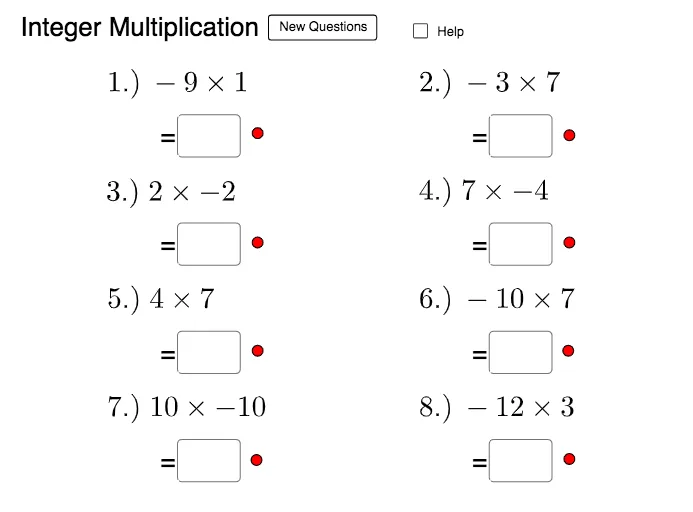
This GeoGebra example demonstrates how to practice integer multiplication and division by using interactive input fields and randomly generated integer values. It highlights the key phenomenon behind correct results: the sign rules for multiplying and dividing integers (same sign vs. opposite sign) and the consistency between computed expressions and user-provided answers. The core concepts include integer arithmetic, multiplication/division of integers, and verification of outcomes over multiple trials. Construction-wise, it leverages the commands and objects referenced in the construct summary—Random to generate variables used in the scene (e, j, i, h, g, f, l, d, m, c, n, o, p, b, q, a, etc.), and Textfield together with inputBox1–inputBox7 for learner input (ans1–ans7). It also uses additional mapped variables (a_1–a_8, ans8, text9) to present prompts and compare or aggregate results. Suitable for middle and high school algebra lessons, drill practice, and interactive homework or self-assessment.
GeoGebra Commands & Parameters
Random(-12, 12) → eRandom(-12, 12) → jRandom(-12, 12) → iRandom(-12, 12) → hRandom(-12, 12) → gRandom(-12, 12) → fRandom(-12, 12) → lRandom(-12, 12) → dRandom(-12, 12) → mRandom(-12, 12) → cRandom(-20, 20) → nRandom(-10, 10) → oRandom(-20, 20) → pRandom(-12, 12) → bRandom(-10, 10) → qRandom(-12, 12) → aTextfield(a_1) → inputBox1Textfield(a_2) → inputBox2Textfield(a_3) → inputBox3Textfield(a_4) → inputBox4Textfield(a_5) → inputBox5Textfield(a_6) → inputBox6Textfield(a_7) → inputBox7Textfield(a_8) → inputBox8Random(-12, 12) → k
AI Drawing Prompt Reference
Create an interactive math practice tool demonstrating sign rules and answer checking for integer multiplication and division. Randomly generate multiple integers between -12 and 12, and provide text fields for user input. Compare user answers with computed expressions to verify the rules of signs in multiplication and division. Include sliders to control random number generation, visually display the calculation process and result comparison, suitable for middle and high school algebra lessons and self-assessment.
The prompt above was compiled from the original drawing commands and is for reference only.