
Wallpaper Symmetry Group pm4
Loading the math board and drawing, please wait…
In collections
Wallpaper Symmetry Groups
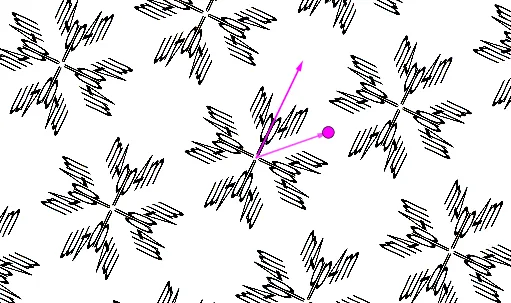
This example demonstrates the geometric construction and properties of the wallpaper symmetry group pm4, showcasing the combination of translation and reflection symmetries. Core mathematical concepts include symmetry, vectors, linear functions, trigonometry, ratios, and coordinate geometry. The construction involves commands and objects such as Intersect (intersection), Vector (vector), OrthogonalLine (perpendicular line), Circle (circle), Dilate (dilation), Midpoint (midpoint), Sequence (sequence), and Mirror (reflection) from GeoGebra. Suitable for high school and above learners to understand spatial symmetry and the application of geometric transformations.
GeoGebra Commands & Parameters
Intersect(xAxis, yAxis) → AVector(A, B) → uOrthogonalLine(A, u, xOyPlane) → fCircle(A, (sqrt(2) * B)) → cIntersect(f, c) → D, EDilate(Rotate[B, π / 4], sqrt(2)) → B'Vector(A, B') → vMidpoint(A, B) → HMidpoint(A, B') → IMidpoint(B, B') → JSequence(Rotate[pic1, (a * π / 2)], a, 0, 3) → L_1Mirror(L_1, Line[H, B]) → L_2Sequence(Sequence[Translate[L_1, Vector[((2 * a) * u) + ((2 * b) * v)]], a, -10, 10], b, -10, 10) → L_3Sequence(Sequence[Translate[L_2, Vector[((2 * a) * u) + ((2 * b) * v)]], a, -10, 10], b, -10, 10) → L_4
AI Drawing Prompt Reference
Draw a geometric illustration of the wallpaper symmetry group pm4, starting with the intersection of horizontal and vertical axes. Create a vector along the horizontal axis and a perpendicular line from this point. Draw a circle centered at the intersection with radius equal to the vector's length times sqrt(2). Mark the intersection points of the circle and the perpendicular line. Rotate the vector by 45 degrees, scale it, and connect the intersection point to the scaled endpoint. Find midpoints between the original and scaled vectors. Perform a series of rotations and reflections based on these midpoints, then translate the resulting patterns to fill the plane and display the complete symmetry.
The prompt above was compiled from the original drawing commands and is for reference only.