
Volumes of Solids by Cross-Section: Interactive Visualization
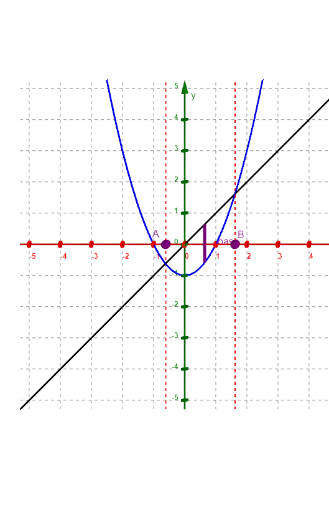
Loading the math board and drawing, please wait…
① This interactive GeoGebra example demonstrates the classic calculus method of finding the volume of a solid by integrating the areas of its cross-sections. Users can switch among different cross-section shapes (square, rectangle, semicircle, circle, equilateral triangle) to see how the solid is built from stacked slices. ② Core mathematical concepts include definite integrals, the cross-section method (Cavalieri's principle), volume integration, area under curves, and formulas for common solids like cones and ellipsoids. ③ Construction highlights: using GeoGebra commands such as Point, Segment, IntegralBetween, Polygon, CircumcircleArc, Circle, and Sequence, the applet builds dynamic cross-sections, a base region, input boxes (InputBox), and checkboxes (chkSquare, chkRect, etc.). A slider n controls the number of slices, dx is the step size, and integral commands compute the sum of slice areas. ④ Suitable for high school to undergraduate calculus courses, especially AP Calculus or college-level math, helping students grasp the transition from 2D area to 3D volume and the relationship between numerical and exact integration.
GeoGebra Commands & Parameters
Point(xAxis) → BPoint(xAxis) → ATextfield(f) → InputBox1Textfield(g) → InputBox2Segment((xc, f(xc)), (xc, g(xc))) → baseIntegralBetween(f, g, xa, xb) → BaseRegionPolygon((xc, f(xc), 0), (xc, g(xc), 0), (xc, g(xc), baselen), (xc, f(xc), baselen)) → Psquare, h, i, j, kTextfield(hw) → InputBox3Polygon((xc, f(xc), 0), (xc, g(xc), 0), (xc, g(xc), (baselen * hw)), (xc, f(xc), (baselen * hw))) → Prect, l, m, p, qCircumcircleArc((xc, f(xc), 0), (xc, (f(xc) + g(xc)) / 2, baselen / 2), (xc, g(xc))) → PSemiCircleCircle((xc, f(xc), 0), (xc, (f(xc) + g(xc)) / 2, baselen / 2), (xc, g(xc))) → PCircPolygon((xc, f(xc), 0), (xc, g(xc), 0), (xc, (f(xc) + g(xc)) / 2, (sqrt(3) / 2 * baselen))) → PEqTri, r, s, tSequence(Circle[(xa + (i * dx), f(xa + (i * dx)), 0), (xa + (i * dx), (f(xa + (i * dx)) + g(xa + (i * dx))) / 2, abs(f(xa + (i * dx)) - g(xa + (i * dx))) / 2), (xa + (i * dx), g(xa + (i * dx)))], i, 0, n, 1) → PCircSeqSequence(Polygon[(xa + (i * dx), f(xa + (i * dx)), 0), (xa + (i * dx), g(xa + (i * dx)), 0), (xa + (i * dx), (f(xa + (i * dx)) + g(xa + (i * dx))) / 2, (sqrt(3) / 2 * abs(f(xa + (i * dx)) - g(xa + (i * dx)))))], i, 0, n, 1) → PEqTriSeqSequence(CircumcircleArc[(xa + (i * dx), f(xa + (i * dx)), 0), (xa + (i * dx), (f(xa + (i * dx)) + g(xa + (i * dx))) / 2, abs(f(xa + (i * dx)) - g(xa + (i * dx))) / 2), (xa + (i * dx), g(xa + (i * dx)))], i, 0, n, 1) → PSemiCircSeqSequence(Polygon[(xa + (i * dx), f(xa + (i * dx)), 0), (xa + (i * dx), g(xa + (i * dx)), 0), (xa + (i * dx), g(xa + (i * dx)), (hw * abs(f(xa + (i * dx)) - g(xa + (i * dx))))), (xa + (i * dx), f(xa + (i * dx)), (hw * abs(f(xa + (i * dx)) - g(xa + (i * dx)))))], i, 0, n, 1) → PrectSeqSequence(Polygon[(xa + (i * dx), f(xa + (i * dx)), 0), (xa + (i * dx), g(xa + (i * dx)), 0), (xa + (i * dx), g(xa + (i * dx)), abs(f(xa + (i * dx)) - g(xa + (i * dx)))), (xa + (i * dx), f(xa + (i * dx)), abs(f(xa + (i * dx)) - g(xa + (i * dx))))], i, 0, n, 1) → PsquareSeq
AI Drawing Prompt Reference
Create a 3D solid visualization showing volume by cross-sections. Two function curves on the x-axis enclose a base region. Stack a series of cross-sections vertically from this region, with shapes selectable as square, rectangle, semicircle, circle, or equilateral triangle. Each section's size depends on the distance between the curves at that x-position. Include a slider to control the number of slices and display the integral sum. The scene illustrates the transition from 2D area to 3D volume, aiding understanding of definite integrals and volume calculation.
The prompt above was compiled from the original drawing commands and is for reference only.