
Disk/Washer Method for Volume of Solid of Revolution
Loading the math board and drawing, please wait…
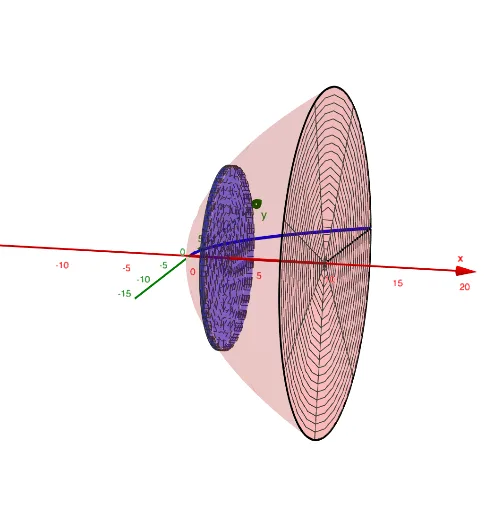
This GeoGebra example provides an interactive visualization of the disk and washer methods for computing volumes of solids of revolution. It demonstrates how a planar region rotated about an axis generates a 3D solid, and how the volume can be approximated by summing thin disks or washers, converging to the exact integral. Key mathematical concepts include definite integrals, volume of revolution, infinitesimal elements, and the relationship between function graphs and surfaces of revolution. The construction uses commands such as Surface, CurveCartesian, Segment, and Textfield, along with sliders (speed, a, b) and buttons to toggle the display of functions, rotated solids, disks, and partial/full views. This resource is ideal for high school or introductory college calculus students, helping them grasp the geometric foundation of volume formulas, and serves as an effective teaching tool for instructors.
GeoGebra Commands & Parameters
Textfield(f) → poleTekstowe1Surface(t, g(t, s), h(t, s), t, a, b, s, 0, ss) → czesciowaPowierzchniaSurface(t, g(tt + dx / 2, s), h(tt + dx / 2, s), t, tt, tt + dx, s, 0, (2 * π)) → outerwalecTextfield(k) → InputBox1Surface(tt, (t * cos(s)), (t * sin(s)), t, k(tt + dx / 2), f(tt + dx / 2), s, 0, (2 * π)) → dysk1Surface(tt + dx, (t * cos(s)), (t * sin(s)), t, k(tt + dx / 2), f(tt + dx / 2), s, 0, (2 * π)) → dysk2CurveCartesian(t, (f(t) * cos(ss)), (f(t) * sin(ss)), t, a, b) → krzywapodkatemCurveCartesian(t, (k(t) * cos(ss)), (k(t) * sin(ss)), t, a, b) → krzywa2podkatemCurveCartesian(b, (f(b) * cos(s)), (f(b) * sin(s)), s, 0, ss) → kolkoBCurveCartesian(b, (k(b) * cos(s)), (k(b) * sin(s)), s, 0, ss) → kolko2BSurface(t, (k(t) * cos(s)), (k(t) * sin(s)), t, a, b, s, 0, ss) → czesciowaPowierzchnia2Surface(b, (t * cos(s)), (t * sin(s)), t, k(b), f(b), s, 0, ss) → czolobrylySegment((b, (k(b) * cos(ss)), (k(b) * sin(ss))), (b, (f(b) * cos(ss)), (f(b) * sin(ss)))) → czesciowyodcinekBSegment((b, k(b)), (b, f(b))) → odcinekBnaXYSegment((a, k(a)), (a, f(a))) → odcinekAnaXYSegment((a, (k(a) * cos(ss)), (k(a) * sin(ss))), (a, (f(a) * cos(ss)), (f(a) * sin(ss)))) → czesciowyodcinekASurface(a, (t * cos(s)), (t * sin(s)), t, k(a), f(a), s, 0, ss) → tylbryly
AI Drawing Prompt Reference
Create a 3D solid of revolution illustrating the disk and washer method. In the coordinate plane, draw two function curves, an outer boundary and an inner boundary, enclosing a planar region from a to b. Rotate this region about the x-axis to form a hollow solid with outer and inner surfaces. Along the x-axis, slice the solid into thin washers, each consisting of two circular faces and a ring-shaped side, with a variable cross-section angle. At both ends, show circular rings and radial segments connecting the inner and outer radii. Use semi-transparency to reveal internal structure, and include sliders to adjust rotation angle and slice position.
The prompt above was compiled from the original drawing commands and is for reference only.