
Volume of Solid with Square Cross Sections
Loading the math board and drawing, please wait…
In collections
BC Calculus
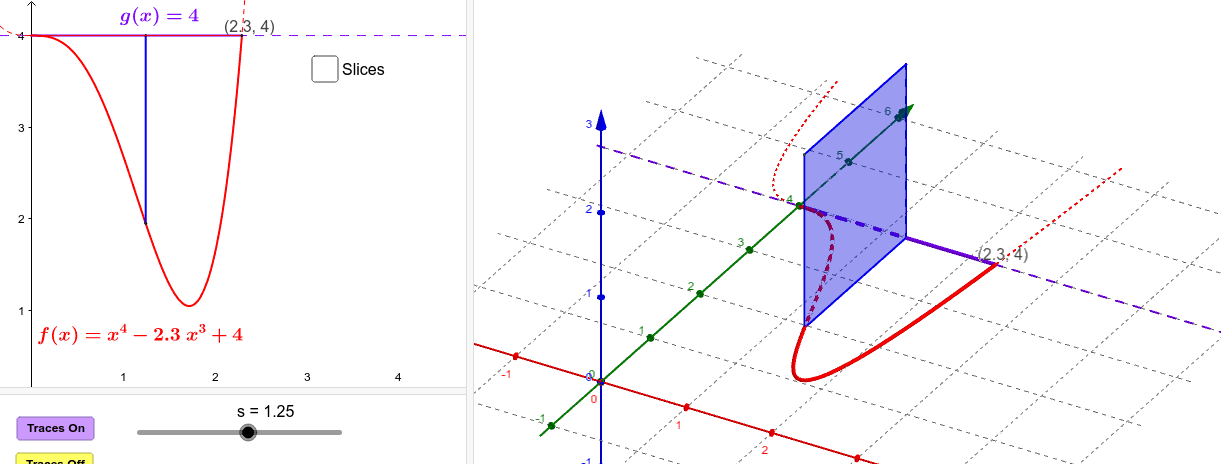
This example demonstrates how to calculate the volume of a solid whose cross sections are squares with one side in the base. Key math concepts include integral calculus, the relationship between squares and the base, and volume formulas in solid geometry. GeoGebra commands and objects like Polygon, Segment, Locus, Integral, If, Intersect, Surface, and Sequence are used to construct the visualization, showing the formation and transformation of the solid through slider animations and loci. Suitable for high school and above students to learn the application of calculus in geometric volume calculations.
GeoGebra Commands & Parameters
Polygon(B, A, C, D) → Squares, a, c, d, bSegment(A, B) → eLocus(C, s) → loc1Integral((g(x) - f(x))^(2), 0, 2.3) → IntegIf(togDF ≟ 1, "Show Instructions", "Show volume integral") → ToggleDirectionVolumeIntegralIf(togS ≟ 1, "Hide surface", "Show surface") → ShowSurfaceLocus(D, s) → loc2Intersect(f, g) → E, FSurface(u, g(u), (v * (g(u) - f(u))), v, 0, 1, u, 0, lx) → SurfaceBackSurface(u, (v * f(u)) + ((1 - v) * g(u)), 0, u, 0, lx, v, 0, 1) → BaseSurface(u, f(u), (v * (g(u) - f(u))), v, 0, 1, u, 0, lx) → SurfaceFrontSurface(u, (v * f(u)) + ((1 - v) * g(u)), g(u) - f(u), u, 0, lx, v, 0, 1) → TopSequence(Polygon[((k * h), f(((k + p) * h))), ((k * h), g(((k + p) * h))), (((k + 1) * h), g(((k + p) * h))), (((k + 1) * h), f(((k + p) * h)))], k, 0, m - 1) → SlicesBaseSequence(Polygon[((k * h), f(((k + p) * h)), 0), ((k * h), g(((k + p) * h)), 0), ((k * h), g(((k + p) * h)), g(((k + p) * h)) - f(((k + p) * h))), ((k * h), f(((k + p) * h)), g(((k + p) * h)) - f(((k + p) * h)))], k, 0, m - 1) → SlicesLeftSequence(Polygon[(((k + 1) * h), f(((k + p) * h)), 0), (((k + 1) * h), g(((k + p) * h)), 0), (((k + 1) * h), g(((k + p) * h)), g(((k + p) * h)) - f(((k + p) * h))), (((k + 1) * h), f(((k + p) * h)), g(((k + p) * h)) - f(((k + p) * h)))], k, 0, m - 1) → SlicesRightSequence(Surface[u, f(((k + p) * h)), (v * (g(((k + p) * h)) - f(((k + p) * h)))), u, (k * h), ((k + 1) * h), v, 0, 1], k, 0, m - 1) → SlicesFrontSequence(Surface[u, g(((k + p) * h)), (v * (g(((k + p) * h)) - f(((k + p) * h)))), u, (k * h), ((k + 1) * h), v, 0, 1], k, 0, m - 1) → SlicesBackSequence(Surface[u, (v * g(((k + p) * h))) + ((1 - v) * f(((k + p) * h))), g(((k + p) * h)) - f(((k + p) * h)), u, (k * h), ((k + 1) * h), v, 0, 1], k, 0, m - 1) → SlicesTopSequence(If[Defined[Area[Element[SlicesLeft, k]]], Area[Element[SlicesLeft, k]], 0], k, 1, m) → Areas
AI Drawing Prompt Reference
Visualize a solid with square cross-sections where one side of each square lies on the base. Show the process of calculating the volume using integral calculus, including the base, square cross-sections, integral curves, and the integral area. Use animations to demonstrate how the cross-sections change with height, and illustrate the formation and transformation of the solid. The solid should consist of multiple slices, each a square with varying side lengths depending on height. Display the integral expression for volume calculation and label it within the visualization.
The prompt above was compiled from the original drawing commands and is for reference only.