
Volume of Revolution by Michael Borcherds
Loading the math board and drawing, please wait…
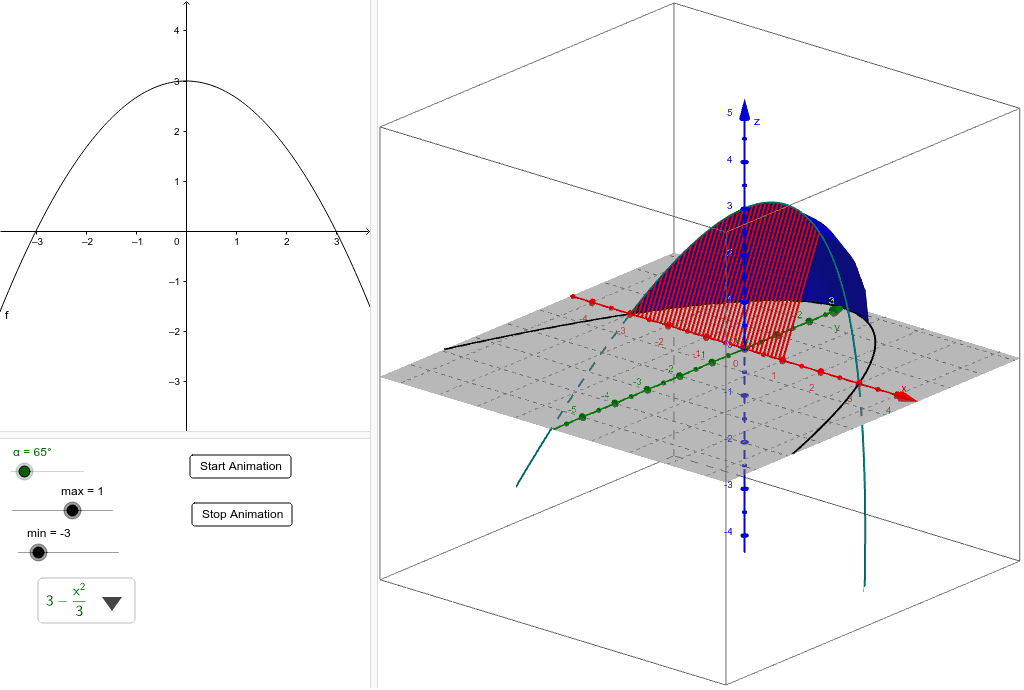
This example demonstrates the calculation of the volume of a solid of revolution formed by rotating a plane region around an axis. Key mathematical concepts include integral calculus, volume formulas for solids of revolution, and function graphing. It utilizes GeoGebra commands such as SelectedElement, CurveCartesian, Surface, and Sequence. Suitable for high school and above students studying calculus and solid geometry to understand the geometric meaning and computation of volumes of revolution.
GeoGebra Commands & Parameters
SelectedElement(list2) → fCurveCartesian(a, (f(a) * cos(α)), (f(a) * sin(α)), a, -5, 5) → aaSurface(a, (f(a) * cos(β)), (f(a) * sin(β)), a, min, max, β, 0, α) → bSequence(Segment[(a, 0, 0), (a, (f(a) * cos(α)), (f(a) * sin(α)))], a, min, max, d) → list1
AI Drawing Prompt Reference
Draw the volume of a solid of revolution formed by rotating a function f(x) around the x-axis. First, plot the graph of the function f(x), then generate the surface of the solid by rotating it around the x-axis. Finally, draw several segments from the base to the top of the solid to illustrate its structure.
The prompt above was compiled from the original drawing commands and is for reference only.