
Volume of Revolution around the x-axis
Loading the math board and drawing, please wait…
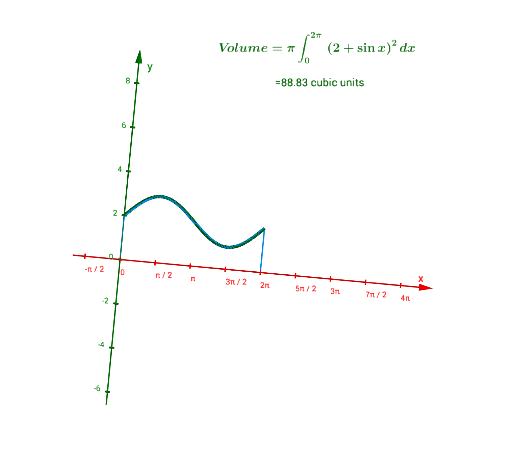
This example demonstrates how to generate a solid of revolution by rotating a function around the x-axis and calculating its volume. Key math concepts include rotation, integration, and volume calculation. Construction highlights the use of GeoGebra commands and objects such as Rotate, Intersect, Point, Segment, and Integral. Suitable for high school and above students learning volume calculation in calculus.
GeoGebra Commands & Parameters
Rotate(f, α, xAxis) → f_1Intersect(xAxis, yAxis) → APoint(xAxis) → CSegment(C, I) → hRotate(A, α, xAxis) → A'Rotate(C, α, xAxis) → C'Rotate(I, α, xAxis) → I'Segment(C', I') → h'Segment(A, B) → gRotate(A, α, xAxis) → A'_1Rotate(B, α, xAxis) → B'Segment(A'_1, B') → g'Integral((π * f(x)^(2)), 0, (2 * π)) → a
AI Drawing Prompt Reference
Draw a solid of revolution formed by rotating a function around the x-axis to demonstrate volume calculation. Start with the x and y axes, determine the rotation angle, rotate the function curve around the x-axis to create the surface of revolution, and mark key intersection points and segments. Finally, calculate the volume using integration and differentiate the solid and auxiliary lines with colors to present the 3D appearance and calculation steps clearly.
The prompt above was compiled from the original drawing commands and is for reference only.