
Volume of Cone by Kent Tsang
Loading the math board and drawing, please wait…
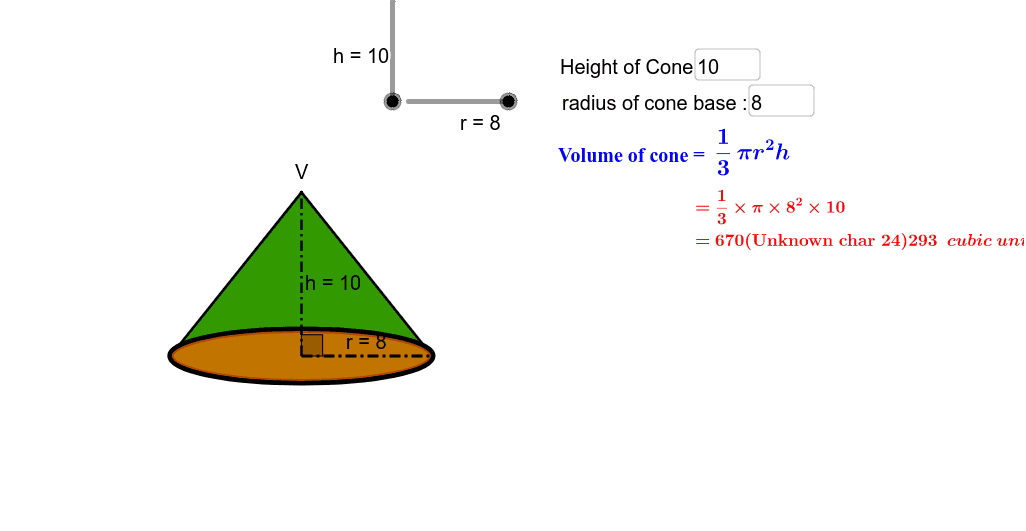
This example demonstrates how to generate a cone by rotation and calculate its volume. Key mathematical concepts include the volume formula of a cone and rotation geometry. Using GeoGebra commands such as If, Conic, Segment, Midpoint, etc., the net of the cone and volume calculation are constructed. Suitable for high school mathematics education and learning.
GeoGebra Commands & Parameters
If(net < -1, (((-net) - 1) * 3), 0) → net_θIf(net < -1, (3 * ((-net) - 1)) + 0.2, 0.2) → net_bIf(net < -1, -1, net) → net_eIf(net_e > -0.001, 0, (-net_e)) → net_hConic(A, B, C, D, E) → cIf(net > 0, 1, 0) → net_1Conic(A, B, C, D, E) → dSegment(V, A') → bSegment(V, F') → eMidpoint(A', F') → M_{A'F'}Point(c) → GConic(A', B', C', F', E') → kConic(A', B', C', F', E') → pDistance(O, V) → distanceOVSegment(O_c, O_u) → lRotate(O_o, (θ * 2), V) → HRotate(O_o, ((-θ) * 2), V) → H'CircleSector(V, H', H) → qPolygon(V, A', F') → poly1, f', v, aDistance(V, H') → distanceVH'Segment(V, H) → b'Segment(V, H') → e'Intersect(p, b') → K, K_2Intersect(p, e') → J, J_2Segment(V, J_2) → gSegment(V, K_2) → iArc(p, A', K_2) → tArc(p, J_2, F') → fIf(θ + (0.6 * θ_d) < (((2 * π) * r / l_s) * 0.5), θ + (0.6 * θ_d), (((2 * π) * r / l_s) * 0.5)) → θ_cRotate(O_o, θ_c, V) → H_1Rotate(O_o, (-θ_c), V) → H'_1CircleSector(V, H'_1, H_1) → c_2Circumference(c_2) → jCircumference(c) → circumferencecDistance(V, H'_1) → distanceVH'1Angle(H'_1, V, H_1) → αPoint(c_2) → ICircumcircleArc(H', O_o, H) → c_1CircleSector(V, H'_1, H_1) → sSegment(M_{A'F'}, F') → mSegment(M_{A'F'}, V) → nAngle(F', M_{A'F'}, V) → βMidpoint(b) → M_{VA'}Textfield(r) → inputBox1Textfield(h) → inputBox2
AI Drawing Prompt Reference
Draw a cone by first creating its net, then rotating it to form the 3D shape. Set the radius of the base and height, and calculate the volume of the cone. Key objects include the base radius, height, net, and side surface of the cone.
The prompt above was compiled from the original drawing commands and is for reference only.