
Volume of a Solid with Circular Base and Isosceles Triangular Cross Sections
Loading the math board and drawing, please wait…
In collections
intersection: surface-surface, curve-curve
intersection: surface-surface, curve-curve
intersection: surface-surface, curve-curve
intersection: surface-surface, curve-curve
Volumes in Calculus
Volumes in Calculus
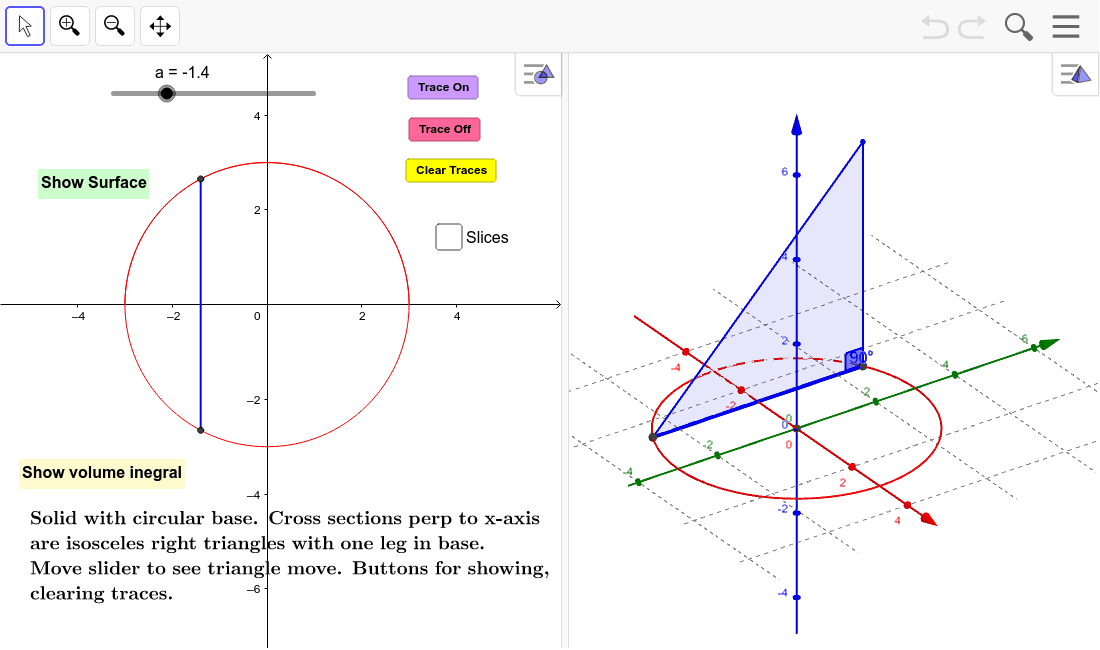
This example demonstrates the volume calculation of a solid with a circular base and isosceles triangular cross sections. Key mathematical concepts include solid geometry and integration. Using GeoGebra commands such as Circle, Polygon, Locus, and Integral, the solid can be constructed and its volume calculated. Suitable for high school mathematics education and learning.
GeoGebra Commands & Parameters
Circle((0, 0), 3) → cPolygon(C, B, A) → poly1, a_1, c_1, b_1Locus(C, a) → loc1Angle(C, A, B) → αIf(togDV ≟ 1, "Show description", "Show volume inegral") → ToggleDescripVolumeIntegral((2 * (9 - x^(2))), -3, 3) → dSequence(Polygon[(-3 + (k * h), f(-3 + ((k + p) * h))), (-3 + (k * h), (-f(-3 + ((k + p) * h)))), (-3 + ((k + 1) * h), (-f(-3 + ((k + p) * h)))), (-3 + ((k + 1) * h), f(-3 + ((k + p) * h)))], k, 0, m - 1) → SlicesBaseSequence(Polygon[(-3 + (k * h), f(-3 + ((k + p) * h)), 0), (-3 + (k * h), (-f(-3 + ((k + p) * h))), 0), (-3 + (k * h), f(-3 + ((k + p) * h)), (2 * f(-3 + ((k + p) * h))))], k, 0, m - 1) → SidesLeftSequence(Polygon[(-3 + ((k + 1) * h), f(-3 + ((k + p) * h)), 0), (-3 + ((k + 1) * h), (-f(-3 + ((k + p) * h))), 0), (-3 + ((k + 1) * h), f(-3 + ((k + p) * h)), (2 * f(-3 + ((k + p) * h))))], k, 0, m - 1) → SidesRightSequence(Surface[-3 + ((k + u) * h), f(-3 + ((k + p) * h)), ((2 * v) * f(-3 + ((k + p) * h))), u, 0, 1, v, 0, 1], k, 0, m - 1) → SlicesBackSequence(Surface[-3 + ((k + u) * h), ((1 - (2 * v)) * f(-3 + ((k + p) * h))), ((2 * (1 - v)) * f(-3 + ((k + p) * h))), u, 0, 1, v, 0, 1], k, 0, m - 1) → SlicesTopSequence(Area[Element[SidesLeft, k]], k, 1, m) → AreasIf(togS ≟ 1, "Hide Surface", "Show Surface") → ShowSurfaceCircle((0, 0), 3) → SurfaceBaseSurface(u, ((1 - (2 * v)) * f(u)), ((2 * (1 - v)) * f(u)), u, -3, 3, v, 0, 1) → SurfaceTopSurface(u, f(u), ((2 * v) * f(u)), u, -3, 3, v, 0, 1) → SurfaceBack
AI Drawing Prompt Reference
Draw a solid with a circular base and isosceles triangular cross sections. Start by drawing a circle with a radius of 3 as the base. Then, take points A, B, and C on the circle and construct an isosceles triangle ABC as the cross section. Use the locus command to create the trajectory of the isosceles triangle moving along the circle. Calculate the volume of the solid using integration. Finally, use sequence commands to construct the sides and back of the solid, forming the complete solid.
The prompt above was compiled from the original drawing commands and is for reference only.