
Volume of a Parallelepiped by John Rodgers
Loading the math board and drawing, please wait…
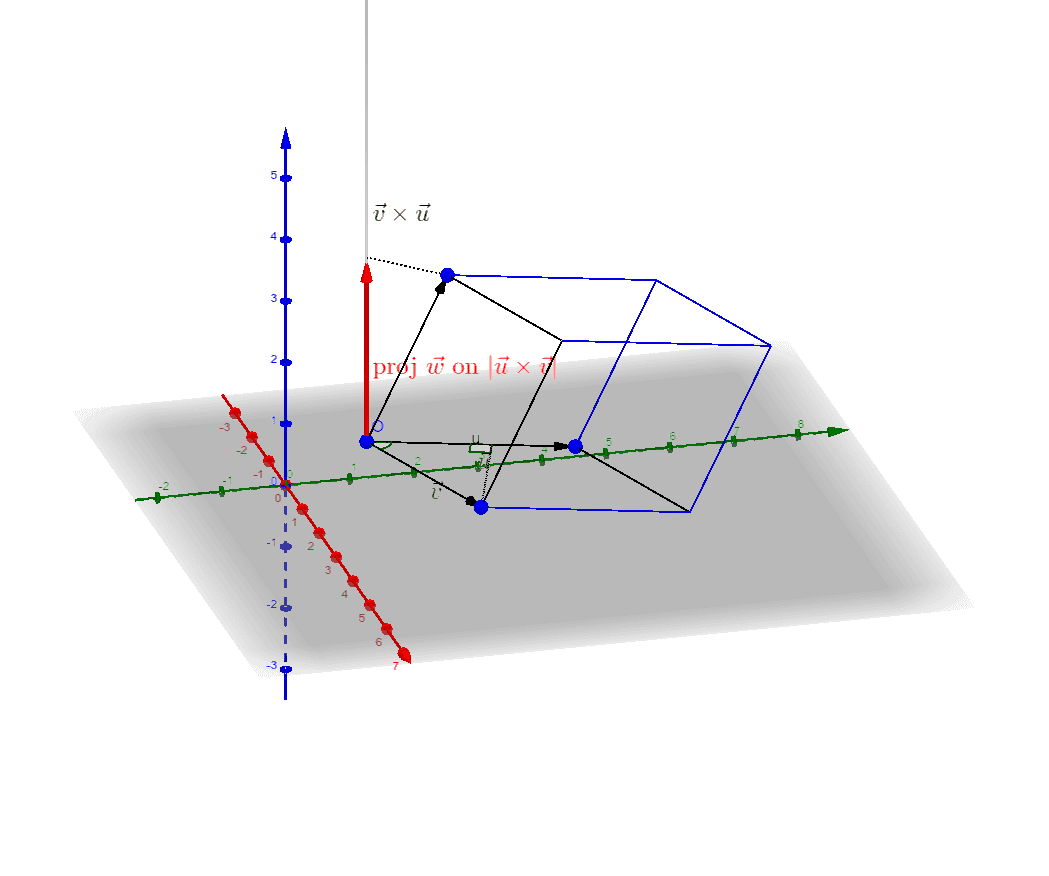
This example demonstrates how to construct a parallelepiped using vectors and calculate its volume. Key mathematical concepts include vectors, solid geometry, and coordinate geometry. Using GeoGebra commands such as Vector, Segment, Angle, and OrthogonalLine, the construction process is visually illustrated. Suitable for high school mathematics education and students learning solid geometry.
GeoGebra Commands & Parameters
Vector(O, B) → uVector(O, A) → vVector(O, C) → wSegment(A, D) → fSegment(B, D) → gSegment(D, E) → hSegment(C, F) → iSegment(C, G) → jSegment(G, E) → kSegment(B, G) → lSegment(F, A) → mSegment(F, E) → nAngle(B, O, A) → αVector(O, O + v ⊗ u) → aSegment(O, H) → pOrthogonalLine(C, p, space) → qPoint(q) → IVector(O, I) → bSegment(C, I) → rMidpoint(O, I) → JMidpoint(O, H) → KSegment(O, B) → sOrthogonalLine(A, s, space) → tIntersect(s, t) → LSegment(A, L) → cAngle(O, L, A) → βMidpoint(O, A) → MMidpoint(O, B) → N
AI Drawing Prompt Reference
Draw a parallelepiped formed by three vectors originating from a common point. Show the three vectors and the angle between two of them. Connect the endpoints to form the edges and faces of the solid. Construct a line perpendicular to the base from the origin, place a point on it, and connect that point to a vertex to indicate height. Mark the angle between the base vectors and the angle between the height direction and the base. Finally, mark the midpoints of the edges to aid spatial understanding.
The prompt above was compiled from the original drawing commands and is for reference only.