
Volume Cube Task: Similarity Transformations and Cross-Sections
Loading the math board and drawing, please wait…
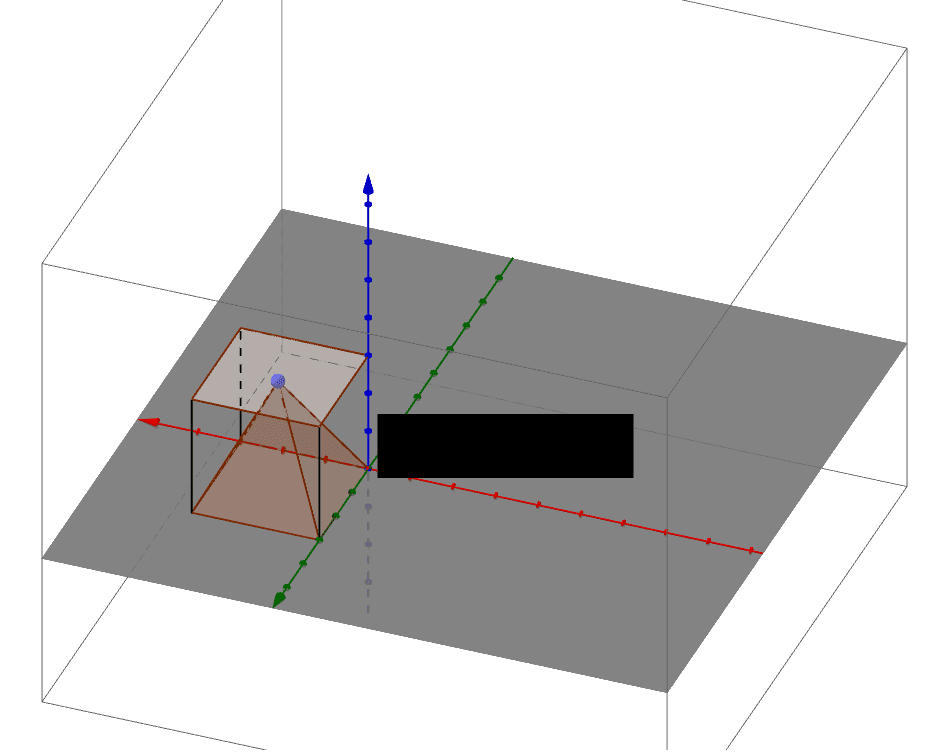
① This interactive GeoGebra example demonstrates how to construct a cube, apply a similarity transformation (translation and scaling) to create a second cube, and dynamically compute its volume, illustrating the cubic relationship between edge length and volume. ② Core mathematical concepts include cube volume formula, similarity transformations (translation and homothety), similar triangles, secant planes (cross-sections), and the integration of hypothesis testing and confidence intervals in geometric measurement contexts. ③ Construction details: Using GeoGebra commands such as Polygon, Vector, Translate, PointIn, Pyramid, Segment, Volume, and Point, the example builds cube ABCD and its translated copy A'B'C'D', defines points E and F to create cross-sectional faces (e.g., faceCDF, faceBCF), computes volumes via the Volume command, and displays results with text objects. ④ Suitable for upper middle school to high school students, this task supports teaching solid geometry volume, similarity transformations, and inquiry-based learning, allowing students to verify volume formulas and connect geometric reasoning with statistical inference.
GeoGebra Commands & Parameters
Polygon(D, C, B, A) → poly1, d, c, b, aVector(D, E) → uTranslate(poly1, u) → poly1'Translate(xOyPlane, Vector[(0, 0, 0)]) → xOyPlane'PointIn(poly1') → FPyramid(poly1, F) → e, faceCDF, faceBCF, faceABF, faceADF, edgeDF, edgeCF, edgeBF, edgeAFTranslate(B, u) → B'Translate(C, u) → C'Translate(xOyPlane, Vector[(0, 0, 0)]) → xOyPlane'_1Translate(A, u) → A'Segment(A, A') → fSegment(C, C') → gSegment(B, B') → hVolume(e) → volumeePoint(e) → Pointe