
Isosceles Trapezoid Construction Task
Loading the math board and drawing, please wait…
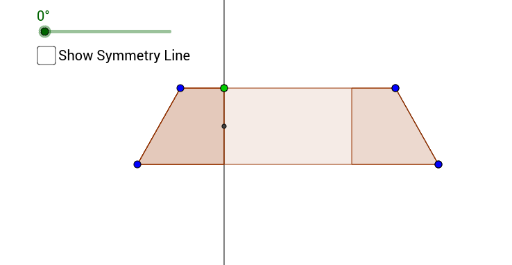
This example demonstrates the construction of an isosceles trapezoid. Key mathematical concepts include the properties of isosceles trapezoids and geometric construction. Using GeoGebra commands such as Segment, Line, Mirror, and Polygon, an isosceles trapezoid can be constructed. Suitable for middle school and above students or teachers.
GeoGebra Commands & Parameters
Segment(A, B) → fLine(C, D) → gMirror(A, g) → A'Mirror(B, g) → B'Segment(A', B') → f'Polygon(A, A', B', B) → poly1, a, a', b', bPoint(b') → GVector(A, G) → uTranslate(A, u) → A'_1OrthogonalLine(G, b') → hIntersect(h, a) → EPolygon(E, A, B, G) → poly2, e, a_1, b_1, g_1Mirror(E, g) → E'Mirror(A, g) → A'_2Mirror(B, g) → B'_1Mirror(G, g) → G'Polygon(E', A'_2, B'_1, G') → poly3, e', a'_2, b'_1, g'Midpoint(G, E) → FRotate(E, Angle, F) → E'_1Rotate(A, Angle, F) → A'_3Rotate(B, Angle, F) → B'_2Rotate(G, Angle, F) → G'_1Polygon(E'_1, A'_3, B'_2, G'_1) → poly4, e'_1, a'_3, b'_2, g'_1
AI Drawing Prompt Reference
Construct an isosceles trapezoid by drawing a base segment and a symmetry line, then mirror the base endpoints across the line to get the top base, and connect all four vertices. Pick a point on one leg, draw a perpendicular from it to the other leg, forming an inner trapezoid. Mirror this inner trapezoid across the symmetry line to get its symmetric counterpart. Finally, rotate the inner trapezoid about the midpoint of one of its diagonals by an arbitrary angle to show the rotated version.
The prompt above was compiled from the original drawing commands and is for reference only.