
Volume Calculation with Right Triangular Cross-Sections Between Two Quadrilatera
Loading the math board and drawing, please wait…
In collections
intersection: surface-surface, curve-curve
intersection: surface-surface, curve-curve
intersection: surface-surface, curve-curve
intersection: surface-surface, curve-curve
Volumes in Calculus
Volumes in Calculus
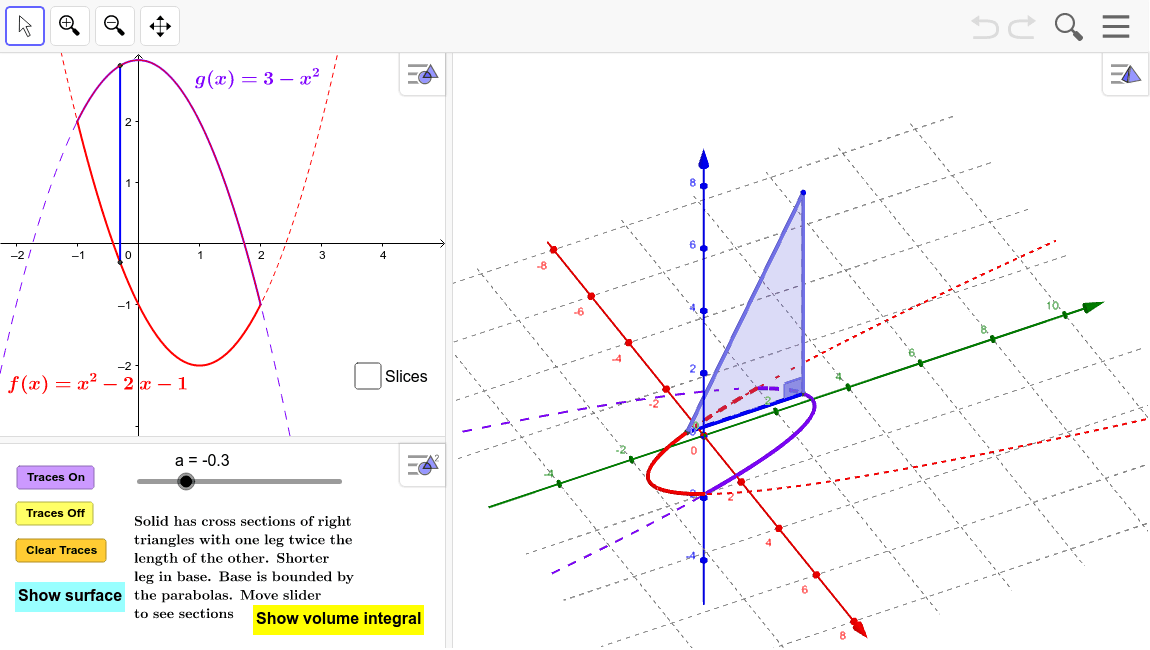
This example demonstrates how to calculate the volume formed by right triangular cross-sections between two parallelograms. Key math concepts include integration, solid geometry, and properties of right triangles. GeoGebra commands and objects used in construction are Polygon, Angle, Locus, Integral, If, Surface, and Sequence. Suitable for high school and above students to learn volume calculation methods and the application of integration in geometry.
GeoGebra Commands & Parameters
Polygon(B, A, C) → Triangle, c_1, b_1, a_1Angle(B, A, C) → αLocus(C, a) → loc1Integral((4 + (2 * x) - (2 * x^(2)))^(2), -1, 2) → IntegIf(togDF ≟ 1, "Show Instructions", "Show volume integral") → ToggleDirectionVolumeIntegralIf(togS ≟ 1, "Hide surface", "Show surface") → ShowSurfaceSurface(u, (v * f(u)) + ((1 - v) * g(u)), 0, u, -1, 2, v, 0, 1) → BaseSurface(u, g(u), ((2 * v) * (g(u) - f(u))), v, 0, 1, u, -1, 2) → SurfaceBackSurface(u, (v * f(u)) + ((1 - v) * g(u)), (2 * ((v * f(u)) + ((1 - v) * g(u)) - f(u))), v, 0, 1, u, -1, 2) → SurfaceFrontSequence(Polygon[(-1 + (k * h), f(-1 + ((k + p) * h))), (-1 + (k * h), g(-1 + ((k + p) * h))), (-1 + ((k + 1) * h), g(-1 + ((k + p) * h))), (-1 + ((k + 1) * h), f(-1 + ((k + p) * h)))], k, 0, m - 1) → SlicesBaseSequence(Polygon[(-1 + (k * h), f(-1 + ((k + p) * h)), 0), (-1 + (k * h), g(-1 + ((k + p) * h)), 0), (-1 + (k * h), g(-1 + ((k + p) * h)), ht(-1 + ((k + p) * h)))], k, 0, m - 1) → SidesLeftSequence(Polygon[(-1 + ((k + 1) * h), f(-1 + ((k + p) * h)), 0), (-1 + ((k + 1) * h), g(-1 + ((k + p) * h)), 0), (-1 + ((k + 1) * h), g(-1 + ((k + p) * h)), ht(-1 + ((k + p) * h)))], k, 0, m - 1) → SidesRightSequence(Surface[-1 + ((k + u) * h), (v * g(-1 + ((k + p) * h))) + ((1 - v) * f(-1 + ((k + p) * h))), (v * ht(-1 + ((k + p) * h))), u, 0, 1, v, 0, 1], k, 0, m - 1) → SlicesTopSequence(Surface[-1 + ((k + u) * h), g(-1 + ((k + p) * h)), (v * ht(-1 + ((k + p) * h))), u, 0, 1, v, 0, 1], k, 0, m - 1) → SlicesBackSequence(Area[Element[SidesLeft, k]], k, 1, m) → Areas