
Volume and Surface Area of a Right Circular Cylinder
Loading the math board and drawing, please wait…
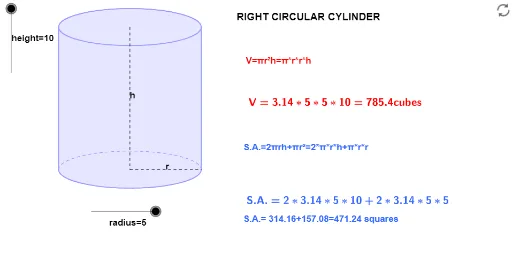
① This GeoGebra example dynamically demonstrates the volume and surface area of a right circular cylinder, allowing users to adjust the radius and height to see how these quantities change. ② Core mathematical concepts include the volume formula V=πr²h, lateral and total surface area formulas, and properties of solids of revolution in solid geometry. ③ Construction highlights: using commands such as Dilate, Vector, Translate, Polygon, Segment, Midpoint, and Arc to build the cylinder's base circles and lateral surface, with sliders controlling radius and height, and live text updates for computed values. ④ Suitable for middle and high school geometry classes, as well as introductory calculus when visualizing volumes of revolution, providing an interactive way to connect formulas with geometric intuition.
GeoGebra Commands & Parameters
Dilate(B, height, A) → CVector(A, C) → uTranslate(c, u) → dTranslate(R, u) → DTranslate(P, u) → ETranslate(L, u) → FPolygon(F, D, R, L) → Q, f_1, d_1, r_1, lSegment(E, P) → aSegment(P, R) → bMidpoint(E, P) → GMidpoint(P, R) → HArc(d, 0, π) → eArc(c, π, 0) → f
AI Drawing Prompt Reference
Draw a right circular cylinder where you can adjust the radius and height to change its volume and surface area. Start by drawing two circles for the bases, then create the side using translations and rotations, and finally connect the bases and sides with a polygon to form the complete cylinder.
The prompt above was compiled from the original drawing commands and is for reference only.