
Volume and Density
Loading the math board and drawing, please wait…
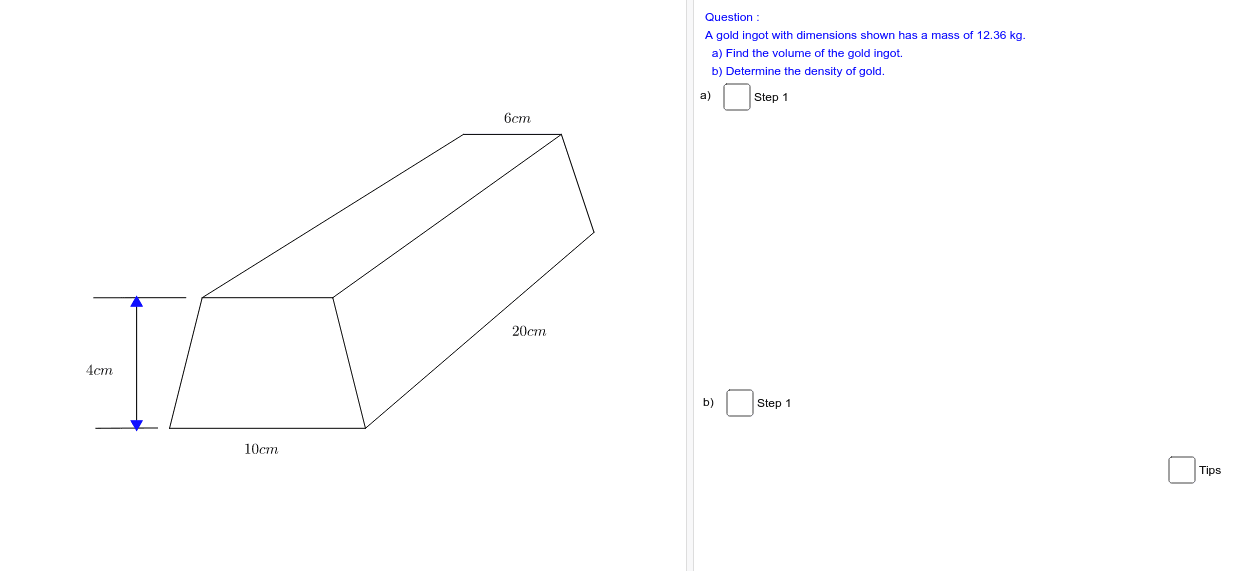
This example demonstrates understanding volume and density through geometric shapes. It involves concepts such as volume calculation and density formula. Using GeoGebra commands like Segment, it constructs a cube and calculates its volume. Suitable for middle school and above students to learn related concepts in geometry and physics.
GeoGebra Commands & Parameters
Segment(I, J) → bSegment(J, K) → cSegment(I, H) → aSegment(H, K) → dSegment(J, L) → eSegment(I, M) → fSegment(M, L) → gSegment(K, N) → hSegment(L, N) → iSegment(A, B) → jSegment(C, D) → kSegment(E, F) → l
AI Drawing Prompt Reference
Draw a cube by first creating three line segments that are not collinear to represent three edges of the cube, then draw three more edges perpendicular to these, and finally connect the endpoints of these edges to form the cube.
The prompt above was compiled from the original drawing commands and is for reference only.