
Viviani Curve
Loading the math board and drawing, please wait…
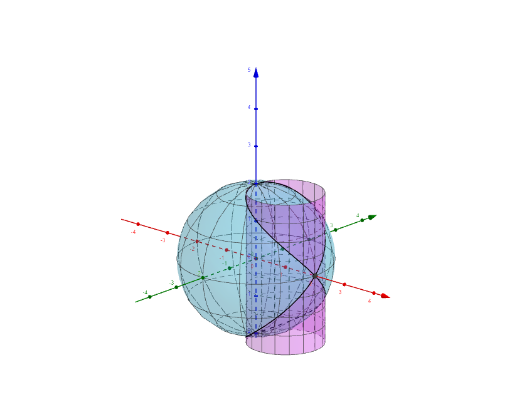
This example demonstrates the generation of the Viviani curve. The Viviani curve is formed by the locus of the midpoint of the line segment joining a fixed point on a circle to the circle's center. Key mathematical concepts include parametric equations and loci. It utilizes commands such as Surface, CurveCartesian, UnitVector, Vector, If, and IntegralBetween in GeoGebra. Suitable for high school mathematics education and learning about parametric equations and loci.
GeoGebra Commands & Parameters
Surface(((2 * sin(θ)) * cos(φ)), ((2 * sin(θ)) * sin(φ)), (2 * cos(θ)), θ, 0, (2 * π), φ, 0, (2 * π)) → bCurveCartesian(1 + cos(t), sin(t), (2 * sin(t / 2)), t, 0, (4 * π)) → cSurface(cos(u) + 1, sin(u), v, u, 0, (2 * π), v, -2, 2) → aSurface(v, t - 1, (-sqrt(t)), t, 0, 4, v, -4, 4) → eCurveCartesian(sin(t), (-cos(t)), (sqrt(2) * sin(t / 2)), t, 0, (4 * π)) → fCurveCartesian(1 + cos(t), sin(t), (2 * sin(t / 2)), t, 0, t1) → hCurveCartesian(sin(t), (-cos(t)), (sqrt(2) * sin(t / 2)), t, 0, t2) → kUnitVector(r1p) → eu1UnitVector(r1pp) → uVector(P1, P11) → vVector(P1, P12) → wVector(P1, P13) → nUnitVector(r2p) → eu2UnitVector(r2pp) → rVector(P2, P21) → sVector(P2, P22) → tVector(P2, P23) → u_1If(o ≟ 1 ∧ i ≟ 1 ∧ j ≟ 1, true, false) → KADr1If(p ≟ 1 ∧ l ≟ 1 ∧ m ≟ 1, true, false) → KADr2Surface(v, t - 1, sqrt(t), t, 0, 4, v, -4, 4) → dSurface(cos(u), sin(u), v, u, 0, (2 * π), v, (-sqrt(2)), sqrt(2)) → gIntegralBetween(sqrt(1 + (cos(x / 2))^(2)), 0, 0, t1) → s1IntIntegralBetween(sqrt(1 + (1 / 2 * (cos(x / 2))^(2))), 0, 0, t2) → s2Int
AI Drawing Prompt Reference
Create the Viviani curve and its related geometric setup. First draw a parametric space curve with coordinates (1+cos t, sin t, 2·sin(t/2)), using t from 0 to 4π. Then construct supportive 3D reference surfaces based on a circle parametrization such as (cos u, sin u, v) with u from 0 to 2π and v spanning a small interval, so the curve is visualized in the correct locus/trajectory context. Include auxiliary vector/UnitVector-based directions to indicate the midpoint/locus construction environment, and incorporate two length-related integral quantities computed over the corresponding t1 and t2 contexts as additional measurement aids.
The prompt above was compiled from the original drawing commands and is for reference only.